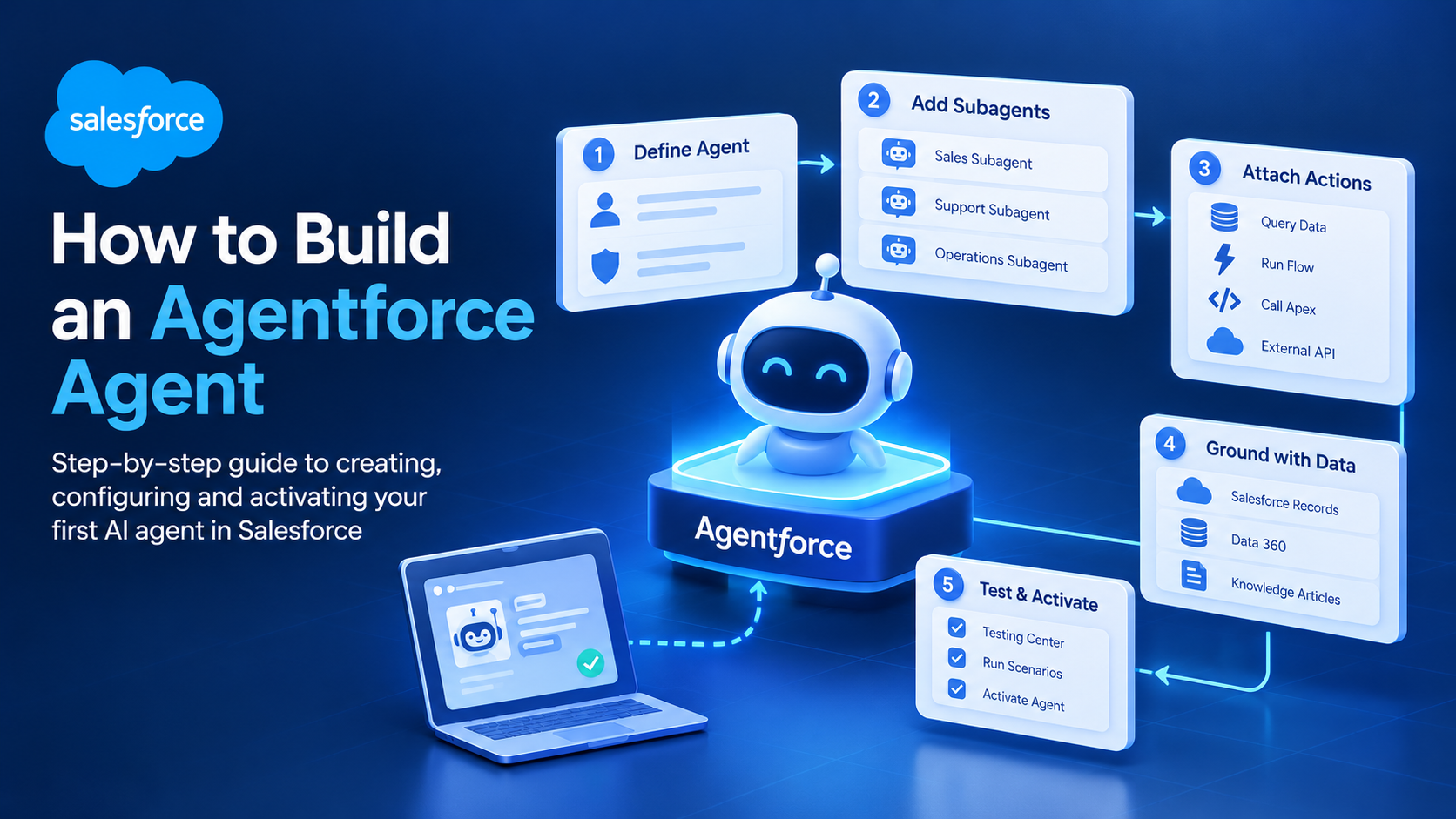
How to Build an Agentforce Agent: Subagents to Go-Live
To build an Agentforce agent you define the agent and its job in Agentforce Builder, add subagents for each area of work it handles, attach actions that let it retrieve or change data, ground it in your Salesforce and Data 360 records, then test it in Testing Center before activating. A competent admin gets a first working agent running in one to two days.
The mechanics are simpler than the vocabulary suggests. The thing that separates an agent that works from one that invents answers is not clever prompting. It is narrow scoping, precisely described actions, and a test suite that includes the cases you would rather not think about.
The four building blocks, and the naming change that breaks older tutorials
An Agentforce agent is assembled from four things, and the vocabulary matters because Salesforce changed it recently.
- The agent is the top-level assistant, defined by a role, a job description and a set of guardrails.
- Subagents are the specialised units that handle one area of work each. These were called topics until April 2026, when Salesforce renamed them subagents with no change to functionality, per the Agentforce Developer Guide. Older blog posts and Trailhead modules still say "topics".
- Actions are what the agent can do: run a Flow, call an Apex method, invoke a prompt template, query records, or call an external API.
- Instructions are the natural-language rules that govern behaviour inside a subagent, including when to use an action, what to refuse, and when to hand off to a human.
Underneath, the Atlas reasoning engine decides which subagent handles an utterance and which actions to invoke. You do not program that routing. You influence it entirely through how precisely you describe each subagent and each action.
What to have ready before you open Agentforce Builder
Missing one of these is the most common reason a first build stalls.
- A sandbox. Build and test in a sandbox, never in production. Test runs consume credits and can modify CRM data.
- Agentforce enabled in Setup, with Einstein turned on for the org.
- The right permission sets assigned to yourself, typically the Agentforce Builder and Agentforce user permission sets, plus permission for whichever channel you plan to deploy to.
- A named, narrow use case. "Handle customer enquiries" is not a use case. "Answer order status questions for existing customers and escalate anything involving a refund" is.
- Data the agent can ground itself in. Knowledge articles, the relevant objects, and Data 360 if you need records from outside Salesforce.
- A decision on the agent user. Agents run as a dedicated user, and that user's profile, sharing and field-level security define exactly what the agent can see.
That last point carries more weight than the other five combined. An agent cannot access data its running user cannot access, so configuring that user tightly removes most of the exposure risk before you write a single instruction.
Creating the agent in Agentforce Builder
Agentforce Builder provides a guided creation flow, covered in the Trailhead Agent Builder module.
- From Setup, open Agentforce Agents and click New Agent.
- Define the purpose. Either select a preconfigured template, which arrives with relevant subagents and actions attached, or describe in plain language what the agent should do.
- Name the agent descriptively. The name appears in logs and observability dashboards, so avoid "Agent 1".
- Click Let's Go. The agent is created with its subagents and actions and opens in the builder canvas.
- Set the agent's role and company description in settings. Keep it factual and short. This text is prepended to every reasoning cycle, so a bloated description costs tokens on every single turn.
Adding subagents and writing action descriptions that route correctly
This is where behaviour gets shaped. The steps follow the official Agentforce workshop.
To add a subagent:
- In the Agentforce Builder explorer, click the + icon next to Subagents and choose Create new subagent.
- Fill in Name, then Describe the job you want the subagent to do with a short, specific purpose statement such as "Help users locate storefronts by name or postcode".
- Click Create and Open.
- Paste your behavioural rules into the Instructions section. Write them as short imperative sentences, one rule per line.
- Save.
To add an action:
- Select the subagent in the explorer, click + next to Actions, and choose Create an action.
- Set Name and Description. The description is not documentation. It is how the reasoning engine decides whether to call this action, so write it as a precise statement of what the action retrieves or changes, for example "Retrieves store information based on a user query".
- Choose the Reference Action Type, being Flow, Apex, Prompt Template or API, and select the underlying Reference Action.
- Click Create and Open, then configure inputs and outputs. Under Outputs, enable Show in conversation for any field the user should see.
- Save.
Write action descriptions as though the reader has no context at all, because the reasoning engine has none beyond what you give it. Vague descriptions cause wrong action selection far more often than weak instructions do, and the failure is quiet: the agent answers confidently using the wrong data source.
One large agent or several narrow ones?
This is the design decision we get asked about most, and it is worth spending a day on.
The obvious approach is one agent with many subagents, since that is how the product is structured. We have built it that way and then undone it. On one service deployment, an agent covering order status, returns and product questions started misrouting once the third subagent went in, because the boundaries between "where is my order", "I want to send this back" and "does this fit my model" are genuinely blurry in the way customers phrase them.
Splitting into two narrower agents fixed the routing. It also cost something real, and it is worth being clear about what. Instructions and guardrails now exist in two places and have to be kept in step. There are two versions to commit, two deployments to promote and two test suites to run each release, which is not trivial overhead for a small team.
The rule we use now: keep one agent while the subagents cover clearly distinct vocabularies, and split only when two of them keep competing for the same utterances in testing. The maintenance cost of splitting is permanent, and the routing problem might not be.
Canvas, Agent Script or Agentforce DX?
Agentforce offers three build surfaces for the same agent. Choose by team and complexity rather than by preference.
| Surface | Best for | Who uses it | Trade-off |
|---|---|---|---|
| Builder canvas (natural language) | Standard service and sales agents, rapid prototyping | Admins, consultants | Limited control over branching and deterministic sequences |
| Agent Script (Script view) | Agents needing deterministic steps mixed with reasoning, complex output types | Admins comfortable with structured syntax, developers | Steeper learning curve, easier to over-engineer |
| Agentforce DX (CLI and VS Code) | Version-controlled agents, CI/CD, multi-environment promotion | Developers, DevOps teams | Only pays off with a source-driven development process behind it |
Testing an agent properly, including the cases nobody writes
Preview mode inside the builder is for smoke-testing, not validation. Real validation happens in Testing Center, and the structure of a test case is fixed. According to the Trailhead agent testing module, each case contains:
- Utterance, the question or request a real user might send.
- Expected subagent, specified by API name rather than label.
- Expected actions, as a bracketed list of action API names.
- Expected response, describing what a correct answer should cover.
You upload test cases as a CSV and run them against a single agent. Plan for two things: runs consume requests and credits, and they can modify CRM data. Sandbox-only testing is not a stylistic preference.
Build the suite with positive and negative cases. Positive cases confirm the agent routes correctly and calls the right action. Negative cases confirm it refuses cleanly on off-topic questions and on requests for data the running user cannot see.
Agents almost always fail in production on the negative cases, because nobody wrote any. A reasonable first suite is 20 to 40 cases: three to five per subagent, plus a deliberate block of out-of-scope utterances.
What Agentforce agents are still bad at
Agentforce can qualify an inbound enquiry, answer a grounded question and update a record. It is not close to replacing a service team, and pretending otherwise is how pilots lose their sponsor.
Agents are unreliable at anything resembling arithmetic or aggregation. Ask one to total open opportunities by region and it will often call an action that returns records and then summarise them approximately. If a number matters, compute it in a Flow or Apex action and have the agent report the result rather than derive it.
They handle negation and conditional phrasing poorly. "I do not want to cancel, I want to change the date" is the kind of utterance that trips routing, and that phrasing is common rather than an edge case.
They are also non-deterministic. The same utterance can route differently across runs, which means a test suite that passed once is not proof the agent is correct, only that it was correct that time. Re-run the suite each release rather than treating a green result as permanent.
Finally, grounding quality sets the ceiling. An agent pointed at thin or contradictory knowledge articles produces confident, wrong answers, and no instruction block repairs bad source data. If the knowledge base is the problem, fix the knowledge base.
Deploying and monitoring after activation
- Commit a version. A committed agent version cannot be modified, so further changes require a new draft. Treat commits as releases.
- Choose a channel. Employee agents surface in the Agentforce panel in Lightning. Service agents deploy to Experience Cloud, messaging channels or voice.
- Activate to a limited audience. A pilot group of 10 to 20 users over two weeks surfaces more genuine issues than another month of internal testing.
- Watch Agentforce Observability. Review interaction details for routing errors, actions invoked with wrong parameters, and escalation rate. Escalation rate is the most honest single metric an agent has.
Plan around the release cycle as well. Salesforce ships three releases a year, and Winter '27 reaches general availability on 9–10 October 2026 with sandbox preview from late August, per the Winter '27 preview guide. Agent behaviour can shift between releases, so re-run your suite in a preview sandbox each cycle.
What an agent costs to run
Agentforce is metered. Flex Credits list at USD 500 per 100,000 credits, with a standard action consuming 20 credits and a voice action 30. The alternative per-conversation model lists at USD 2 per conversation, and an org uses one model or the other rather than both. Agentforce 1 editions bundle 1 million Flex Credits per org per year.
Salesforce does not publish a dollar-per-action figure. The commonly quoted USD 0.10 per action is derived from the credit block price, so treat it as an estimate rather than a rate card.
Frequently Asked Questions
What is the difference between topics and subagents in Agentforce?
There is no functional difference. Salesforce renamed agent topics to subagents in April 2026, and the Agentforce Developer Guide confirms functionality was unchanged. Documentation, Trailhead modules and third-party tutorials written before that date use "topics" for the same concept, so expect both terms to appear in search results for a while yet.
Do you need Apex to build an Agentforce agent?
No. Standard actions, Flows and prompt templates cover most service and sales use cases without any code. Apex becomes necessary when an action needs complex logic, callouts with custom authentication, or return types the declarative action framework cannot express.
How long does it take to build a production-ready Agentforce agent?
A prototype takes one to two days. A production-ready agent that is scoped, grounded, tested with a real suite, piloted and monitored typically takes three to six weeks for a first build. Most of that time goes on data grounding and testing rather than on building in the canvas.
Can an Agentforce agent see data the user cannot?
No. The agent runs as a dedicated Salesforce user and inherits that user's profile, permission sets, sharing rules and field-level security. Restricting the agent user is the correct way to control data exposure, and it is the control an auditor will ask about. Instructions are not a substitute.
Getting past the demo that works
Most Agentforce projects stall in the same place: a prototype that answers well in a meeting, and no test suite covering what happens when a customer asks something sideways. If that is where you are, write twenty out-of-scope utterances this week and run them through Testing Center.
Aptivus Solutions builds, grounds and tests Agentforce agents on live orgs. See our Salesforce services or the Aptivus blog.
Have Questions or Need Assistance?
Our team of Salesforce experts is ready to help you implement the solutions discussed in this article.
Contact Us Today