How to Migrate from Profiles to Permission Sets in Salesforce
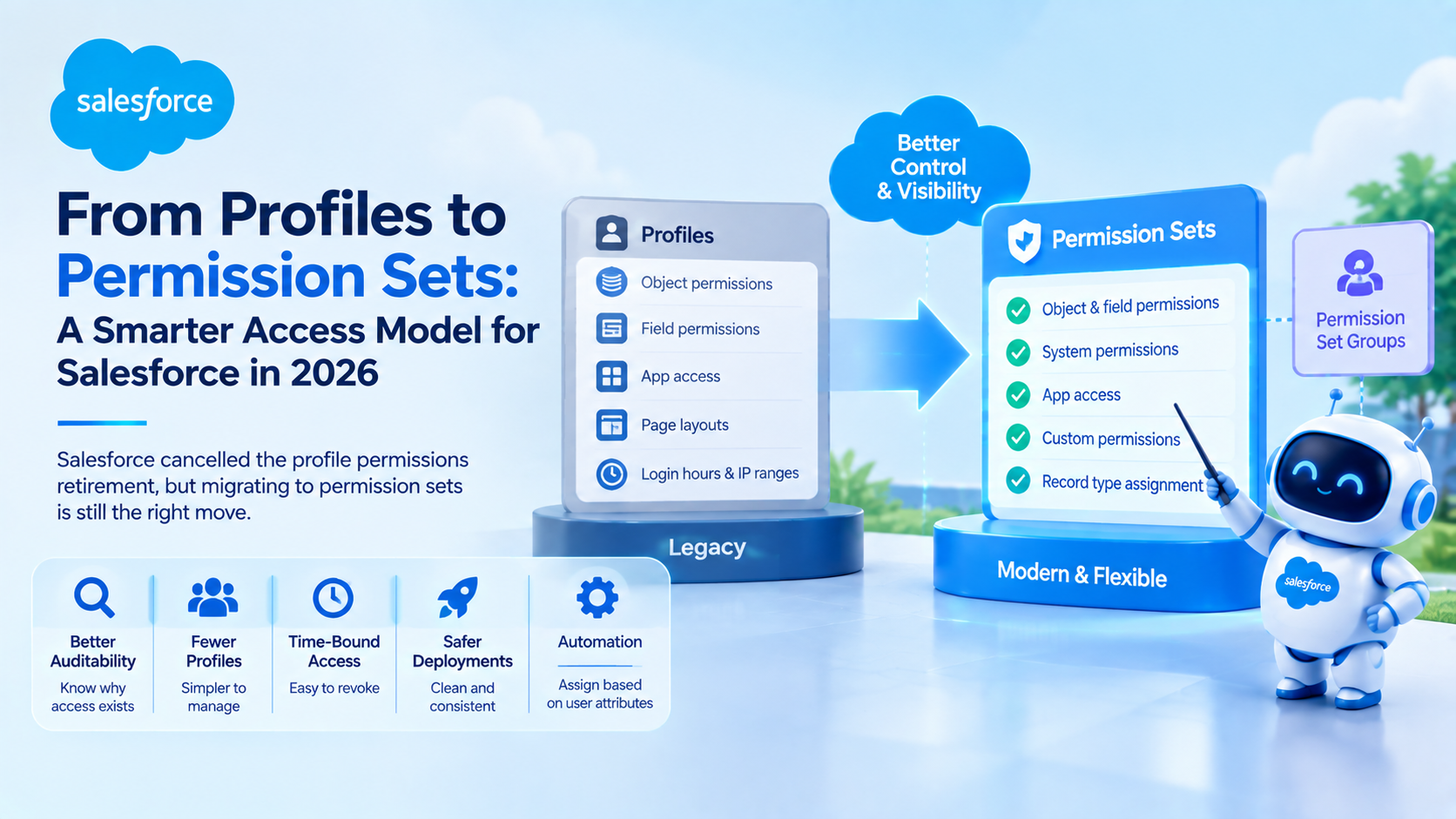
Migrating from profiles to permission sets means stripping profiles back to the settings only they can hold, meaning login hours, IP ranges, page layouts and record type defaults, and moving every functional permission into permission sets and permission set groups. Salesforce cancelled the retirement of permissions on profiles in July 2026, but the migration is still the right architecture.
Did Salesforce cancel the profile permissions retirement?
Yes. It is now a project you run on your own schedule. Salesforce announced in January 2023 that permissions on profiles would reach end of life in Spring 2026. That date was softened in 2024, and in July 2026 the retirement was cancelled outright rather than delayed again, confirmed through quiet updates to Salesforce Knowledge articles and reported by Salesforce Ben. The stated reasons were customer readiness and remaining feature gaps in the replacement tooling.
What changes: you no longer face a forced deadline, and you no longer have to invent workarounds for settings that permission sets cannot hold.
What does not change: profiles are a blunt instrument. A user gets exactly one, so every permission difference between two roles forces either a new profile or over-provisioning. Orgs that ran on profiles alone typically accumulate dozens of near-identical profiles nobody can audit. The cancellation removed the deadline, not the architectural problem.
Why migrate to permission sets if profiles are staying?
Permission sets are additive and stackable, which is the entire point. A user can hold many, so access becomes a composition of small, named, reviewable grants rather than one profile serving every variation of a role.
The concrete operational gains:
- Auditability. "Why can this user delete accounts?" has a traceable answer when the permission lives in a named permission set assigned for a stated reason.
- Fewer profiles to maintain. Most orgs can collapse 30 or 40 profiles into fewer than ten once functional permissions move out.
- Time-bound access. A permission set can be revoked without touching anything else, which makes temporary elevated access safe. Removing a permission from a shared profile affects everyone on it.
- Deployment safety. Permission sets deploy cleanly between sandboxes and production. Profile metadata is notoriously partial in deployments, and profile-based access gaps are a recurring cause of "it worked in the sandbox" defects.
- Automation. User Access Policies can assign permission sets based on user attributes. There is no equivalent for profile assignment.
Adoption remains low. Reporting around the cancellation cited survey data suggesting only about one in five organisations had fully transitioned. That is a gap worth closing on your own schedule rather than a vendor's.
What can permission sets do, and what still only lives on profiles?
Keep this table open while planning, because getting it wrong means discovering mid-cutover that a setting has nowhere to go.
| Setting | Permission set | Profile | Notes |
|---|---|---|---|
| Object and field permissions | Yes | Yes | Move to permission sets |
| System and user permissions | Yes | Yes | Move to permission sets |
| Apex class and Visualforce access | Yes | Yes | Move to permission sets |
| Tab visibility | Yes | Yes | Move to permission sets |
| App and connected app access | Yes | Yes | Move to permission sets |
| Custom permissions | Yes | Yes | Move to permission sets |
| Record type assignment | Yes | Yes | Assignable in both |
| Default record type | No | Yes | Profile only |
| Page layout assignment | No | Yes | Profile only |
| Login hours and login IP ranges | No | Yes | Profile only |
| Password policies | No | Yes | Profile only |
| Default app | No | Yes | Profile only |
The target state is a few thin profiles carrying only defaults, layouts and login restrictions, with everything functional delivered by permission sets grouped by role.
Why mirroring each profile into one permission set is the wrong shortcut
There is a much faster migration than the one below, and it comes up in nearly every planning session we run. Export each profile, create one permission set with exactly the same permissions, assign it to the same users, empty the profile. A script does most of it in an afternoon.
We have recommended it twice, both times for orgs with an audit finding carrying a fixed remediation date. There it is the correct call, because it satisfies the finding and buys time.
Everywhere else it loses, because it reproduces the sprawl with extra steps. You end up with 38 permission sets each granting an unrelated bundle of permissions, no reuse between them, and the same inability to say why a user has a permission. The org we cleaned up afterwards was worse off than at the start, because the model now looked modern to auditors while remaining just as opaque.
The composable approach costs more upfront, mostly in persona design, and repays it the first time a new role is assembled from existing parts instead of cloned.
How do you migrate from profiles to permission sets, step by step?
Work in a full sandbox, and treat this as several small releases rather than one cutover weekend.
- Inventory what you have. Export profile metadata for every profile and count active users on each. Profiles with zero or one active user are the easiest wins and often make up a third of the list.
- Identify the personas. Group users by what they actually need to do, such as inside sales, field service, finance approver, integration user. Personas, not job titles, are the unit of design.
- Design the permission set library. Build small, single-purpose permission sets named for what they grant, then compose them. A useful convention prefixes the type and names the object or function:
OBJ_Opportunity_Edit,FN_Discount_Approval,INT_Order_Sync. Avoid one permission set per person. - Extract permissions from one profile at a time. Pick a low-risk profile, replicate its functional permissions into permission sets, and assign both in parallel. Nothing breaks, because permissions are additive.
- Bundle into permission set groups by persona. A group assembles the permission sets a persona needs into one assignment. Use muting permission sets inside the group to suppress a permission for that persona rather than forking the underlying set.
- Strip the profile. Once the permission sets carry everything, remove functional permissions from the profile, leaving layouts, record type defaults and login settings. Do this in production only after a full regression pass.
- Automate assignment with User Access Policies. Replace manual assignment with criteria-driven policies so new starters and role changes are handled automatically.
- Validate and monitor. Run a permission comparison before and after for a sample of real users, then schedule a quarterly access review. Salesforce's guidelines for creating permission sets are worth re-reading before you finalise the naming standard.
Sequencing matters more than speed. Assign new permission sets alongside existing profiles, verify, and only then remove anything. A migration that never strips a profile until the replacement is proven cannot lock a user out, and that property is what lets you ship it in pieces.
How do User Access Policies automate permission assignment?
User Access Policies define criteria on the user record and automatically grant or revoke permission sets, permission set groups, permission set licences, package licences, public group membership and queue membership. They are what makes a permission-set model maintainable past a handful of personas.
Per Salesforce's User Access Policies module on Trailhead:
- Criteria combine up to three user filters (profile, role, permission set or group, package licence, public group or queue) with up to ten additional user fields, including custom text, picklist, number and checkbox fields.
- All conditions must be met. Filter logic between conditions is not available, so design criteria to be mutually exclusive.
- Policies run on user create, user update, or both, or can be applied manually, which is the right mode for a one-off bulk migration.
- An org supports up to 200 active policies.
- An active policy applies to an existing user only when that user record is next updated to match the criteria.
That last point catches teams out. A policy does not retroactively sweep users who already match, so an admin who activates a policy and assumes the org is now compliant will be wrong until every affected user happens to be edited. The pattern that works is one manual policy per persona for the initial bulk assignment, then the equivalent active policy for joiners and movers from that point on.
What limits should you plan around?
Three constraints shape the design more than any others, per Salesforce's permission set group considerations:
- A permission set group holds up to 100 permission sets. Ample for a persona, but it rules out a design where every field-level grant is its own permission set.
- Recalculation timing differs by ownership. Changes to custom permission sets inside a group recalculate immediately; changes to Salesforce-owned standard permission sets in a group are calculated daily. Plan release testing around that lag.
- Recalculation can time out. Complex permission sets, or permission sets missing a required licence, can make group recalculation slow or fail. Keep permission sets focused and confirm licence prerequisites before adding them.
One more is worth calling out as a genuine security trap. Session-based permission sets included in a permission set group lose their session activation requirement for users assigned through the group. A control you deliberately put in place is silently weakened, and nothing in the interface warns you. If you use session-based permission sets, assign them directly and keep them out of groups.
A permission set group also cannot be deleted until all user assignments are removed. That is a nuisance rather than a risk, but it means deprecating a persona takes two releases.
What does a good permission set naming convention look like?
A naming convention is what keeps the model auditable after two years of change. The test: can someone read an assignment list and understand a user's access without opening a record?
A convention that holds up in practice:
OBJ_<Object>_<Level>for object and field access, such asOBJ_Contract_Edit.FN_<Function>for functional capability, such asFN_Mass_EmailorFN_Report_Builder.INT_<System>for integration and API users, such asINT_ERP_Order_Sync.PSG_<Persona>for permission set groups, such asPSG_Inside_Sales.MUTE_<Persona>_<Reason>for muting permission sets, so the suppression documents itself.
Record why each permission set exists in its description field. That field is the only place a future admin will find the answer, and filling it in takes ten seconds.
Frequently Asked Questions
Do I still need to migrate now that the retirement is cancelled?
There is no deadline, so no. But the reasons to migrate were never really about the deadline: permission sets give you auditable, stackable, revocable access and clean deployments, none of which profiles provide. Most teams should plan a phased migration over two or three quarters rather than either rushing or abandoning it.
Can a user have both a profile and permission sets?
Yes, and that is the intended model. Every user has exactly one profile and can hold many permission sets and permission set groups. Permissions are additive, so a permission set can only grant access beyond the profile, never remove it. Restricting access requires changing the profile or using muting permission sets within a group.
What is a muting permission set used for?
A muting permission set suppresses specific permissions inside a permission set group for the users assigned to that group. It lets you reuse a broad permission set across several personas while removing one or two permissions for a particular persona, instead of maintaining near-duplicate permission sets that drift apart over time.
How many profiles should an org end up with?
Most organisations can operate on fewer than ten profiles once functional permissions move to permission sets. Profiles then differ only on page layouts, default record types, default app, and login hours or IP restrictions. If two profiles differ on nothing but a permission a permission set could grant, they should be merged.
Will removing permissions from profiles break my integrations?
It can, if integration users depend on profile-level Apex class or object access. Migrate integration users first and separately: create a dedicated INT_ permission set per integration, assign it in parallel, run the integration end to end in a full sandbox, and only then strip the profile. Never change an integration profile and its permission sets in the same release.
Start with the profiles nobody can explain
Most orgs that ask us about this have the same symptom: a profile list nobody can justify line by line. Export your profiles with active user counts and start with the ones holding zero or one user, since those carry the least risk and usually clear a third of the list. If you would rather not build the regression pass yourself, talk to our team about an access review.
Have Questions or Need Assistance?
Our team of Salesforce experts is ready to help you implement the solutions discussed in this article.
Contact Us Today