How to Test an Agentforce Agent Before Go-Live
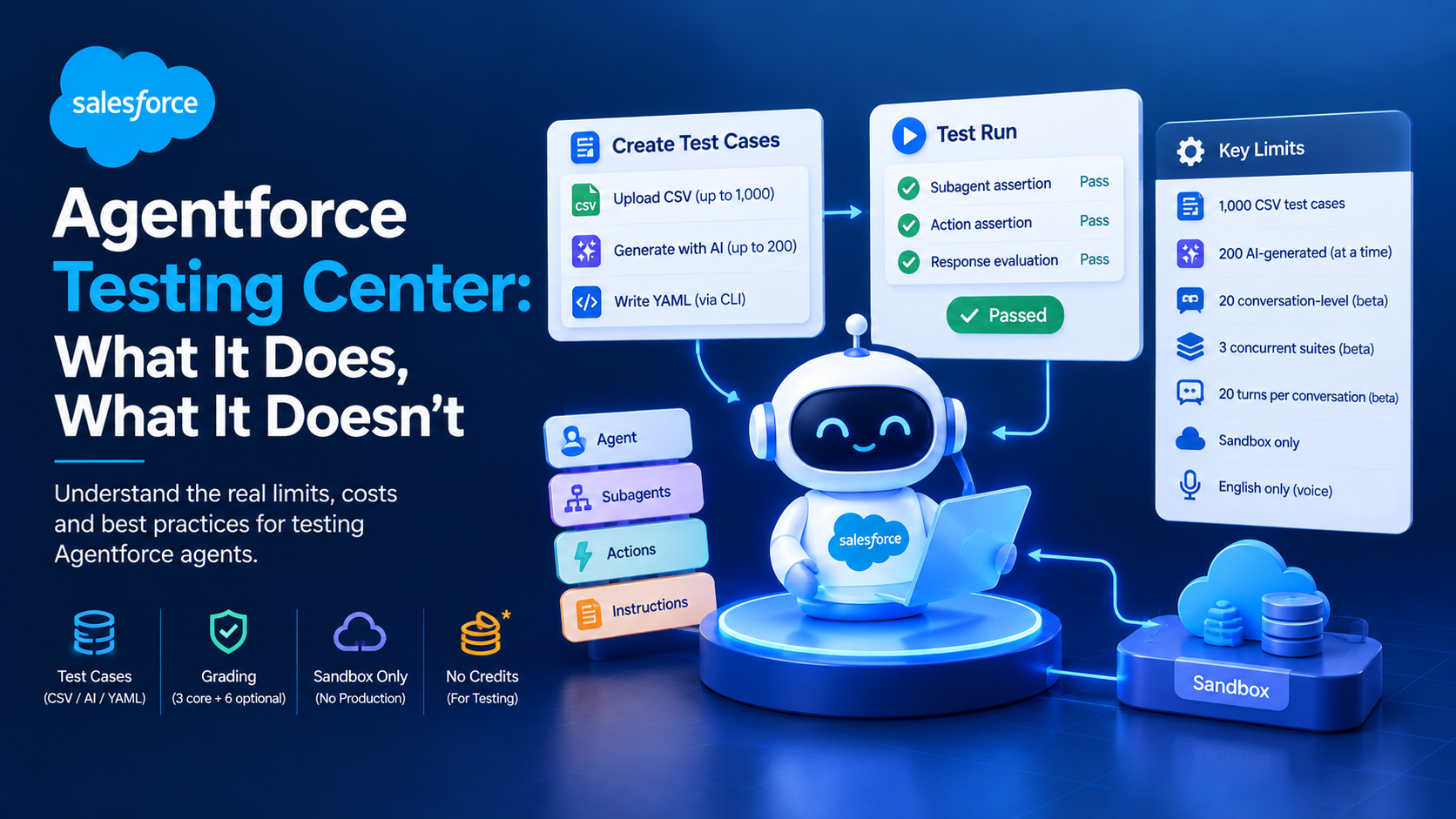
Agentforce Testing Center is generally available and runs only in sandboxes, because agent tests write to CRM data. You create test cases three ways: upload up to 1,000 by CSV, generate up to 200 at a time from subagents and actions, or author them as YAML test specs through the Salesforce CLI for continuous integration. Salesforce grades each run on subagent selection, action selection and response quality. A green run is not a go-live gate, and this post explains why.
That last sentence is the part most testing guidance leaves out, so we will start there rather than at the end.
Why a passing Testing Center run does not mean the agent is safe
Three properties of agent testing break the mental model that unit testing gives you, and all three are documented or reproducible rather than theoretical.
The same test can produce different results on consecutive runs. Practitioners at RealFast documented this directly: an identical utterance classified into one subagent on one run and a different one on the next. If your CI pipeline gates deployment on a binary pass, a flaky classification will either block a good build or, worse, train the team to re-run until green.
Tests pass on fabricated answers. The same write-up records an agent inventing a product specification that did not exist in the grounding data, and passing its test, because the response was structurally correct and semantically plausible. The response grader is an LLM comparing meaning against an expected value. It is not a fact checker against your data.
Classification and outcome are decoupled. An agent can route to the wrong subagent, select the right action anyway, and return the correct answer. If you only watch the subagent assertion, you will chase failures that did not affect a single user.
None of this makes Testing Center useless. It makes it one layer. Salesforce's own agent development lifecycle guide says the same thing and is worth quoting because it is unusually candid for vendor documentation: "no single testing method is sufficient. A comprehensive validation strategy must be layered."
What Agentforce Testing Center actually does, and what it costs to run
Testing Center is GA in Enterprise, Performance, Unlimited and Developer editions. The newer conversation-level testing inside Agentforce Studio is in beta, which matters because the beta carries most of the restrictions.
The published limits, from Salesforce's Testing Center considerations page:
| Capability | Limit or status |
|---|---|
| Test cases per CSV upload | 1,000 |
| AI-generated cases from subagents and actions | 200 at a time |
| AI-generated conversation-level cases (beta) | 20 |
| Concurrent test suites (beta) | 3 |
| Turns per conversation (beta) | 20 |
| Environment | Sandbox only |
| Voice simulation | English only |
Conversation-level testing in beta does not support context variables, custom scorers, knowledge-based test generation, escalations or Employee Agents. If your agent depends on context variables, which most service agents do, your conversation testing is limited until that gap closes.
On cost, Salesforce's answer changed and the documentation has not caught up. The considerations page states that "as of Summer '26, testing in Agentforce Testing Center is unmetered and doesn't consume Einstein Requests or Flex Credits." Two other Salesforce pages, the Testing Center overview and the Testing API get-started guide, still say running tests consumes requests and credits.
We are going with the considerations page because it is the most specific and explicitly dated, but we would not build a budget on it without confirmation. Ask your account executive in writing. And note the carve-out even on the optimistic reading: Data 360 queries during testing remain metered, so an agent grounded in Data 360 still burns credits every time you run its suite.
There is one more consideration that catches teams out. Salesforce states plainly that "testing agents can modify CRM data". Testing Center is sandbox-only for a reason. A test suite that exercises a case-creation action creates cases. Refresh your sandbox before a large run and assume the data afterwards is not clean.
How Salesforce grades an agent response
Three graders always run, and six more are optional. Understanding what each one measures is what stops a team from tuning the wrong thing.
Always evaluated, per Salesforce's test results documentation:
- Subagent assertion. Did the agent route to the expected subagent? Pass or fail.
- Action assertion. Did it select the correct and complete set of actions? Pass or fail.
- Response evaluation. An LLM judge compares the response to your expected value semantically rather than literally. Pass or fail.
Optional graders, which need no expected value and are therefore cheap to add:
- Coherence. Is the response conversational rather than a dump of raw structured data? Pass or fail.
- Completeness. Is essential information present? Pass or fail.
- Conciseness. Brief but accurate? Pass or fail.
- Latency. Milliseconds from request to response. Numeric, not pass or fail.
- Instruction adherence. Scored HIGH, LOW or UNCERTAIN. It is the only non-binary grader Salesforce ships, and UNCERTAIN is the most useful signal in the whole set, because it flags the cases a human should read.
A wrinkle worth knowing before you write metadata by hand: the expectation names in the API still use the old vocabulary. You will write topic_sequence_match and action_sequence_match in the metadata while the results screen reports a "subagent" test. Salesforce renamed topics to subagents in the interface and documentation, and the metadata layer has not followed. Both terms are live in Salesforce's own docs today, so do not assume a doc using "topic" is stale.
Running agent tests from the Salesforce CLI, step by step
Testing Center's interface is fine for exploration and useless for regression. Every agent we have taken to production has its suite in version control and running in CI. The CLI agent command reference is the primary source and Salesforce explicitly describes the CLI as useful "in headless continuous integration environments".
- Collect real utterances before writing a single test. Not invented ones. Pull them from existing case subjects, chat transcripts or the search log for the process the agent replaces. Invented utterances are written by people who already know which subagent should handle them, which is precisely the knowledge the agent lacks.
- Generate the test spec. Run
sf agent generate test-spec. It prompts interactively for the utterance, the expected subagent, the expected actions and the expected outcome, and writes a YAML spec. Note the exact command name: there is nosf agent generate testset, despite what several blog posts claim. - Choose your runner explicitly. The
--test-runnerflag takesagentforce-studioortesting-center. Two testing stacks now exist, backed by two metadata types:AiEvaluationDefinitionfor the legacy path, available from API v63.0, andAiTestingDefinitionfor Agentforce Studio. Pick one per project and stay on it. - Deploy the test definition.
sf agent test createturns the spec into the metadata and deploys it to your target org. - Run it and wait.
sf agent test run --api-name My_Agent_Test --target-org my-sandbox --wait 20 --result-format json --output-dir test-results. The--result-formatflag also acceptsjunitandtap, which is what you want if your CI system already parses test reports. - Do not gate the build on a raw pass rate. Because of the non-determinism described earlier, run the suite three times and gate on the worst result per case, or gate only on the subset of cases that have never flaked. A pipeline that fails intermittently for reasons nobody can reproduce gets disabled within a fortnight.
- Read the failures in Plan Tracer, not in the CLI output. Salesforce's troubleshooting guidance for admins covers this: Plan Tracer shows the chosen subagent, the actions available to it, the actions it selected, and the input and output JSON for each. That is where you find out whether the failure was routing, permissions or the action itself.
One documented gap: CLI exit codes for CI gating are not documented anywhere we could find. If you are wiring this into a pipeline, verify the exit code behaviour empirically in a scratch org before trusting it to fail a build.
What actually breaks in production agents
Testing Center catches routing and response problems. It does not catch most of the list below, which is why the layered approach matters.
Permissions produce silence, not errors. If the agent user lacks field-level security on a field an action reads, the action returns null rather than throwing. The agent then generates a plausible answer over the gap. This is the single nastiest failure mode in Agentforce, because every symptom points at the model and the cause is a permission set. Grounding respects the running user's permissions, role hierarchy and field-level security, which is the intended behaviour and also the trap.
Validation rules assume a human is typing. Sweep's catalogue of Agentforce errors puts it well: validation rules were written on the assumption of human input context, and agents do not operate under those assumptions. A rule requiring a field that the agent has no way to populate surfaces to the user as FIELD_CUSTOM_VALIDATION_EXCEPTION, or more often as a generic apology.
"We couldn't retrieve the action's output" is four different bugs. That string appears when a Flow fails internally, when it returns null, when output mapping is wrong, and when the agent user lacks data access. Treat it as a category, not a diagnosis.
Apex actions do not bulkify. Salesforce's best practices for Agentforce Apex actions states that actions do not bulkify by default and each action executes in its own transaction. Chained automations then breach the 10-second synchronous CPU budget and you get System.LimitException: Apex CPU time limit exceeded, plus the usual Too many SOQL queries: 101 from non-bulkified handler logic.
Timeouts stack badly. This combination is worth committing to memory. Per Salesforce's Agentforce considerations, agent actions time out after 60 seconds and reasoning engine requests after 30 seconds. But an Apex callout can legitimately wait up to 120 seconds, with a cumulative 120-second budget per transaction. So a callout that is behaving exactly as designed will still kill the agent action, and the user sees an apology rather than a timeout. If an action calls an external system, set the callout timeout below the agent action budget yourself. The platform will not do it for you.
Two more published limits from the same page that shape design rather than debugging: action outputs over 65,000 characters are truncated, and Salesforce recommends a maximum of 10 actions per subagent and 10 subagents per agent.
Why we test action naming as hard as we test routing
Here is a design point that looks cosmetic and is not.
The Atlas reasoning engine selects actions using the label and description of the invocable method. Those strings are not documentation. They are runtime inputs, read by the model at decision time, in the same way a function signature is read by a compiler.
We learned this the expensive way on an agent with two actions named getOrderStatus and getOrderDetails. The routing accuracy sat around 70% and no amount of instruction tuning moved it, because from the model's position the two names describe the same thing. Renaming them to "Get the current fulfilment status of an order with a human-readable summary" and "Get line items, pricing and shipping address for an order" took twenty minutes and took the same test suite past 90% with no other change.
This matches what Salesforce recommends and what practitioners report independently, so we are not claiming it as a contrarian discovery. Salesforce's own troubleshooting guidance identifies competing similar actions as a standard cause of wrong action selection, and recommends qualifying merge fields in instructions for the same reason: write "Account record Id ({!Account.Id})" rather than the bare merge field, so the model knows what the value is.
The practical consequence for testing is that your action inventory deserves a review pass of its own before you write test cases. If two action descriptions would confuse a new starter reading them cold, they will confuse the reasoning engine, and you will spend a week tuning instructions to compensate for a naming problem.
What the Einstein Trust Layer does and does not protect during testing
Teams assume the Trust Layer is a safety net under testing. Read the documentation before you rely on it.
The most important line in Salesforce's Trust Layer architecture documentation is that data masking is disabled for agents. Masking is a prompt template feature. It is not an agent runtime protection. If your testing assumption was that personally identifiable data is masked before it reaches the model in an agent conversation, that assumption is wrong.
What you do get: toxicity detection with scoring, and an audit trail recording the masked prompt sent to the model, the model's response, the full unmasked response served to the user, and the masking and toxicity scores. Zero retention applies with external model providers, so data is deleted after the response returns.
The audit trail is stored in Data 360 and must be explicitly enabled, by turning on generative AI data collection and storage and installing the report package. It is on automatically only for single-dataspace orgs with Agentforce enabled. Teams that assume it is on by default discover otherwise during their first incident review, when there is nothing to review.
We could not find a published retention period for Trust Layer audit and feedback data anywhere in Salesforce's documentation. We searched for it specifically. If retention matters to your compliance position, get it in writing rather than assuming a default.
How many test cases are enough?
Salesforce publishes no number. We looked, including through the Testing Center Trailhead module and the Well-Architected material, and the guidance is qualitative throughout.
The methodology Salesforce does publish, in its five-step admin guidance, is: identify scenarios and generate synthetic data, review generated cases for coverage and diversity, run in Testing Center, validate with a human, then iterate on prompts, subagents, actions and grounding. Retest whenever any of those four change.
Our working numbers, offered as our practice rather than as Salesforce guidance:
- At least 20 real user utterances per subagent, taken from production sources rather than invented.
- One adversarial case per action that touches data the user should not see. Salesforce's lifecycle guide names adversarial testing as its own layer, and it is the layer most teams skip.
- One case per validation rule on every object the agent writes to.
- Ten percent of cases reviewed by a human every run, sampled from passes rather than failures. Failures get read anyway. The fabricated answer that passed is the one nobody reads.
The last of those is the one clients push back on, and it is the one that has caught the most serious defects for us.
Frequently Asked Questions
Is Agentforce Testing Center free to use?
Salesforce's Testing Center considerations page states that as of Summer '26 testing is unmetered and consumes no Einstein Requests or Flex Credits. Two other Salesforce pages still say testing consumes credits, so confirm with your account executive. Either way, Data 360 queries made during testing remain metered, so agents grounded in Data 360 still incur cost per run.
Can Agentforce tests run in production?
No. Agent testing is available only in sandboxes, and Salesforce is explicit that testing agents can modify CRM data. Use a full or partial sandbox with realistic data volumes for pre-release testing, and scratch orgs during development. For production monitoring, use session traces and the Agentforce logs rather than test runs.
What is the difference between topics and subagents in Agentforce?
They are the same concept during an incomplete rename. The Agentforce interface and current Salesforce documentation use "subagent", while the metadata and API surface still use "topic", including the topic_sequence_match expectation name and <localTopics> in the XML. Both terms appear in live Salesforce documentation today, so a page using "topic" is not necessarily out of date.
How many test cases can Agentforce Testing Center run?
You can upload up to 1,000 test cases by CSV, generate up to 200 at a time from subagents and actions, or generate up to 20 conversation-level cases in the beta. The beta supports 3 concurrent test suites and 20 turns per conversation. Salesforce publishes no cap on runs per day or total execution time.
Why does my agent say it could not retrieve the action's output?
That message covers at least four distinct causes: the Flow failed internally, the Flow returned null, output mapping is misconfigured, or the agent user lacks access to the data. Open Plan Tracer to see which subagent ran, which actions were available and selected, and the input and output JSON, rather than guessing from the message.
Can Agentforce agent tests run in a CI pipeline?
Yes. The Salesforce CLI supports sf agent test run with --result-format values of json, junit and tap, and --wait for synchronous execution, and Salesforce documents the CLI as suited to headless CI. Verify exit code behaviour empirically first, as it is not documented, and account for classification non-determinism before gating builds on a raw pass rate.
Before your next agent goes live
The failure that costs most is not the one Testing Center catches. It is the action that returns null because the agent user is missing field-level security on one field, and the agent generating a confident, well-formed, entirely invented answer over the gap, with a passing test case attached to it. Run your suite three times, read ten percent of the passes by hand, and check the agent user's permissions on every object an action touches before you read a single classification metric.
If you have an agent that tests clean and behaves oddly in a sandbox, send us the Plan Tracer output for a failing conversation. That trace usually identifies the cause in a single reading, and our Agentforce implementation work starts from exactly that artefact.
Have Questions or Need Assistance?
Our team of Salesforce experts is ready to help you implement the solutions discussed in this article.
Contact Us Today