MuleSoft vs Platform Events vs iPaaS: What Each Costs
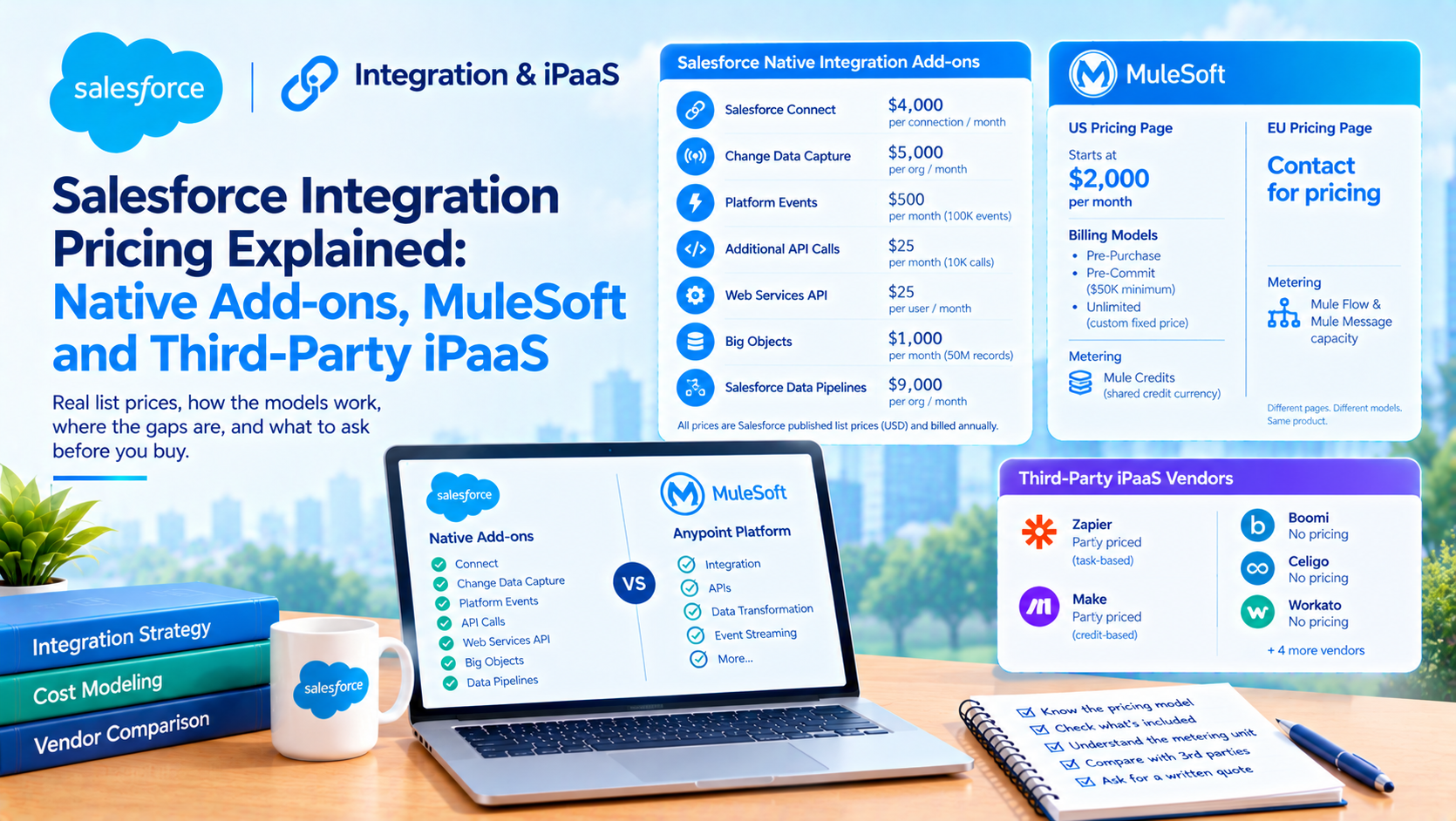
Salesforce publishes list prices for its native integration add-ons and, in most regions, no price at all for MuleSoft. Salesforce Connect is $4,000 per connection per month, Change Data Capture $5,000 per org per month, Platform Events $500 per month for 100,000 daily events and additional API calls $25 per month per 10,000 daily calls. MuleSoft Anypoint Platform starts at $2,000 per month on the US pricing page and shows "Contact for pricing" on the EU page.
That is the opposite of how this comparison is normally written. An architect can build a defensible cost model for every option on the table except the one Salesforce owns.
What does each Salesforce integration option actually cost?
These are Salesforce's published list prices, verified directly on 12 October 2026, from the platform add-ons page. The page carries the footnote "Total cost billed annually. All prices in USD."
| Native option | Published list price | Editions |
|---|---|---|
| Salesforce Connect | $4,000 connection/month | Enterprise, Unlimited |
| Change Data Capture | $5,000 org/month | Pro Suite, Professional, Enterprise, Unlimited |
| Platform Events | $500/month for 100,000 daily events | Enterprise, Unlimited |
| Additional API Calls | $25/month for 10,000 daily calls | Pro Suite, Professional, Enterprise, Unlimited |
| Web Services API | $25/user/month | Pro Suite, Professional (included in Enterprise and Unlimited) |
| Big Objects | $1,000/month for 50 million records | Enterprise, Unlimited |
| Salesforce Data Pipelines | $9,000/org/month | Enterprise, Unlimited |
Evidence standard: every figure above is Salesforce's published list price with a linked source, not an estimate of ours.
Read the first row again. Salesforce Connect is priced per connection, not per org. Three external systems is $12,000 a month, or $144,000 a year, before anybody writes a line of code. That single detail removes "just use external objects" from most mid-market shortlists, and it is routinely written up as though it were an org-level charge.
The second row matters for a different reason. Change Data Capture at $5,000 per org per month is the add-on that lifts the five-entity cap, and the entity limit without it is five objects across all channels. Five is not a lot for an ERP sync.
Why two Salesforce MuleSoft pricing pages give different answers
Both of these were fetched on 12 October 2026, within minutes of each other.
The US MuleSoft pricing page publishes a price: "New MuleSoft pricing starts at $2K per month", restated in the FAQ as "MuleSoft packages start at $2,000 per month, billed annually". It names three billing models, Pre-Purchase, Pre-Commit and Unlimited, with Pre-Commit carrying a "$50K minimum annual commitment" and Unlimited described as "Custom fixed price, uncapped credits". The metering unit is Mule Credits, described as "One shared credit currency across the MuleSoft portfolio". Five starter packages are named: Govern APIs and AI, Manage Agents, Connect Apps, Process Documents and Access Everything.
The EU MuleSoft pricing page publishes no price. Every edition cell reads "Contact for pricing". The editions have different names: MuleSoft Integration Starter, MuleSoft Integration Advanced and API Management Solution. The metering unit is different too, "measured by the amount of Mule Flow and Mule Message capacity needed" rather than credits. No minimum commitment appears.
So a US buyer sees a credits-based model with a $2,000 floor and a $50,000 minimum on one buying option. A European or UK buyer sees the older flow-and-message packaging with no published figure. Same product, same vendor, same day.
If you are buying outside the US, the $2,000 figure in circulation is not the number you will be quoted against, and the metering unit on your order form may not even be the same one. Ask explicitly which model you are being priced under.
One further gap: no Mule Credit rate and no vCore rate is published anywhere we could find. MuleSoft's own vCore pricing documentation publishes the billing mechanism without publishing a rate, and the mechanism is the part to notice: "MuleSoft samples vCore usage every hour and uses the peak hourly value to calculate the daily and monthly maximum." Because that is a peak measure rather than an average, a single hourly spike sets the month's bill.
Which third-party iPaaS vendors publish a real price?
Two of nine. This is a verified negative and it is more useful than a capability matrix.
| Vendor | Published list price? | What is published |
|---|---|---|
| Zapier | Partly | Free $0 (100 tasks/month). Professional "Starting from $19.99"/month. Team "Starting from $69"/month. Enterprise contact-only. The task-volume ladder is behind a slider and individual tiers are not priced |
| Make | Partly | Free $0 (1,000 credits/month). Core $12/month, Pro $21/month, Teams $38/month, each at the 10,000-credit base. Enterprise custom. Volume ladder unpriced |
| Boomi | No | Four editions named (Professional, Pro Plus, Enterprise, Enterprise Plus), no figures |
| Celigo | No | Three editions. Model stated as "Pay for endpoints and flows, not per task or transaction" |
| Jitterbit | No | "We offer custom pricing based on your requirements." "All products require an annual contract" |
| Workato | No | "uses a usage-based billing model". No rates. Customers who joined before February 2024 are on a separate legacy model |
| Informatica (Salesforce-owned) | No | Quote-only, consumption-based, metered in IPUs |
| Tray.ai | Not verified | Vendor pricing page could not be reached |
| n8n | Not verified | Vendor pricing page could not be reached |
Evidence standard: "No" above means we reached the vendor's own pricing page and it published no figure. "Not verified" means we could not reach the page, so we are not quoting a number from an aggregator.
The comparison-blog genre quotes iPaaS list prices freely. Most of those numbers have no vendor source. If a post gives you a per-seat Workato price, ask where it came from.
The practical consequence for procurement is that you cannot model total cost of ownership for seven of these nine before you enter a sales process. That is not a reason to avoid them. It is a reason to run the native-option cost model first, because it is the only one you can build without a vendor conversation, and it gives you a number to negotiate against.
Which enforced limit kills each approach?
Cost tells you what you can afford, but the enforced limits are what decide whether a design survives contact with production volumes. These are all enforced caps verified against Salesforce's dedicated limits pages rather than a wide comparison table.
| Approach | The enforced limit that bites | Source |
|---|---|---|
| Point-to-point API calls | 25 concurrent inbound requests running 20 seconds or longer in production orgs and sandboxes, 5 in Developer and Trial. Exceeding it returns REQUEST_LIMIT_EXCEEDED | API request limits |
| Point-to-point API calls | Daily allocation of 100,000 plus a per-licence-type figure. "Limits and allocations are enforced against the aggregate of all API calls made to the org in a 24-hour period" and "are not on a per-user basis" | Same |
| Platform events | 25,000 event deliveries per day on Enterprise, 50,000 on Performance and Unlimited, 10,000 on Developer. Flat per edition | Platform event allocations |
| Platform events | Retention of 72 hours for high-volume events, 24 hours for standard-volume | Same, and CDC allocations page |
| Change Data Capture | 5 selectable entities across all channels without the add-on, every edition including Unlimited | CDC allocations |
| Salesforce Connect | 4 joins per SOQL query, 1,000 rows per subquery involving external objects, and "Each join requires a separate round trip to the external system when executing the query" | SOQL limits |
| Apex callouts | 100 callouts per transaction, 120 seconds cumulative callout timeout, 6 MB request or response synchronous and 12 MB asynchronous, counting against heap | Apex governor limits |
| Bulk API | 15,000 batches per rolling 24 hours shared between Bulk API 1.0 and 2.0, 24-hour maximum job duration, and a payload cap of 150 MB of base64-encoded content | App and platform limits cheat sheet, release 254 |
Two precision points, because getting these wrong leads an architect to build against the wrong number.
The concurrent long-running request limit is 25 in production, not 10. The figure of 10 that circulates belongs to a different limit: the Apex governor for synchronous concurrent transactions lasting longer than 5 seconds, which is calculated as 100 licences to 1 transaction with a minimum of 10 and a maximum of 50. Two limits with a similar shape, routinely conflated.
On Bulk API, 150 MB is the enforced cap and 100 MB is not a recommendation. Salesforce's wording is that a request "can provide CSV data that does not in total exceed 150 MB of base64 encoded content", and separately instructs: "To account for the base64 conversion increase, upload data that does not exceed 100 MB." Base64 inflates data by roughly half, so 100 MB of raw CSV is the budget that keeps you inside the 150 MB cap. Calling 100 MB "a guideline" invites an architect to exceed it and hit a hard failure.
A caveat on provenance, since it affects how you should treat those Bulk figures. The fullest Bulk API limits table we could verify is the release 254 cheat sheet PDF. The current-release PDF was not retrievable, and two live HTML pages now say most Bulk API limits are described in a document that neither of them contains. Date those figures to release 254 and confirm the current ones in your own org.
Why the platform event allocation is the limit that catches teams out
Of every number above, this is the one we see break a design that otherwise looked sound.
The event delivery allocation is 25,000 per day on Enterprise Edition, and Salesforce states on both the platform events and Change Data Capture pages: "The event delivery allocation is shared between high-volume platform events and Change Data Capture events."
Three things follow, and all three are counter-intuitive.
It does not grow with your user count. The daily API allocation is 100,000 plus a figure per licence, so doubling your users roughly doubles your API headroom. The event delivery allocation is a flat per-edition number. Scaling the org does not scale the event budget. An integration sized against today's volumes has exactly the same ceiling after a 400-seat expansion.
Someone else can consume it. Turning on Change Data Capture for a busy object draws from the same 25,000. The integration team does not necessarily own the decision that exhausts their allocation, and there is no reason a data team enabling CDC for a warehouse feed would know they were doing it.
A breach disconnects the subscriber rather than queuing. Pub/Sub API returns sfdc.platform.eventbus.grpc.subscription.limit.exceeded. CometD returns 403::Organization total events daily limit exceeded.
Now combine that last point with the 72-hour retention window. If your subscriber is disconnected by an allocation breach, you have 72 hours to notice before the events are gone permanently. A breach on a Friday afternoon closes its window on Monday morning.
Platform events are also at-least-once rather than exactly-once. Salesforce states that failed publishing is retried "using the at-least-once model", that ordering "isn't guaranteed because publish requests can be processed by different Salesforce application servers" across publish requests, and that events defined to publish immediately "don't respect transaction boundaries" and cannot be rolled back. Subscribers have to be idempotent. That is not a flaw, it is the contract, and it is the reason the next section matters.
What Salesforce's own integration guidance actually recommends
This is where the comparison gets interesting, because Salesforce's guidance is more product-neutral than its sales motion.
Salesforce's canonical Integration Patterns and Practices document, version 64.0, rates solutions as Best, Good or Suboptimal across six named patterns. MuleSoft appears in it only as a reference footnote. It is not named as the recommended solution for a single pattern. The middleware guidance is generic: "We recommend that all complex orchestrations be implemented in the middleware layer."
Salesforce's data integration decision guide does give MuleSoft an affirmative recommendation, and it is worth quoting in full rather than selectively, because both halves matter. The "when to use" guidance is "When you need a single enterprise-grade, unified solution to build, orchestrate, and manage your integrations; when you need to replace a legacy point-to-point architecture; or when you need API management support."
And the qualifier, in Salesforce's own words: "Use MuleSoft or other Enterprise Service Bus (ESB) or Extract-Transform-Load (ETL) solutions, if available and part of your existing landscape." Followed by: "In this guide, wherever MuleSoft Anypoint is recommended, consider whether your existing ESB/ETL solution will suffice."
So Salesforce does recommend MuleSoft for a defined set of problems, and it also tells you to check whether what you already own covers them. If you have Boomi, Informatica or an existing ESB, Salesforce's own guide points you at that first. That is more useful advice than most partner blogs give, and it comes from the vendor.
The trade-off, and what middleware actually buys you
The honest case for middleware is in Salesforce's own architecture guidance rather than in a MuleSoft brochure. The live patterns guidance recommends that "the remote system (or middleware) manages error handling and idempotent design" and that "the remote system implement a reliable messaging system". The Data 360 patterns guide goes further: "Data 360 supports streaming ingestion and flow-based outbound messaging, but durable queuing and guaranteed delivery are typically handled by middleware", and "Although routing can be implemented within Salesforce (Apex, Flows), middleware routing is preferred for scalability, flexibility, and governance."
That is the trade-off stated properly. Salesforce puts idempotency, error handling, durable queuing and guaranteed delivery on the other side of the boundary. Native platform events do not provide them, by design.
So the choice between native and middleware is not a feature comparison. It is a question of where you want to own retry logic, dead-letter handling and delivery guarantees. Build it on the platform and you own it in Apex, with governor limits and the 72-hour retention window. Buy middleware and you own a licence, a runtime, a deployment pipeline and a team that knows it.
For two or three integrations with tolerant business requirements, the native route wins and the alternative loses on cost: $500 a month for 100,000 daily events against a $2,000 monthly floor and a $50,000 minimum annual commitment on one MuleSoft buying model. For a dozen integrations where a lost message creates a financial discrepancy, middleware wins and the native route loses on the thing it was never built to do. The uncomfortable middle is four to six integrations, where in our experience the deciding factor is not volume at all. It is whether you have anyone who will own retry logic in Apex for the next three years.
One more thing Salesforce says that most consultancies ignore
Salesforce rates Apex web services and Apex REST services as "Suboptimal" for the Remote Call-In pattern, in both the patterns document and its live architect guidance, against REST API and Composite API as "Best".
Custom Apex REST endpoints are the default build at a lot of consultancies, including, historically, on projects we inherited. Salesforce's own guidance says use the standard APIs and the Composite resources instead. Where the client already has the endpoints, we usually leave them alone, because rewriting working integrations is rarely the best use of a budget. For anything new, the standard APIs are the default and the burden of proof sits with the custom endpoint.
Where Salesforce Connect wins, and where $4,000 a connection stops being worth it
Salesforce Connect and external objects get recommended as the cheap alternative to data replication. At $4,000 per connection per month they are not cheap, and the constraints are tighter than "reporting is limited" suggests.
What you cannot do in SOQL against external objects, per Salesforce's documentation: GROUP BY, HAVING, SUM(), AVG(), MAX(), MIN(), COUNT(fieldName), LIKE, INCLUDES, EXCLUDES, TYPEOF and WITH. Bare COUNT() is supported.
The absence of GROUP BY, SUM() and LIKE is a more precise and more actionable statement than "limited reporting", because it tells you exactly which user story fails. Any requirement that aggregates external data, or that offers a contains-style search box over it, is not a Salesforce Connect requirement.
Add the join behaviour. Four joins maximum per query, 1,000 rows per subquery, and "Each join requires a separate round trip to the external system when executing the query". A page that joins across four external objects makes four synchronous calls to your ERP while a user waits.
And in Apex, Salesforce states that Apex-managed sharing and Apex triggers "aren't available for external objects", with triggers possible only on external change data capture events from OData 4.0 connections.
So Salesforce Connect is right when the requirement is genuinely read-only lookup of a small result set against a system of record you must not copy, and the data must be editable in place, which is the one thing Data 360 zero-copy cannot do. It is wrong for reporting, for aggregation, for search, and for anything that needs a trigger. It is priced like middleware and constrained like a database view.
We should also flag a limit we could not verify: we found no published maximum number of external objects per org. Figures circulate. We could not source one, so we are not quoting one. The economic ceiling arrives well before any technical one at $4,000 per connection.
What happens when you exhaust the daily API allocation
This is widely written up incorrectly, so here is Salesforce's actual wording.
"If your org reaches or exceeds its daily API request limit, Salesforce still lets the operations proceed by a certain amount, if possible." It "helps avoid blocking your workflows during unexpected spikes in workloads and occasional peak periods". But "A hard cap is in place to safeguard platform resources and prevent API requests from exceeding the daily limit unimpeded", the allowance "is designed to be used occasionally", and Salesforce says plainly: "Don't rely on it on an ongoing basis."
Four things to take from that.
It is a soft limit with a hard cap behind it, so hitting the daily allocation does not immediately stop traffic on a paid active org. The grace amount is not quantified anywhere, which means you cannot plan with it. It "only applies to paid orgs in active status" and "doesn't apply to trial orgs, Developer Edition, or sandboxes", so your sandbox fails earlier and harder than production. And the route to more headroom is commercial: "To increase your allocation, contact your Salesforce account representative", which in practice means the Additional API Calls add-on at $25 per month per 10,000 daily calls, not a support-case favour.
The failure mode that actually hurts is not the daily allocation at all. It is the 25-concurrent-long-running-request cap, because it arrives as intermittent production failures under load rather than as a budget alert.
How to choose, in order
- Count the integrations and classify each one by delivery requirement. Can a message be lost or duplicated without a financial or regulatory consequence? That single question separates the native cases from the middleware cases faster than volume does.
- Build the native cost model first. It is the only one you can build from published prices. Platform Events at $500 per 100,000 daily events, Additional API Calls at $25 per 10,000 daily calls, Salesforce Connect at $4,000 per connection, CDC at $5,000 per org.
- Check the enforced limit before the price. If you need more than five CDC entities, or more than 25,000 event deliveries a day on Enterprise, the add-on is not optional and belongs in the model.
- Check what middleware you already own. Salesforce's own decision guide tells you to, and an existing Boomi or Informatica estate changes the answer.
- Price MuleSoft against the right regional page. Confirm whether you are being quoted on Mule Credits or on Mule Flow and Mule Message capacity, and get the credit rate in writing since none is published.
- Decide who owns retry logic for the next three years. If the answer is nobody, that decides it, whatever the arithmetic says.
- Pick the pattern from Salesforce's own list, then the technology. Fire and forget, request and reply, batch synchronisation, remote call-in and data virtualisation each have a documented best-fit solution. Choosing the tool before the pattern is how orgs end up with four integration technologies and no standard.
Step 1 is the one that decides the outcome, and the steps after it are mostly arithmetic against published figures.
What we could not price, and why it matters
Being straight about the gaps, because an architect should know where the model is soft:
- No Mule Credit rate and no vCore rate is published anywhere we could find, so a MuleSoft total cannot be computed from published figures. Only the $2,000 monthly floor and the $50,000 Pre-Commit minimum are published, and only on the US page.
- No price is published for Boomi, Celigo, Jitterbit, Workato or Informatica. Verified by reaching each vendor's own pricing page.
- The daily API grace allowance is not quantified. "by a certain amount, if possible" is all Salesforce publishes.
- No maximum number of external objects per org is published.
- No published limit on External Services registrations or schema size appears in the metadata reference or the limits cheat sheet.
- Pub/Sub API has no published concurrent client limit. Only the CometD figures exist: 2,000 on Performance and Unlimited, 1,000 on Enterprise, 20 on Developer.
One correction to a widely repeated claim while we are here: CometD is not documented as deprecated or retiring. Streaming API versions 37.0 through 67.0 are all listed as supported, and only PushTopic and Generic events carry a legacy label. Salesforce's architect guidance does state that "The Pub/Sub API is the recommended way for external publishers to publish events on the Event Bus", which is a preference rather than a retirement.
And the Headless 360 MCP Server, which is increasingly part of this conversation, is beta. Salesforce's developer documentation states: "The Headless 360 MCP Server is a Beta Service, available starting in July 2026." A Salesforce marketing blog from May 2026 says only "AIforce is now available" with no status qualifier. Two Salesforce surfaces, two answers. Build against the documentation, not the blog.
Frequently Asked Questions
How much does MuleSoft cost?
Salesforce's US pricing page states that "MuleSoft packages start at $2,000 per month, billed annually", with a "$50K minimum annual commitment" on the Pre-Commit buying model. The EU pricing page publishes no price and shows "Contact for pricing" on every edition, using a different metering unit. No Mule Credit rate or vCore rate is published anywhere, so a full cost cannot be computed from published figures.
How much does Salesforce Connect cost?
Salesforce publishes Salesforce Connect at $4,000 per connection per month, billed annually, available in Enterprise and Unlimited. The per-connection basis is the detail that catches buyers out: three external systems is $12,000 a month, or $144,000 a year. That is the economic ceiling on external objects well before any technical limit applies.
What is the platform event limit in Salesforce?
Event delivery is capped at 25,000 messages per day on Enterprise Edition, 50,000 on Performance and Unlimited and 10,000 on Developer. The allocation is shared with Change Data Capture events and is flat per edition, so it does not grow with your user count. High-volume events are retained 72 hours. The add-on lists at $500 per month for 100,000 daily events.
Do I need MuleSoft to integrate Salesforce with my ERP?
Not necessarily. Salesforce's own integration patterns document does not name MuleSoft as the recommended solution for any pattern, and its data integration decision guide says to use MuleSoft or another ESB "if available and part of your existing landscape" and to "consider whether your existing ESB/ETL solution will suffice". For a small number of integrations with tolerant delivery requirements, native platform events and APIs are substantially cheaper.
What happens when a Salesforce org exceeds its daily API limit?
Salesforce "still lets the operations proceed by a certain amount, if possible", with a hard cap behind it, and says not to rely on that allowance on an ongoing basis. The grace amount is not published. It does not apply to trial orgs, Developer Edition or sandboxes. More headroom comes from the Additional API Calls add-on at $25 per month per 10,000 daily calls, arranged through your account representative.
Is CometD or Streaming API being retired?
No. Streaming API versions 37.0 through 67.0 are all listed as supported, and only PushTopic and Generic events carry a legacy label. Salesforce's architect guidance states that Pub/Sub API "is the recommended way for external publishers to publish events on the Event Bus", which is a preference rather than a retirement. Standard-volume custom platform events are a separate matter and retire in Summer '27.
The decision this post was really about
The expensive mistake in integration architecture is not picking the wrong tool. It is picking the tool before classifying the integrations, then discovering at user acceptance testing that a flat 25,000-event daily allocation shared with a Change Data Capture feed somebody else enabled does not cover month-end.
If you are sizing a Salesforce integration estate and you want the native cost model built from published prices before you take a middleware quote, that is work we do in a couple of weeks: the integration inventory, the enforced limit each one runs into, and the native-versus-middleware arithmetic for your specific volumes and your specific edition. Talk to us about it, or read more about our Salesforce integration work.
Have Questions or Need Assistance?
Our team of Salesforce experts is ready to help you implement the solutions discussed in this article.
Contact Us Today