Running Agentforce in Production: Monitoring and Cost
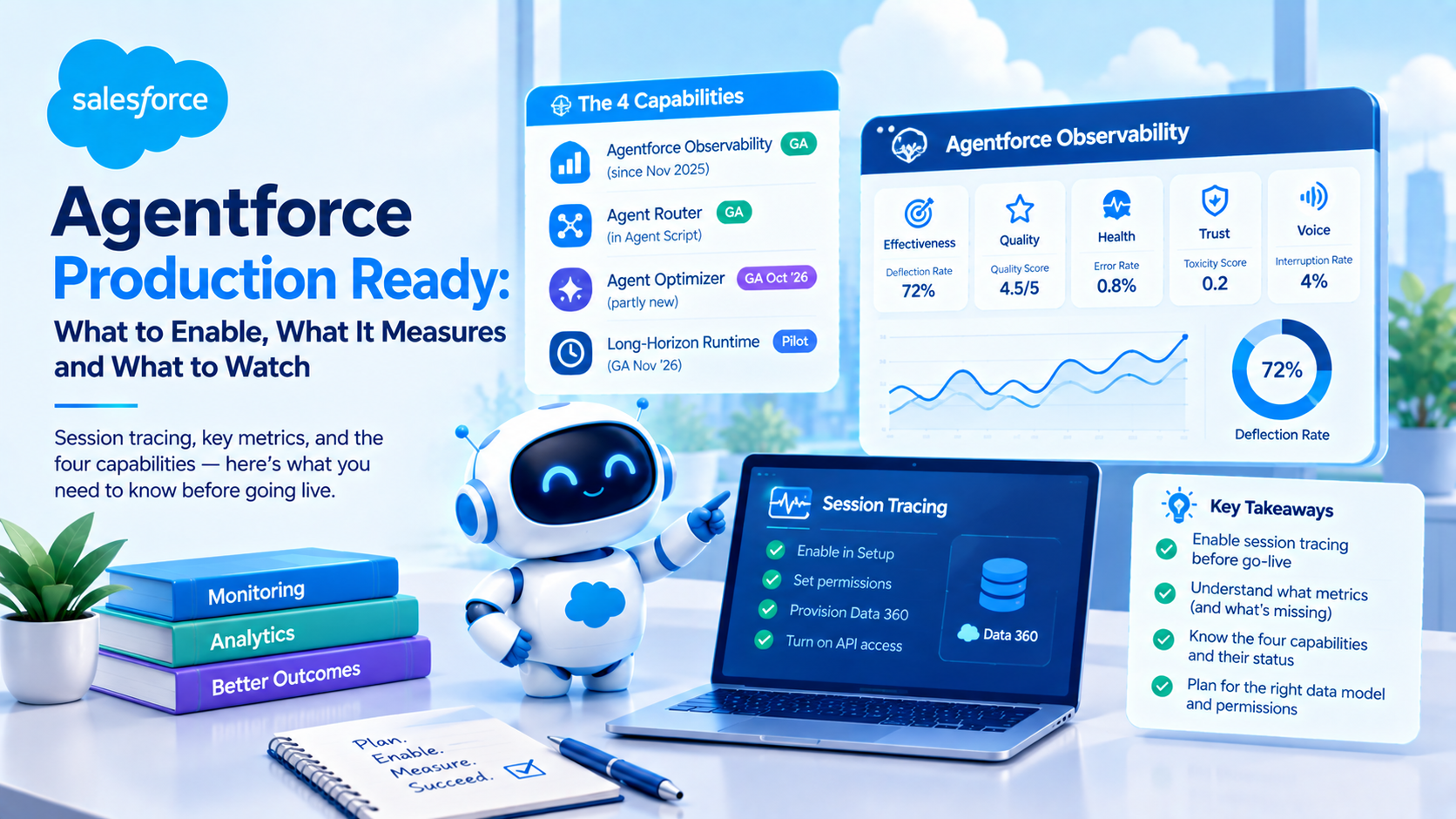
Running Agentforce agents in production needs three things Salesforce does not do for you: session tracing enabled before go-live, because observability is not retroactive; a deliberate view of what the success metrics do not catch; and a credit model. Agentforce Observability has been generally available since November 2025, Agent Optimizer reaches GA in October 2026, and the long-horizon runtime is still pilot.
The Dreamforce '26 Agentforce keynote presented four capabilities as one coherent launch. They sit at four different maturity levels, and two of them are not new. Separating them is the most useful thing we can do for anyone planning a production rollout this quarter.
The four capabilities, and what each one actually is
| Capability | Real status, 22 September 2026 | New at Dreamforce '26? |
|---|---|---|
| Agentforce Observability | GA since November 2025 | No, ten months old |
| Agent Router | GA as the start_agent block in Agent Script | No, in the developer docs already |
| Agent Optimizer | GA October '26, per Salesforce's own dated page | Partly |
| Long-Horizon Runtime | Pilot, via Hunter. Hunter GA November '26 | Yes |
At least one widely-shared recap tabulates all four as generally available. That is contradicted by Salesforce's own agent portfolio page, published nine days before the recap, which lists Agent Optimizer as "GA October '26" and Hunter as "Pilot now; GA November '26". Check the dated Salesforce page rather than the recap, including when the recap is ours.
There is also a naming collision that will cost somebody an afternoon. Agent Optimization is a toggle in Setup and a section in Agentforce Studio, generally available since November 2025. Agent Optimizer is the product demonstrated at Dreamforce, with GA targeted for October 2026. Enable "Agentforce Optimization" in Setup today and you get the 2025 capability, not the keynote demo.
Enable session tracing before go-live, because observability is not retroactive
This is the single most actionable line in this post, and it comes straight from Salesforce's setup documentation: "The analytics and insights will only show up for new conversations occurring after setting up the Session Tracing Data Model." The same page warns that "it may take a while before data starts showing up".
Go live without enabling session tracing and the first weeks of production are permanently unobservable. You cannot backfill. For an agent handling customer conversations, those first weeks are exactly the period you will later want to analyse, because that is when the classification is worst and the edge cases arrive.
What you need in place first:
- In Setup, Einstein Audit, Analytics, and Monitoring Setup, with both "Agentforce Session Tracing and Data Model" and "Agentforce Optimization" enabled
- Permission sets: Access Agentforce Optimization, plus either Tableau Next Limited Consumer or Tableau Next Platform Analyst, plus Data Cloud User
- Salesforce Foundations, the zero-cost SKU, which is what carries the Tableau Next Limited Consumer licence
- API Enabled set to true on the relevant user profiles
- Data 360 provisioned
None of that is difficult. All of it is easy to discover a month too late.
What Agentforce Observability actually measures
The metric set is published and larger than most teams realise. Salesforce groups it into effectiveness, usage, quality, health, trust and voice.
Effectiveness: Deflection Rate, Escalation Rate, Abandonment Rate, Engagement Rate, Success Rate, Task Resolution Rate.
Quality: Quality Score on a 1 to 5 scale, plus Answer Faithfulness, Answer Relevance and Context Relevance, each on a 0 to 1 scale.
Health: Error Rate, Session Duration, and Agent Interaction Duration, which is the latency measure.
Trust: Adherence Response Rate and Average Agent Toxicity Score. Voice: Interruption Rate.
Two gaps in that list are worth knowing before you promise a dashboard to a stakeholder.
There is no metric called containment. Salesforce publishes Deflection Rate, defined as the share of sessions that ended without escalation. That is functionally the containment metric under a different name. If your service leadership benchmarks against published industry containment figures, they are comparing two differently-named things, and somebody should say so in the first meeting rather than the third.
There is no cost-per-conversation metric. It is not in the metric list. Salesforce's product page claims dashboards show consumption and credit usage per agent, which is per agent rather than per conversation, and credit consumption is tracked separately in Digital Wallet. If you want unit economics per conversation you are building that yourself.
Underneath, session tracing writes to five Data 360 objects covering sessions, participants, interactions, interaction steps and messages. Salesforce's instruction is explicit: query the DMOs, not the DLOs directly. Step-level telemetry is separately queryable via SOQL against the telemetry span object, with duration in milliseconds, an OK or ERROR status code, and a parent span identifier that lets you rebuild the trace tree.
Export exists but is narrower than it sounds. The OpenTelemetry export API returns OTLP-conformant JSON suitable for Splunk, Datadog or New Relic, and it is Beta. The documented constraints: one session ID per request, no bulk query support, and only sessions that started within the previous 72 hours, with standard Connect API rate limits applying. You cannot build a continuous full-fidelity pipeline into your existing observability platform off that API today. It is an investigation tool. For bulk analysis you query the Data 360 objects instead.
What your success rate does not catch
Salesforce defines Success Rate as the share of interactions that "included action steps and completed without errors". Read that definition against the three failure modes that hurt most in production, and a pattern appears.
Truncation is not an error. There are two separate ceilings at two layers. Agent action outputs over 65,000 characters are truncated. Separately, LLM responses are subject to a roughly 2,048 token limit, which produces responses cut off mid-sentence and missing sections in long outputs. Neither has a documented metric or alert. A truncated response completes successfully by every exposed measure.
An empty result is not an error. Salesforce's own tracing documentation gives the canonical example: a flow returned status OK while its database query returned zero rows, causing the parent action to fail. Only the span attributes revealed it. Salesforce's comment on that case is the sentence to remember: "a top-level error message rarely tells the full story."
Non-determinism is not measured at all. Salesforce confirms in its behaviour-issues documentation that "identical inputs produce inconsistent outputs" and that agents "can behave unpredictably if prompts are unclear or inconsistent". Observability shows you this session. It does not show you the distribution across repeated runs of the same utterance. That is the biggest genuine gap in the tooling, and it is the one most likely to produce a defect report you cannot reproduce.
The documented route to catching these is Custom Scorers, currently Beta, which grade live sessions against your own criteria. They are deployable via the Metadata API using aiAgentScorerDefinitions, which means they live in source control, and they are activated from the Scorer Hub to run on live traffic. That is the genuine difference from pre-go-live testing: the same grader primitive, pointed at production instead of a test set, and version controlled.
If you have not yet built a pre-go-live test suite, that is the prior step and we have written about it separately on our blog. This post assumes you are already live.
One correction to a claim we have repeated ourselves. The error message "We couldn't retrieve the action's output" is widely described as covering several distinct causes. Salesforce's knowledge article on it documents exactly one: the Einstein Service Agent User's access to Knowledge, resolved by granting View Knowledge or assigning the Agentforce Service Agent Object Access permission set. The multi-cause characterisation comes from community reports, not from Salesforce documentation, and we should have attributed it that way the first time.
How much does it cost to run an agent, and what happens if you go over?
The rates are published. From the Flex Credits rate card dated 17 June 2026, per action, with the sandbox rate alongside:
| Usage type | Production | Sandbox |
|---|---|---|
| Standard or custom action | 20 credits | 16 credits |
| Standard or custom voice action | 30 credits | 24 credits |
| Starter or basic prompt | 2 credits | not published |
| Standard prompt | 4 credits | not published |
| Advanced prompt | 16 credits | not published |
| Speech to text | 150 credits per transcription hour | not published |
| Text to speech | 6,000 credits per million characters | not published |
| Help Agent resolution | 400 credits | not published |
That sandbox column is under-reported and matters for the testing question below. Sandbox actions carry an explicit, non-zero credit rate.
On unit price, Salesforce's Agentforce pricing page publishes worked examples rather than a rate: case management at 3 actions and 60 credits for USD 0.30, field service scheduling at 6 actions and 120 credits for USD 0.60, employee onboarding at 1 action and 20 credits for USD 0.10. All three imply USD 0.005 per credit, which makes a standard action USD 0.10, a voice action USD 0.15 and a Help Agent resolution USD 2.00.
Write that as "implied by Salesforce's published examples", not as a published rate, because a fourth example on the same page gives reservation management at 4 actions and 120 credits for USD 0.15, which reconciles with nothing. We checked that page on 22 September 2026 and the inconsistency is live. Do not build a model off any single worked example without checking the arithmetic yourself.
And now the overage question, which has an answer. We have looked for a published Flex Credit overage rate repeatedly and never found one. The reason is that there is no overage rate, because there is no overage penalty. Salesforce's pricing page states it directly:
"There is no overage penalty. If you exceed your entitlement, your rate is your contracted rate billed monthly in arrears."
Two further terms from the same page that belong in any budget conversation: unused Flex Credits do not roll over into subsequent subscription terms, and Flex Credits and Conversations are not supported in the same org. You pick one model per org.
One caution on edition allocations. The Agentforce pricing page is stale. It still describes "Agentforce 1 Editions" with 1M Flex Credits per org per year, while the current Sales and Service Cloud pricing pages describe Max at the same USD 550 price with 2.75M Flex Credits. Same price, different edition name, different allocation, both live on salesforce.com simultaneously. Use the Sales or Service pricing page.
Does observability itself cost anything? Salesforce says both
This one needs care, because the two answers have different consequences at renewal.
Salesforce's billing documentation for session tracing contains both of these statements:
- "Agentforce Session Tracing consumes Data 360 credits for storage used over the allocated amount."
- "Agentforce Session Tracing no longer consumes Flex or Data 360 Data Services credits."
Those reconcile, and the reconciliation is the useful part: tracing does not consume Flex Credits or Data 360 compute credits, but it does consume Data 360 storage beyond your allocation. Observability is compute-free and not storage-free. For a high-volume agent that is a real and growing line sitting in Digital Wallet under Data Storage Allocation, and almost nobody is watching it.
Salesforce's own observability blog says something different, that it is "included at no additional Data Cloud cost for all Agentforce customers". That cannot be squared with the billing page. Prefer the billing page, and put a Digital Wallet check in your monthly routine so the storage line is not a surprise in month eleven.
Routing carries no separate charge, because Agent Router is the start_agent block rather than a metered service. But routing is LLM-based, so the reasoning bills as prompts, and every subagent action invoked bills at 20 credits. A router that mis-routes and then re-routes costs a full extra action. Routing quality is a cost lever, not only a quality lever.
For long-horizon execution, no billable usage type covers durable execution, plan persistence, memory or checkpoints. Given the per-action model, a multi-week agent taking hundreds of actions has genuinely unbounded published cost. We are not going to estimate it, and neither should a business case.
Is Testing Center metered? Salesforce still says both, on three pages
We wrote previously that testing in Agentforce Testing Center is unmetered, citing Salesforce's considerations page. We rechecked on 22 September 2026. The contradiction has not been resolved. It has widened.
Saying unmetered, one page. The considerations page still reads: "As of Summer '26, testing in Agentforce Testing Center is unmetered and doesn't consume Einstein Requests or Flex Credits."
Saying metered, two pages plus the rate card. The Testing Center page says "Running tests consumes requests and credits." The usage and billing page says "Testing through Agentforce Builder, Agentforce Grid, Testing Center, and Sandbox are metered to account for required compute resources." And the June 2026 rate card publishes explicit sandbox rates of 16 credits per action and 24 per voice action, which is hard to square with sandbox testing being free.
The balance of evidence now favours metered, and the unmetered sentence looks like copy that survived a release transition. It is still published, so we are calling it an unresolved documentation conflict rather than declaring it settled. Budget as though testing consumes credits. If your agent programme assumed otherwise, that assumption is worth revisiting this month rather than at renewal.
Agent Router does not raise the ten-subagent recommendation
Worth being precise here, because the difference between a recommendation and an enforced limit changes what you are allowed to design.
Salesforce's Agentforce considerations page says: "For best performance, we recommend assigning no more than 10 actions to a subagent, and 10 subagents to an agent." That is a performance recommendation in Salesforce's own words, not a cap. The nearby enforced limit is 100 agents per org.
Agent Router does not change it. The router documentation pushes the other way: "Start with essential subagents and add more gradually as needed. Fewer subagents means clearer routing decisions for your agent." Routing is decided by LLM evaluation of subagent descriptions, by conditional logic for critical decisions, and by available when filters that gate which subagents are visible at all. Description quality is your main routing lever, which means the text you write in a description is runtime input rather than documentation.
The scaling path beyond roughly ten subagents is multi-agent orchestration, which Salesforce listed as GA at Dreamforce. Salesforce's own framing of why the ceiling exists is cognitive rather than technical: once an agent carries more than about eight to ten well-scoped topics, it "starts carrying too much concurrent intent", producing drift or hallucination that hybrid reasoning does not fully solve. Moving to orchestration buys headroom and costs you a second layer of routing to debug.
A production runbook for the first 90 days
- Enable session tracing before go-live. Everything else on this list depends on it, and it cannot be backfilled.
- Decide your metric definitions on day one. Agree that Deflection Rate is what your business means by containment, and write it down before anyone benchmarks against an outside figure.
- Build Custom Scorers for the three invisible failures. Truncation at the character and token boundaries, empty-result actions, and any action returning null where a value was expected.
- Put a Digital Wallet review in the monthly routine, specifically the Data Storage Allocation line, because that is where observability cost accumulates.
- Re-run a fixed set of utterances weekly and record the variance. Nothing in the platform measures run-to-run non-determinism for you.
- Track mis-routes as a cost line, not just a quality line. Every re-route is a full extra action at 20 credits.
- Reconcile your credit burn against your contracted rate monthly. There is no overage penalty, but there is also no rollover, so both under and over consumption cost you something.
- Re-read the status of anything you are waiting for. Agent Optimizer in October, Hunter in November, and Koa in winter for US regions only.
At Aptivus Solutions we set this up as part of go-live rather than after it, because the enable-tracing-first constraint makes it genuinely impossible to retrofit.
Frequently Asked Questions
Is Agentforce Observability free?
Not entirely. Salesforce's billing documentation states that session tracing no longer consumes Flex Credits or Data 360 Data Services credits, but does consume Data 360 credits for storage used beyond your allocation. Salesforce's observability blog separately claims no additional Data Cloud cost, which contradicts the billing page. Prefer the billing page and monitor the Data Storage Allocation line in Digital Wallet.
Can I see agent data from before I enabled observability?
No. Salesforce states that analytics and insights only appear for new conversations occurring after the Session Tracing Data Model is set up. There is no backfill, so any production period before enablement is permanently unobservable. This is the strongest argument for treating session tracing as a go-live prerequisite rather than a later improvement.
What happens if we exceed our Flex Credit entitlement?
Salesforce states there is no overage penalty, and that if you exceed your entitlement your rate is your contracted rate billed monthly in arrears. Unused credits do not roll over into subsequent subscription terms, and Flex Credits and Agentforce Conversations cannot both be used in the same org, so you commit to one model per org.
How many subagents can one Agentforce agent have?
There is no enforced limit on subagents. Salesforce recommends no more than 10 actions per subagent and 10 subagents per agent for best performance, which is a recommendation rather than a cap. The enforced limit nearby is 100 agents per org. Beyond roughly ten subagents, multi-agent orchestration is the documented scaling path.
Does running tests in Agentforce Testing Center consume credits?
Salesforce currently publishes both answers. One page says testing is unmetered as of Summer '26, while two others say testing consumes requests and credits, and the June 2026 rate card publishes sandbox action rates of 16 and 24 credits. The balance of evidence favours metered. Budget as though testing costs credits until Salesforce resolves it.
Can I export Agentforce traces to Datadog or Splunk?
Partly. A Beta OpenTelemetry export API returns OTLP-conformant JSON that those platforms can ingest, but it accepts one session ID per request, has no bulk query support, and only returns sessions started within the previous 72 hours. It suits targeted investigation rather than a continuous pipeline. For bulk analysis, query the Data 360 objects directly.
The setting to check before your next go-live
The specific problem this post describes is that the most consequential production decision happens before production starts: session tracing is not retroactive, and no amount of tooling bought later recovers the data. Add a success metric defined as "completed without errors" while the three worst failures are not errors, and it is possible to run an agent for a quarter with a green dashboard and no idea what it did.
If you have an agent going live in the next few weeks, check that Einstein Audit, Analytics, and Monitoring Setup is on before anything else. If you want the observability and scorer configuration done alongside the build, we can help with that.
Have Questions or Need Assistance?
Our team of Salesforce experts is ready to help you implement the solutions discussed in this article.
Contact Us Today