Salesforce Backup Options Compared: Cost and Restore
Salesforce does not back up your data for you in any sense that helps after a bad data load. Its own documentation states that "data integrity and protection is a shared responsibility between Salesforce and you", and that it is "unable to restore business-level data outside of" an infrastructure disaster event. Your realistic options are the free weekly data export, one of three Salesforce-branded backup products, or a third party such as Gearset, Odaseva or OpenText. Of all of those, only Gearset publishes a list price.
That last point is the most useful thing to know before you start a procurement, and it is why comparison articles on this topic are full of numbers nobody can source.
Does Salesforce back up your Salesforce data?
Salesforce maintains backups, but for a different purpose than the one you care about. The availability and backup documentation draws the line explicitly: Salesforce's backups exist for infrastructure-level disaster recovery, "Salesforce data isn't always safe from business-level user error or integration downtime", and customers should "create a backup plan to quickly recover and restore your business data".
The numbers Salesforce does publish are for the infrastructure product, not for your records. Salesforce Advanced Cross-Region Continuity targets a 12 hour recovery time objective and a 4 hour recovery point objective, and the page separates the two concerns in one sentence: "Salesforce Backup protects data against everyday risks, such as accidental deletions or cyber attacks. Salesforce Advanced Cross-Region Continuity maintains full operational capabilities during severe regional disruptions."
The paid Data Recovery Service that used to sit behind this gap is gone. Salesforce retired it in 2020, reinstated it after customer pushback, then re-retired it once native and partner products existed. Its own admin blog says so directly: "as both native and partner solutions are available to our entire customer base, we have (re)retired our Data Recovery Service." We could not find any currently orderable Salesforce data recovery service at any price. The USD 10,000 and six to eight week figures that still circulate come from a Gearset article dated March 2021 describing the version that has since been withdrawn. They are historical.
So the answer to "who fixes it when someone runs an update on 200,000 records with the wrong external ID" is: you do, with a tool you bought in advance.
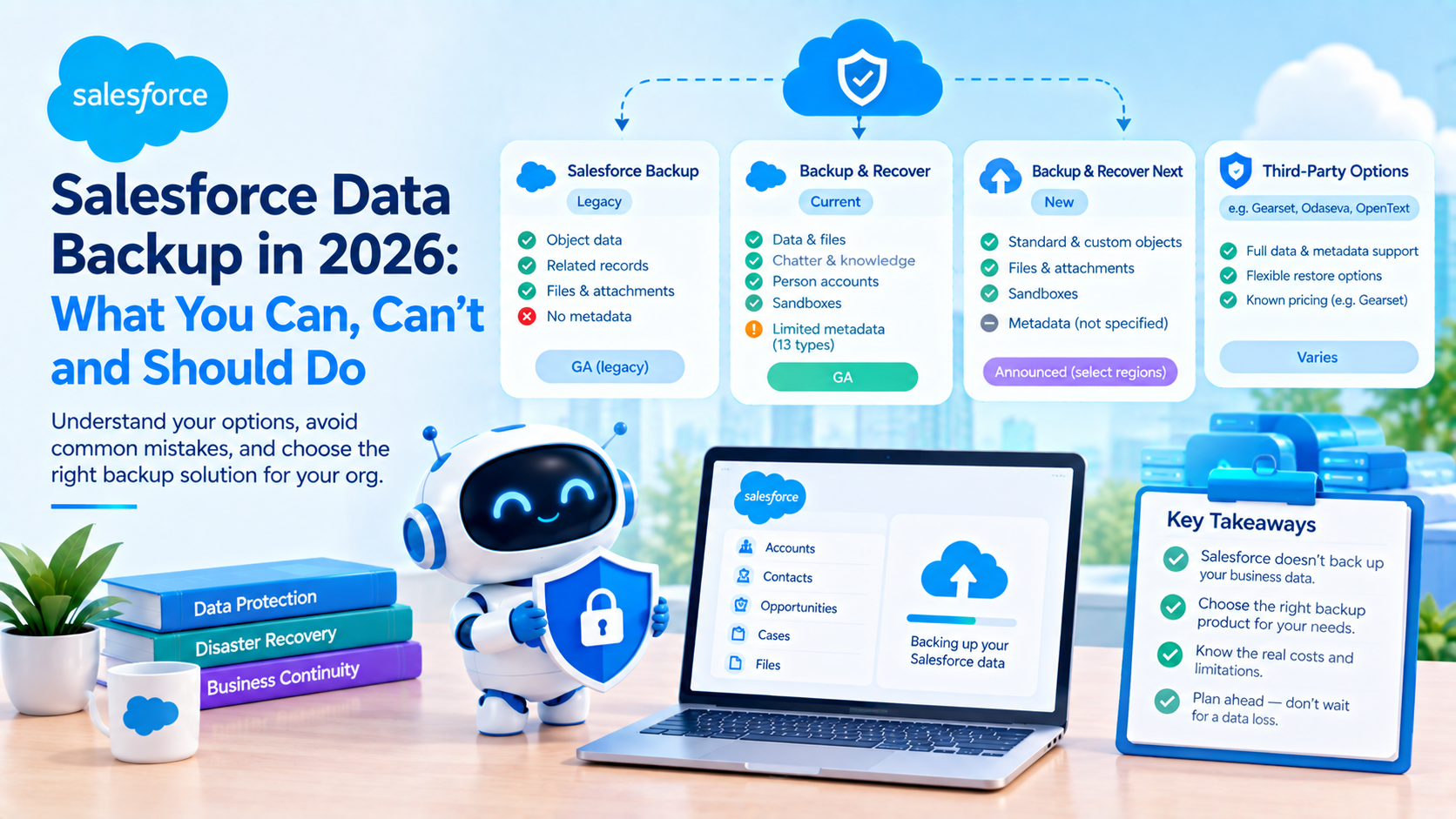
Salesforce now sells three products called Backup, and they cover different things
This is the first place a procurement goes wrong, because the names are nearly identical and the coverage is not.
| Product | Data | Metadata | Status |
|---|---|---|---|
| Salesforce Backup, formerly Backup and Restore, described in docs as the legacy version | Object data, related records, files, attachments | None | GA, referred to by Salesforce as legacy |
| Salesforce Backup & Recover, the former Own product | Data, files, Chatter, knowledge articles, person accounts, managed packages, sandboxes | Yes, but restore is limited to 13 named types | GA |
| Salesforce Backup & Recover Next | Standard and custom objects, files, attachments, sandboxes. Not subject to API governor limits | Not stated in either the announcement or the help overview | Announced 17 April 2026, "currently available in select regions" |
Salesforce itself flags the distinction, stating that one of its articles applies to "the legacy version of Salesforce Backup and not the more recent Salesforce Backup and Recover or Salesforce Backup and Recover - Next". If a proposal says "Salesforce Backup", ask which one.
The legacy product's exclusions are published and enforced. It does not support objects the Bulk API does not support, records in big objects, standard objects missing CreatedDate, LastModifiedDate, SystemModstamp and LoginDate, or Light Application objects. Classic-encrypted fields are inaccessible unless the integration user holds View Encrypted Data. Formula fields can be backed up but, in Salesforce's words, "can't be restored". Backup frequency options are monthly, weekly, daily or hourly, retention is indefinite until you manually delete, and file storage is billed at 10% of actual GB used.
Backup & Recover Next is the interesting one, for a single reason covered below: Salesforce states it "isn't subject to API governor limits", and also claims it is "conservatively 200% faster than the existing Backup & Recover solution". The first of those changes restore mathematics. The second is a vendor benchmark with no published methodology, so treat it as a claim rather than a measurement.
One naming note worth having straight, because it changes who you are buying from. OwnBackup became Own Company in October 2023, Salesforce announced its acquisition on 5 September 2024 for approximately USD 1.9 billion, and Own is now branded "Own from Salesforce". Own is not an independent alternative to Salesforce any more. It is the Salesforce product.
What does the weekly Salesforce data export actually cover?
Every Salesforce org has the export tool, and a surprising number of organisations believe it constitutes a backup strategy. Here is what it is, all enforced and all published:
- Weekly export is available in Enterprise, Performance and Unlimited Editions only. Monthly export is available in all editions except Database.com. So Professional, Group and Developer orgs get one export a month.
- Zip files are deleted 48 hours after the email is sent, not including weekends. The weekend exclusion is real and almost never mentioned.
- Files are removed immediately when a new export is queued, even inside that 48 hour window, and there is no way for either customers or Salesforce Support to recover them.
- Each zip is up to approximately 512 MB, with larger exports split across multiple zips.
- Files and attachments are opt-in checkboxes, not defaults.
- Formula and roll-up summary fields are always excluded.
- Recycle Bin data is not included. Archived records are.
- There is no metadata.
- There is no restore. Nothing in the export tooling puts data back. Re-importing is a manual Data Loader or Import Wizard exercise that you build yourself, under pressure, on the day.
That last line is the whole point. Export is a copy, not a recovery capability. A 40 GB org that exports weekly and has never tested a re-import does not have a recovery time objective, it has a hope. We have written up related platform limits and edition constraints on our blog.
The thing data backup never covers: metadata
Salesforce documents metadata backup as a completely separate procedure from data backup. Its guidance for the manual route is one sentence: "to back up your metadata, create an unmanaged package." For anything beyond that it points at the Metadata API developer guide and the Salesforce CLI. Its restore advice is to restore metadata into a sandbox first, then deploy to production by your normal route.
So none of the following is in any data backup: Apex classes and triggers, flows, validation rules, page layouts, profiles and permission sets, record types, the definitions of custom fields and objects, reports and dashboards, email templates, sharing rules, workflow.
Even where a product does back up metadata, restore coverage is narrower than backup coverage. Backup & Recover restores a defined list of 13 types: Apex Class, Assignment Rules, Custom Labels, Dashboards, Email Templates, Flows, Layouts, Permission Set Groups, Permission Sets, Profiles, Report Types, Reports and Workflow. Salesforce also notes the backups include only your own organisation's metadata, not managed package metadata, and recommends Workbench "for objects that are backed up, but not available in the pick list". Backed up does not imply restorable, and that is stated on Salesforce's own page.
There is a related confusion worth killing. DevOps Center is not a backup tool. It is change and release management over a source control system. Source control gives you metadata history and is genuinely the right answer for metadata recovery, but it will not help you with 200,000 wrongly updated Opportunity records, and it is not a substitute for a data backup product. Salesforce does not say "DevOps Center is not a backup" anywhere we could find, so we are arguing it from what the documentation does say rather than quoting it.
What do Salesforce backup options cost, and what does each cover?
Verified 28 September 2026.
| Option | Data | Metadata | Restore | Published list price | Evidence for that price |
|---|---|---|---|---|---|
| Weekly or monthly data export | Objects as CSV. Files opt-in. No formula or roll-up fields. No Recycle Bin | None | None | Free with the edition. Weekly is EE, PE and UE only | Salesforce help, published |
| Salesforce Backup, legacy | Object data, related records, files. Excludes big objects and non-Bulk-API objects | None | Record by record with version selection, bulk option. Deleted records get new IDs. Formula fields not restorable | None. Quote only | Salesforce: "Pricing varies based on each customer's individual needs" |
| Backup & Recover, Own from Salesforce | Data, files, Chatter, knowledge, person accounts, managed packages, sandboxes. Continuous Data Protection | Yes, restore limited to 13 types | Field, record and object level. Compare and preview. Depth slider, default 3 levels | None. Quote only | The former Own pricing page now redirects to a Salesforce page that does not price backup |
| Backup & Recover Next | Standard and custom objects, files, sandboxes. Daily incremental, full backup Sundays. Not subject to API governor limits | Not stated | Compare backups, preview restore, restore specific fields | None. Quote only. Two add-on SKUs exist, Data and Files | Licensing named on the help page, price absent |
| Gearset Backup | Data, daily automated, high-frequency jobs from Teams up. Big Objects at Enterprise tier only | Yes, restore, compare, export, change monitoring | Four restore flows. Retains lookups and references. Can disable 7 automation types | USD 2.75 per Salesforce user per month, USD 275/month minimum. Teams USD 3.50, USD 350/month minimum. Enterprise quote-only | gearset.com/pricing/data-backup, fetched 28 Sep 2026 |
| Odaseva | Data, metadata and files. Incremental. Backup up to every 5 minutes. Large data volume oriented | Yes, targeted metadata restore | Guided flows, single record rollback, targeted metadata restore | None. Quote only | No pricing language on the product page |
| OpenText, formerly CloudAlly | Standard and custom objects, attachments, emails, layouts, Chatter. Unlimited retention | Yes, workflows, reports, Apex, processes, schemas | Point in time, granular, cross-org restore, in-place restore, sandbox seeding | None. Quote only | cloudally.com Salesforce pricing now redirects to OpenText, which shows a contact form |
One column in that table is doing all the work. Gearset is the only vendor here that publishes a list price for Salesforce backup. Salesforce's own position, verbatim from both of its backup product pages, is that "pricing varies based on each customer's individual needs". Its Cloud Data Security pricing page prices Shield at 30% of net spend, Security Center at 10%, Privacy Center at 15% and Data Mask & Seed at 10%, and carries no backup line at all.
Any per-user figure you see for Salesforce Backup, Own, Odaseva or CloudAlly on a comparison site is unattributable. The frequently repeated CloudAlly figure of roughly USD 3 per user per month is not currently published by the vendor and should not be treated as a list price.
For the one option you can actually model: a 200 seat org on Gearset Backup Teams is 200 multiplied by USD 3.50, or USD 700 a month, comfortably above the minimum. A 50 seat org computes to USD 175, so the USD 350 monthly minimum binds and the effective rate is USD 7.00 per user. That arithmetic is ours, from Gearset's published figures. Small orgs pay double the headline rate, which is worth knowing before you build a business case on USD 3.50.
The trade-off: publishable price versus everything else
The temptation is to read "only Gearset publishes a price" as "therefore buy Gearset". It is not that simple, and we have recommended against it.
Quote-only pricing is genuinely worse for buyers. It makes budgeting harder, it weakens you at renewal, and it hides whether you are being charged like a reference customer or a captive one. On price transparency alone, Gearset wins outright.
What loses Gearset deals in our experience is two specific things. First, big objects: Gearset supports them only at the Enterprise tier, which is quote-only, so the transparency advantage disappears exactly when a large org needs it. Second, the API question. Salesforce states that Backup & Recover Next "isn't subject to API governor limits", which no third-party tool operating through the API can claim. For an org already running close to its daily API allocation, that single sentence is the strongest argument for buying native, and it beats the pricing argument. We have moved a client off a third-party backup for that reason and would again.
Where the third parties still win: Odaseva publishes backup frequency up to every five minutes, and OpenText documents cross-org restore, which is not documented for native Salesforce Backup. If your requirement is restoring production data into a different org, check that capability specifically rather than assuming it.
How long does a Salesforce restore actually take?
Buying backup is easy. The part that decides whether you actually recover is restore throughput and automation, and both are governed by limits nobody looks at until the incident.
The Bulk API ceilings are enforced. Per Salesforce's platform limits cheat sheet: 15,000 batches per rolling 24 hour period, 10,000 records per batch maximum, which gives a theoretical 150,000,000 records per 24 hours. Maximum job duration is 24 hours, and a job that has not finished in 24 hours is a failed restore. Bulk API 2.0 allows 150 MB per job, which is enforced, with a separate Salesforce recommendation not to exceed 100 MB. Those are two different things and should not be conflated. Maximum CPU time for Bulk API and Bulk API 2.0 is 60,000 milliseconds.
The org API allocation is the limit that actually constrains you, because your backup tool shares it with every integration you run. Enterprise and Professional with API get 100,000 calls plus 1,000 per Salesforce or Salesforce Platform licence, plus purchased add-ons. Unlimited and Performance get 5,000 per licence. Salesforce is explicit that this is an aggregate of all API calls to the org in a 24 hour period and is not per user.
So a 200 user Enterprise org has 100,000 plus 200,000, which is 300,000 API calls per 24 hours, shared across the restore, your middleware, your mobile app and every scheduled integration. That arithmetic is ours from Salesforce's published formula. The theoretical 150 million record ceiling and your actual 300,000 call budget are not the same universe.
Disabling automation is not hygiene, it is a gating condition. Salesforce's own page on the subject lists Apex triggers, flow definitions, validation rules and workflow rules as the automations to disable, recommends using Salesforce Automations Bypass as the method, and then states the consequence flatly: "By default, the Restore job will fail if any Automations are unable to be disabled." Gearset extends the list to duplicate rules, restricted picklists and field history tracking, and names two things that cannot be disabled at all: managed package metadata, and duplicate rules with custom filter logic on a custom field.
Think about what that means operationally. A restore requires org-wide automation to be off, which means every other user's writes during the restore window are also unvalidated and untriggered. That is a change window, not a background task, and it needs to be in your runbook.
Record IDs do not survive a deleted-record restore. Salesforce documents both halves precisely: "When a record is updated, the original record ID is maintained. Only the changed fields are restored." And: "When a record is deleted, a new record ID is created to restore that record." Salesforce ships a restore report that "maps the original record ID to the new record ID" specifically because the reconciliation is your job.
Everything keyed on the old 18 character ID breaks: external system foreign keys, report filters pinned to records, hardcoded IDs in Apex and flows, list view and dashboard filters, links embedded in emails and documents.
Two field types need handling in advance. Audit fields are overwritten on restore, so restored records look as though they were created on restore day unless Create Audit Fields is enabled. Auto-number fields have a documented workaround from Salesforce's own engineering blog: switch the field type to text, restore the original values, then switch it back.
Why a ten million record restore is not a one-day job, built from the pieces above rather than a made-up figure: the 150 million per day ceiling is a raw insert ceiling with automation off, restore is ordered parent then child with lookup remapping and ID reconciliation, every batch competes for the 60,000 millisecond CPU budget along with any automation you could not disable, and a job exceeding 24 hours fails and must be chunked by hand. For a cited duration, the best available is secondary: Salesforce Ben, updated 31 January 2025, describes manual restore as "an intensive and cumbersome process" that "depending on the level of lost data, it may take 20 or more days to recover it". We could not find a vendor-published records-per-hour restore throughput figure from Salesforce, Own, Gearset, Odaseva or OpenText. If you want that number, it has to come from your own timed test in a full sandbox.
Two Recycle Bin facts almost every article gets wrong
The Recycle Bin does not hold 25 times your storage. That formula is repeated across dozens of blog posts and it is obsolete. Salesforce's current documentation states, in both the Lightning and Classic pages, that "there isn't a limit on the number of deleted records that the Recycle Bin can hold" and that "records in the Recycle Bin don't count against your Salesforce org's storage usage". A search of Salesforce's own help for the 25 times formula returns only third-party blogs. The retention period is still 15 days, after which Salesforce "schedules these items for permanent deletion", and once permanently deleted "you can't recover it".
Recycle Bin retention can be extended to 30 days, and hardly anyone knows. Extended Recycle Bin Retention doubles the default from 15 days to 30, is available in Contact Manager, Group, Professional, Enterprise, Performance, Unlimited and Developer editions, and must be activated by Salesforce Support through an admin request. There is a catch that matters: the 30 day extension "is only fully accessible in Salesforce Classic", so recovering records beyond day 15 may mean switching a user to Classic. For an org with no backup product at all, raising that support case is the single cheapest resilience improvement available.
Three more Recycle Bin behaviours worth having in a runbook. Restore from the Recycle Bin recovers only lookup relationships "that have not been replaced", so if anything re-pointed at a different record while yours was deleted, that relationship is gone permanently. Hard-deleted records bypass the Recycle Bin entirely and "must be recreated". And on master-detail pairs the order matters: delete the child then the parent and the child becomes hard deleted and unrecoverable, delete the parent first and the child is soft deleted but invisible in the Recycle Bin, recoverable only by restoring the parent.
The compliance argument nobody makes
Most backup business cases lean on regulation, and most do it badly. Here are the two that hold up, plus one that does not.
GDPR Article 32 is the cleanest citation, and it quotes well. Article 32(1)(c) requires "the ability to restore the availability and access to personal data in a timely manner in the event of a physical or technical incident". Article 32(1)(d) requires "a process for regularly testing, assessing and evaluating the effectiveness of technical and organisational measures". Read together, an untested restore is not compliance. The testing obligation is explicit and it is the part organisations skip.
DORA Article 12 obliges EU financial entities to document backup policies with scope and minimum frequency based on criticality, document restoration procedures, test those procedures periodically, and perform restoration on systems physically and logically segregated from the source. We are paraphrasing rather than quoting, because every source available to us paraphrases it too. If you are going to put DORA in a board paper, read it from EUR-Lex yourself. That the requirement is commercially real is evidenced by Odaseva selling named "Restore Audit & Test Services" and "DORA Audit Services" against it.
The SEC 17a-4 argument is the interesting one, and it is not the one usually made. The 2022 amendment added an audit-trail alternative allowing a broker-dealer to use a system that "permits the recreation of an original record if it is modified or deleted", with the audit trail covering all modifications and deletions, their date and time, and the identity of the person responsible. Effective 3 January 2023, compliance date 3 May 2023.
Now put that next to what Salesforce documents about restore: audit fields are overwritten, and deleted records come back with new record IDs. A firm relying on a Salesforce restore to "recreate an original record" is producing a record with a different ID and a different created date. That is a real, sourced problem and we have not seen another article raise it. We are not going to tell you what your compliance officer should conclude, but it is a question worth putting to them before it is put to you.
One thing not to claim: we could not verify from the SEC page any 17a-4 requirement to hold a backup or duplicate copy, nor the retention period in years. Do not put a year figure in a board paper without reading 17 CFR 240.17a-4 directly.
How to choose, in order
- Write down your recovery point and recovery time objectives before looking at any product. Not aspirationally. In hours, agreed with whoever owns the business process. Most of this decision falls out of those two numbers.
- Decide whether metadata is in scope. If yes, source control covers it better than any backup product, and you still need a data product. If a vendor claims metadata backup, ask for the restorable type list, not the backup coverage list.
- Check your API headroom. Compute your daily allocation from the published formula, then look at your current consumption. If you are running near the ceiling, Backup & Recover Next's exemption from API governor limits is the single most consequential differentiator in this market.
- Check big objects. Native Salesforce Backup excludes them outright. Gearset supports them at Enterprise tier only. If you have them, this narrows the field fast.
- Ask every quote-only vendor for the price in writing early, because six of the seven options here are quote-only and you cannot compare what you cannot see.
- Test a restore in a full sandbox before you sign, not after. Time it. Note which automations had to be disabled and which refused to disable. That timing is your real recovery time objective, and it is usually several times the one in the proposal.
- If you buy nothing else, raise the Extended Recycle Bin Retention case. It is free, it doubles your worst-case window from 15 to 30 days, and it takes a support request.
- Write the runbook while you still have the vendor's attention. Automation bypass steps, auto-number field handling, the ID reconciliation report, who signs off the change window.
Frequently Asked Questions
Does Salesforce back up your data automatically?
Salesforce maintains backups for infrastructure-level disaster recovery only. Its documentation states that data protection is a shared responsibility and that Salesforce is unable to restore business-level data outside a disaster event. There is no currently orderable paid Salesforce data recovery service. Recovering from user error, a bad data load or a rogue integration is the customer's responsibility, using the export tool, a Salesforce backup product or a third party.
How much does Salesforce Backup cost?
Salesforce publishes no list price for any of its three backup products. Both product pages state that pricing varies by customer and direct buyers to sales, and backup does not appear on the Cloud Data Security pricing page that prices Shield, Security Center, Privacy Center and Data Mask & Seed. Gearset is the only vendor in this comparison with a published rate, at USD 2.75 and USD 3.50 per Salesforce user per month.
Is the weekly data export a backup?
It is a copy, not a recovery capability. Weekly export is limited to Enterprise, Performance and Unlimited Editions, zip files are deleted after 48 hours excluding weekends and immediately if a new export is queued, formula and roll-up fields are always excluded, Recycle Bin data is omitted, metadata is not included, and there is no restore function of any kind. Re-importing is a manual Data Loader exercise you build under pressure.
Do restored Salesforce records keep their original IDs?
Only if the record still exists. Salesforce documents that when a record is updated, the original ID is maintained and only changed fields are restored. When a record was deleted, a new record ID is created on restore. Salesforce provides a report mapping original to new IDs because reconciliation is the customer's job. External foreign keys, hardcoded IDs and pinned report filters all break.
How long does a large Salesforce restore take?
No vendor publishes a records-per-hour figure. The constraints are 15,000 Bulk API batches per 24 hours, a 24 hour maximum job duration after which the job fails, a 60,000 millisecond CPU ceiling per job, and your org's shared daily API allocation. Salesforce Ben has described manual restores of significant data loss as potentially taking 20 or more days. The only reliable number is a timed test in your own full sandbox.
Does the Recycle Bin have a size limit?
Not any more. Salesforce's current documentation states there is no limit on the number of deleted records the Recycle Bin can hold, and that those records do not count against org storage. The widely repeated formula of 25 times your megabyte storage does not appear on any Salesforce page. Retention is 15 days by default, extendable to 30 days through a Salesforce Support request, though the extension is only fully accessible in Salesforce Classic.
The failure that costs the most is not the absence of a backup, it is a backup nobody has ever restored from, bought against a recovery time objective that turns out to be three days rather than three hours once automation bypass and API allocation enter the arithmetic. Before you renew or buy, run one timed restore in a full sandbox and write down what it actually took. If you want that test designed and run against your org, including the automation bypass and ID reconciliation steps, that is the kind of work we do on our Salesforce engagements.
Have Questions or Need Assistance?
Our team of Salesforce experts is ready to help you implement the solutions discussed in this article.
Contact Us Today