Salesforce Identity Resolution: Match Rules and Cost
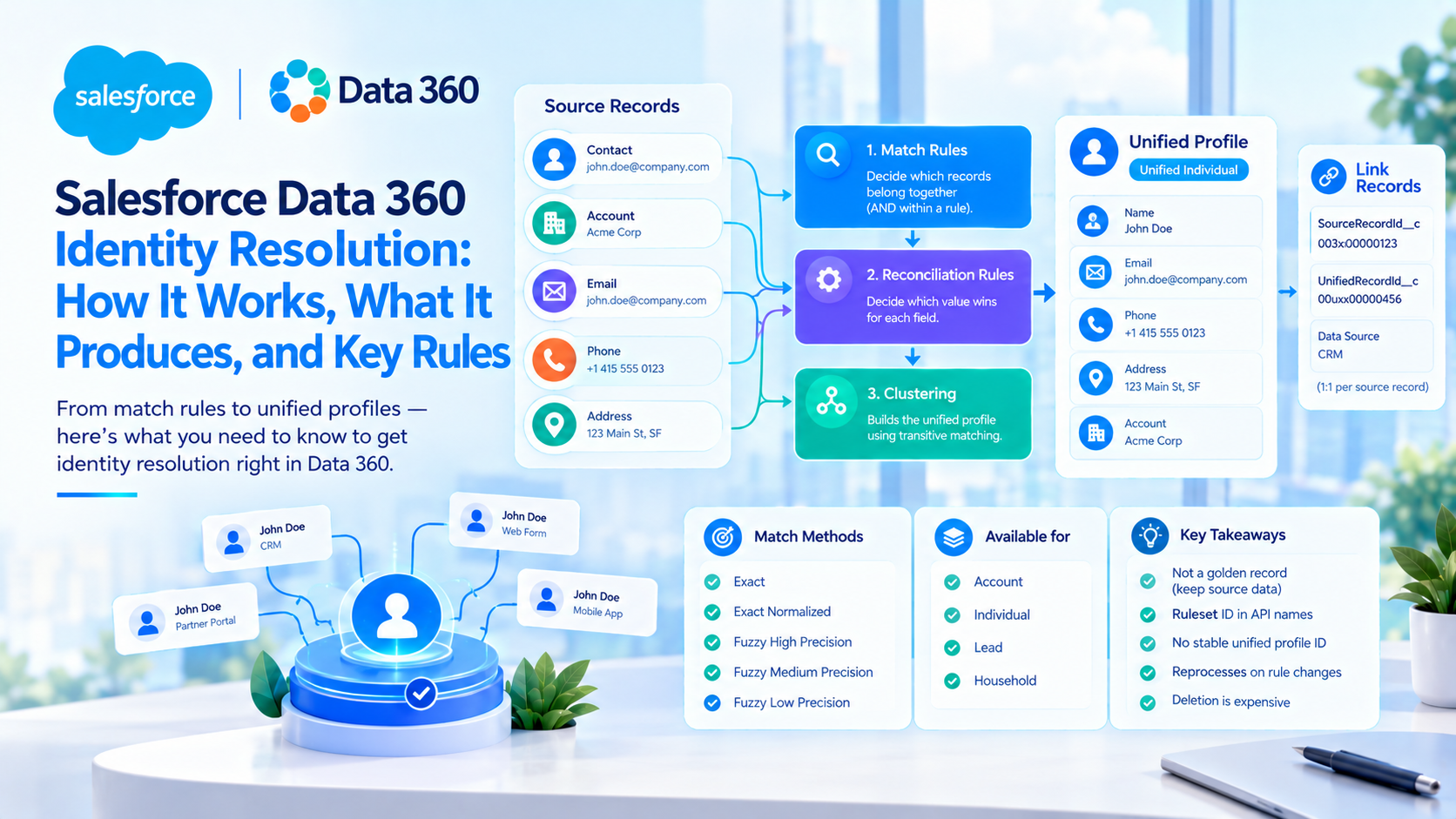
Identity resolution in Salesforce Data 360 is a matching engine that links source records belonging to the same person or company into a unified profile, using a ruleset made of match rules and reconciliation rules. Match rules decide which records belong together. Reconciliation rules decide which value wins on each field. Salesforce bills it on the number of source rows processed, which makes it the most expensive operation in Data 360 by a wide margin.
The part practitioners underestimate is not the configuration. It is that editing a match rule triggers a full reprocess, that the unified profile ID is not stable, and that the only published limits table for identity resolution sits on a documentation page for a licence Salesforce no longer sells.
What identity resolution produces, and why it is not a golden record
Salesforce's own framing is the most useful sentence in the documentation. A unified profile is described not as a single merged record but as a "ring of keys", where each key connects to the source records belonging to the same individual. The source records are not overwritten, merged or moved. Reconciliation rules "don't alter source data or connected systems".
That distinction is what separates Data 360 identity resolution from classic MDM. In a golden-record MDM, the survivorship result is the record. In Data 360, the result is a cluster plus a set of link rows, and the cluster is the entity.
A ruleset can be built on four primary data model objects: Account, Individual, Lead and Household. Running one produces a family of unified objects (Unified Individual, Unified Account, Unified Contact Point Email, Unified Contact Point Phone, Unified Contact Point Address, Unified Contact Point App, Unified Party Identification) and a matching family of link objects that bridge source records to unified ones. The link objects carry SourceRecordId__c, UnifiedRecordId__c and the data source identifiers, one to one.
Here is the detail that determines whether your downstream work survives a change of mind. The ruleset ID is appended to the API names of every object identity resolution creates. A ruleset named Test produces UnifiedssotIndividualTest__dlm and UnifiedLinkIndividualTest__dlm. Anything bound to those API names is bound to that specific ruleset: segments, data graphs, calculated insight definitions, Agentforce retrievers, external queries. We will come back to why that makes deletion so expensive.
Under the covers, per Salesforce's Data 360 architecture guide, matching runs in three stages. Blocking keys and locality sensitive hashing narrow the candidate set, machine learning models score each candidate pair probabilistically, and then a clustering step resolves transitive matches. That last stage is the mechanism behind most over-merging: if A matches B and B matches C, all three land in one cluster even when A and C share nothing at all.
How match rules combine: AND inside a rule, OR across rules
Salesforce states the logic in two sentences that are worth memorising. "Profiles are matched when all criteria within a match rule are satisfied." And: "A unified profile is created if any single match rule is activated."
So criteria inside one rule are ANDed, and rules within a ruleset are ORed. Adding a criterion to an existing rule makes that rule stricter. Adding a new rule makes the whole ruleset looser. Teams routinely do the second while intending the first, then wonder why consolidation jumped.
The objects available in match rules differ by unification type. For individuals: Individual, Contact Point Address, Contact Point App, Contact Point Email, Contact Point Phone, Contact Point Social, Party Identification. For accounts: Account, Contact Point Address, Contact Point Phone, Contact Point Email, Party Identification.
Two special matching modes exist alongside field matching. Party Identification matching is an exact match on identification number, identification name and party identification type together, which is what you use for loyalty numbers, government identifiers or cookies. External Link matching unifies profiles already identified as matching in an external system, which is the right route if the client already owns an MDM and wants Data 360 to inherit its decisions rather than re-litigate them.
Which match methods can you use, and why does High Precision match more aggressively?
There are five methods, per Salesforce's fuzzy and normalised matching documentation: Exact, Exact Normalized, Fuzzy High Precision, Fuzzy Medium Precision and Fuzzy Low Precision.
| Method | Behaviour | Availability |
|---|---|---|
| Exact | Case-insensitive exact comparison | All objects and fields |
| Exact Normalized | Exact after Salesforce normalisation | Restricted field whitelist only |
| Fuzzy, High Precision | Nicknames, punctuation, international characters. Beatriz matches Beatrice | Not available on Account fields |
| Fuzzy, Medium Precision | Shared initials, gender variants, shuffled name order. S. matches Sharon | Not available on Account fields |
| Fuzzy, Low Precision | Loose character similarity. Lisa matches Liza | Not available on Account fields |
Three things in that table trip people up.
First, the precision labels are not a strictness dial in the direction you expect. High Precision is the tier that matches nicknames and diacritics, which is more aggressive on human name variation, not less. Low Precision is loose character similarity. Reading the tiers as strict to loose gets the behaviour backwards.
Second, and this is a hard functional gap with no workaround: Salesforce states that "fuzzy match methods aren't available for fields from the Account object". If you are doing B2B account deduplication and your plan depended on fuzzy company-name matching, that plan does not work. You are on Exact, Exact Normalized on the whitelisted fields, and Party Identification matching against a registration number or DUNS.
Third, Exact Normalized is only available on a short list of fields: Individual first name, Contact Point Email address, Contact Point Phone formatted E164 number, and Contact Point Address lines 1 to 3 plus state, province and country. Everything else gets Exact or fuzzy.
The normalisation Salesforce applies is more thorough than most people assume. Email is case-folded, whitespace-trimmed and stripped of non-alphanumerics, and for Gmail addresses specifically both dots and plus-addressing are removed. Phone numbers are parsed with Google's international phone library. Addresses are normalised on country-specific rules with abbreviation expansion, so "ON" becomes "Ontario". The fuzzy model itself is BERT-based, trained per Salesforce on data from over 150 countries, 3 billion English words and 20 million names, operating at a confidence threshold of 0.7.
One caveat that catches data teams during UAT: "Reformatted data is not stored in unified profiles. The format of the value stored in a unified profile is based on source data and determined by reconciliation rules." Normalisation happens at match time only, so a normalised match does not give you clean output.
What reconciliation rules do and do not control
There are exactly three reconciliation options, and the naming matters because two of them get misremembered:
- Last Updated. The value from the most recently updated record wins, based on Last Modified Date.
- Most Frequent. The most frequently occurring value wins.
- Source Priority. Data lake objects are ranked most to least preferred.
There is no "Most Recent" option. If a design document says Most Recent, someone was writing from memory.
The tie-breaking behaviour is documented and is worth knowing before a stakeholder asks why a customer's surname flipped. On Last Updated, "if matching records have the same last updated date and time, a value is selected alphabetically". On Most Frequent, if values occur at identical frequency, the last updated value wins. Source Priority tie-breaking is not documented.
Reconciliation rules are set at object level and can be overridden per field, and every object in the ruleset needs a default. There is an Ignore Empty Values option, which does not apply to key fields.
Two limitations here produce silent, hard-to-diagnose results:
Reconciliation rules do not apply to contact points such as email or phone number. Contact points are multi-valued on the unified profile rather than reconciled down to a single winner. If your brief was "give marketing one email address per customer", identity resolution does not do that, and no reconciliation setting will make it.
Last Updated quietly does nothing if Last Modified Date is not mapped from the data stream. There is no error. The rule simply has nothing to sort on.
What are the hard limits on identity resolution, and where are they published?
Salesforce publishes one identity resolution limits table, on the Customer Data Platform Limits and Guidelines page. It has a "Hard Limit?" column, which is unusually helpful. We fetched and read that page twice on 28 September 2026 to confirm the column values.
| Limit | Value | Hard limit per Salesforce |
|---|---|---|
| Identity resolution rulesets | 2 per primary data model object per data space | Yes |
| Scheduled job frequency per ruleset | Once per day, 0 in Developer Edition | Yes |
| Ruleset jobs in any 24-hour period | 4 per ruleset per data space | Yes |
| Match rules per ruleset | 10 | Yes |
| Match criteria per match rule | 10 | Yes |
| Source profiles unified into a single profile | 50,000 | Yes |
| Size of source records processed in a ruleset | 15 KB | Yes |
| Combined character count reviewed by a match rule | 500 characters | Yes |
| Real-time matching under this licence | Not available | No |
Every value above is Salesforce's published figure, not our estimate, and the hard-limit column is Salesforce's own classification.
Now the finding that matters more than any single number. That page is headed with the statement that it covers "the legacy Customer Data Platform license, which is no longer available for purchase". We then checked the current Data 360 Profiles licence limits page, and it contains no identity resolution limits table at all. It publishes a Data Cloud One connection cap, 100 unique segments, 25 calculated insights, 25 batch data transforms and an activation cap at 20% of total data lake object records, and nothing on rulesets, match rules or unified profile ceilings.
So the only published identity resolution limits belong to a retired licence. We are not going to pretend that is fine, and we are not going to tell you the numbers do not apply either. Treat the table as the best available evidence, design inside it, and get your account executive to confirm the ceilings against your actual licence in writing.
Developer Edition deserves its own warning. It allows 2 rulesets per org and a scheduled job frequency of zero, with the note that "ruleset runs aren't scheduled. Use Run Ruleset to kick off a ruleset job manually." If you are prototyping in a Developer org and expecting overnight runs, nothing will happen.
How often does an identity resolution ruleset actually run?
This is a genuine documentation conflict, and you should know about it before you promise a stakeholder a refresh interval.
| Figure | Where it appears |
|---|---|
| Scheduled job frequency once per day, maximum 4 jobs per 24 hours | The CDP limits page, tabulated, on the retired-licence page |
| Processing occurs as frequently as every 60 minutes to 24 hours depending on data source | The current data. namespace About Identity Resolution page |
| Small batches of changes can be processed as often as every 15 minutes | The architect Data 360 architecture guide |
All three are Salesforce primary sources. Our reading is that the once-per-day figure governs scheduled full ruleset jobs while the 15 and 60 minute figures describe the incremental engine, so they may be describing different things rather than contradicting each other. Salesforce never reconciles them on one page, so we are telling you that rather than picking one and sounding confident.
What is documented clearly: scheduled matching "reviews new and updated source data several times in a day" with automatic incremental updates when the primary data model object changes, you cannot control the timing, and you can only disable scheduling entirely.
And the real-time behaviour is the one that invalidates careful tuning. Real-time matching is restricted to "Exact or Exact Normalized matching only, regardless of the scheduled match selected". Your fuzzy rules do not run in real time. Unmatched real-time data does get a second chance at the next scheduled run. Real-time unified profiles can also be a partial view, because Salesforce restricts which source profiles and engagement events are included to hold millisecond performance.
How much does identity resolution cost per million rows?
Two credit models are live as of September 2026, and quoting a cost without naming the model is how teams end up 30% out. The legacy Data Services rate card priced Batch Profile Unification at a flat 100,000 credits per million rows in production. Flex Credits, per the rate card dated 31 August 2026, rename the usage type Data 360 Unification and make it tiered, per 1 million rows processed in production:
| Tier | Threshold, credits consumed | Production multiplier per 1M rows |
|---|---|---|
| Base | up to 300,000 | 75,000 |
| Tier 2 | 300,000 to 1.5M | 60,000 |
| Tier 3 | 1.5M to 12.5M | 30,000 |
| Tier 4 | beyond 12.5M | 15,000 |
All four multipliers are published figures from that rate card. Salesforce states that "tier multipliers are based on the individual usage type and reset on the first day of each calendar month", which means a single large rebuild inside one calendar month gets a better blended rate than the same volume split across two.
Flex Credits are published at USD 500 per 100,000, which is USD 0.005 per credit.
Two things about the billing basis change how you should model it. Salesforce defines Data 360 Unification as billed on "the number of source profiles processed by an identity resolution ruleset", so you pay for rows fed in, not unified profiles produced. And Salesforce's own engineering blog is explicit that "if X new records are ingested, the total number of records processed by identity resolution is almost always higher than X", because existing profiles are re-evaluated against the new information.
Here is the arithmetic on 5 million source rows, one full run. All of this is our calculation from Salesforce's published multipliers, not a Salesforce figure.
Under the legacy model: 5 units at 100,000 credits gives 500,000 credits, which at USD 0.005 is USD 2,500.
Under Flex: the base tier ends at 300,000 credits, and at 75,000 per million rows that covers the first 4 million rows exactly. The remaining 1 million rows bill at Tier 2's 60,000. So 300,000 plus 60,000 gives 360,000 credits, which is USD 1,800. Roughly 28% cheaper at this volume, and the gap widens above 4 million rows.
Now the number that actually decides budgets, and it is not the initial load. Assume a 5 million row estate with 1% daily churn, so 50,000 changed rows a day. Assume a re-evaluation amplification of 3 times, which is a secondary-sourced practitioner figure of 2 to 3 times rather than a Salesforce number, so treat it as indicative. That gives 150,000 rows processed daily, which on the legacy multiplier is 15,000 credits, USD 75 a day, roughly USD 27,000 a year.
The steady drip is more than ten times the one-off load. That inversion is the single thing we see missed most often in Data 360 cost models, because the estimate gets built from the migration volume.
The one that blindsides people: rule edits reprocess everything
Salesforce's Data 360 credit feedback loop post, published 3 September 2026, states that changes to ruleset configuration, match rules and reconciliation rules trigger full reprocessing cycles, and that such an event "can dwarf a day's ingestion and is easy to miss because no new data arrived".
This is documented vendor guidance rather than a hard-won secret, and Salesforce's own help documentation corroborates it from the other direction: "To prevent unnecessary credit consumption, we recommend disabling Run jobs automatically while you're configuring a ruleset." That recommendation only makes sense if rule edits cause reprocessing.
Our experience adds one thing to it. On the Data 360 engagements we run, where match rules were tuned iteratively in a production data space with automatic runs left on, the tuning phase consistently cost more than the initial load. Tune with automatic runs disabled, then enable them once.
There is no separate published rate for incremental versus full runs. Both bill at the same multiplier against rows processed. The difference is volume, not rate.
For monitoring, Salesforce points at the Digital Wallet consumption cards for a baseline, then querying TenantDailyEntitlementConsumption, TenantHourlyEntitlementConsumption, TenantBillingUsageEvent and TenantEntitlementTransaction for attribution. Those four are the concrete answer to "where did the credits go".
Why should you edit a ruleset instead of deleting it?
Salesforce's guidance is that "in some cases, it's better to update the match or reconciliation rules instead of deleting the ruleset", specifically to preserve the ruleset name and ID.
That sounds like housekeeping advice. It is not. Recall that the ruleset ID is baked into every created object's API name. Delete and recreate a ruleset and you get new object API names, which breaks every segment, data graph, calculated insight and Agentforce retriever pointing at the old ones. Edit in place and they survive.
Deletion is also more destructive than the word suggests. Per Salesforce: "Deleting a ruleset permanently removes all unified customer data, eliminates dependencies on data model objects, stops all processing of the ruleset, and deletes the history of previous runs", and "you can't recover previous unification data after deleting a ruleset". It takes up to 24 hours to complete.
The trade-off, stated honestly: editing in place preserves your dependencies but still triggers a full reprocess at full credit cost, and you carry forward whatever accumulated assumptions the old ruleset held. Deleting gives you a clean slate and a genuinely fresh consolidation rate, which is occasionally what you want after a bad first attempt. We have chosen deletion exactly once, on an engagement where the first ruleset had been built against unmapped keys and produced a consolidation rate that made every downstream segment meaningless anyway. There was nothing worth preserving. In every other case editing won, because rebuilding thirty segment definitions is a fortnight nobody budgeted.
One documentation gap worth naming: Salesforce's deletion page does not say what happens to segments, activations or data graphs, only that dependencies on data model objects are eliminated. We are not going to guess on your behalf. Inventory your dependencies before you touch it.
The failure modes, and why over-merging is a privacy incident
Over-merging collapses distinct people into one profile. Salesforce's diagnostic is the Outlier Unified Profiles calculated insight, which reviews matched contact points per unified profile, with the stated symptom that "a high number of matches per contact point, like profiles with hundreds of source records matched with the same email address, could indicate issues with data quality or source data". No numeric threshold is published, so do not let anyone quote you one.
The usual cause in practice is shared or placeholder contact points, noreply@, info@, a store's switchboard number, 000-000-0000, combined with transitive clustering. One placeholder email on 400 records is 400 people in one profile.
Here is why that is not merely a data quality problem. Salesforce's own identity debt post names privacy breaches from agents accessing the wrong customer profile as a consequence of poor identity resolution, alongside the line that makes the stakes concrete: "If your underlying data model cannot definitively determine whether 'John Doe' the lead is the same person as 'J. Doe' the contact on an escalated support case, your AI agents will inevitably provide incorrect, incomplete, or conflicting information." An over-merged profile grounding an Agentforce agent means the agent can disclose person A's data to person B. That is the strongest argument available for erring toward under-merging, and it is Salesforce's argument, not ours.
Under-merging is diagnosed with the Consolidation Rates for Unified Profiles calculated insight. Sources known to contain duplicates should show a higher consolidation rate than sources known to be clean. Salesforce recommends running data quality calculated insights both before and after ruleset creation, which is good advice and very rarely followed.
Unified profile IDs are not stable. Salesforce states on Trailhead, explicitly contrasting Data 360 with golden-record MDM, that "the unified ID assigned to an individual can change". Anything that persists a unified profile ID as a foreign key will break: an external warehouse, a reverse-ETL pipeline, an ad platform audience key, custom Apex. This is consistent with the ring-of-keys model, where the cluster is the entity and the ID is not the anchor. If a downstream system needs a stable key, it has to come from your source systems.
One genuine gap: we could not find any Salesforce documentation covering what happens to a unified profile or its link rows when a source record is deleted, or whether link rows are tombstoned. Rather than infer it, test it in a sandbox against your own deletion pattern.
How to stand up a ruleset without burning credits
- Map the mandatory fields first. Salesforce's guidance is unambiguous: "Without these mappings, Data 360 cannot perform identity stitching, leaving your customer view incomplete." At minimum that means Individual ID, first name and last name; Contact Point Email ID and email address; Contact Point Phone ID and formatted E164 number; Contact Point Address lines with city, state, postal code and country; and Party Identification ID, type and number. Mapping definitions cannot be saved without the primary key mapped, which is enforced. Missing key fields, by contrast, fail silently.
- Map Last Modified Date if you intend to use Last Updated reconciliation, or the rule has nothing to sort on.
- Run the data quality calculated insights before you build anything. Unique contact points per source, contact points per individual, and repeat values across email, phone, address and party ID. You need the baseline to tell later whether the ruleset helped.
- Filter placeholder contact points out at ingestion, not in the match rules. Salesforce suggests removing repeat values from source datasets and filtering duplicates with formula fields during ingestion. Placeholders plus transitive matching is the main over-merge engine.
- Disable automatic runs while you configure. This is Salesforce's own recommendation and it is the single largest credit saving available during a build.
- Start deterministic, then add fuzzy. Exact and Party Identification matching first, then loosen. Salesforce's architecture guidance is deterministic before probabilistic, with field-level survivorship.
- Use the second ruleset as an A/B test, then retire it. The hard limit is 2 per primary data model object per data space, and Salesforce recommends running only 1, noting that "maintaining two rulesets per object increases the amount that you're billed for identity resolution". Compare consolidation rates across the two, pick the winner, and turn the other off.
- Edit in place from then on. Never delete and recreate unless there is genuinely nothing downstream worth keeping.
- Set up consumption attribution before go-live, using the Digital Wallet cards plus the four tenant consumption objects. Salesforce's own caution is worth repeating: estimate during design, then validate against actual consumption once live, because real volume rarely matches the design diagram.
Frequently Asked Questions
How much does Salesforce Data 360 identity resolution cost?
Under Flex Credits the published rate is tiered per million source rows processed: 75,000 credits at the base tier, falling to 60,000, 30,000 and 15,000 as monthly consumption rises. At the published USD 500 per 100,000 credits, a single 5 million row run costs roughly USD 1,800. The legacy Data Services rate was a flat 100,000 credits per million rows, giving USD 2,500 for the same run.
Does changing a match rule re-run identity resolution at full cost?
Yes. Salesforce states that changes to ruleset configuration, match rules and reconciliation rules trigger full reprocessing cycles, and that the resulting consumption can exceed a day's ingestion. Salesforce's help documentation separately recommends disabling automatic runs while configuring a ruleset specifically to avoid unnecessary credit consumption. Tune with automatic runs off, then switch them on once.
Can you use fuzzy matching on Account records in Data 360?
No. Salesforce states that fuzzy match methods are not available for fields from the Account object. B2B account deduplication therefore has to rely on Exact matching, Exact Normalized on the whitelisted address and contact point fields, or Party Identification matching against a registration number, DUNS number or similar external identifier.
Is the unified profile ID stable across runs?
No. Salesforce states on Trailhead that the unified ID assigned to an individual can change, explicitly contrasting this with golden-record MDM where the identifier is permanent. Any downstream system that stores a unified profile ID as a foreign key, such as a data warehouse, reverse-ETL job or ad platform audience, will break. Stable keys must come from source systems.
How many identity resolution rulesets can you have?
Salesforce publishes a hard limit of 2 rulesets per primary data model object per data space, and separately recommends running only one active ruleset per object because maintaining two increases identity resolution billing. Developer Edition allows 2 per org with manual runs only. Note that this limits table is published on the page for the retired Customer Data Platform licence, so confirm the ceilings against your own licence.
Do reconciliation rules pick one email address per customer?
No. Salesforce states that reconciliation rules do not apply to contact points such as email or phone number. Contact points are held as multiple values on the unified profile rather than reduced to a single winner. If a marketing team needs exactly one email address per person, that has to be solved with a calculated insight or downstream logic, not with a reconciliation setting.
The expensive mistake in Data 360 identity resolution is tuning match rules iteratively in a production data space with automatic runs left on, which quietly bills a full reprocess for every change while nobody notices because no new data arrived. Before you touch a ruleset, disable automatic runs, note your current consolidation rate, and set up attribution against the tenant consumption objects. If you want help sizing an identity resolution design against your actual data before it meets a credit bill, that is the kind of work we do on our Salesforce data engagements, and there is more Data 360 analysis on our blog.
Have Questions or Need Assistance?
Our team of Salesforce experts is ready to help you implement the solutions discussed in this article.
Contact Us Today