Salesforce OAuth Retirements: What to Fix Before 2027
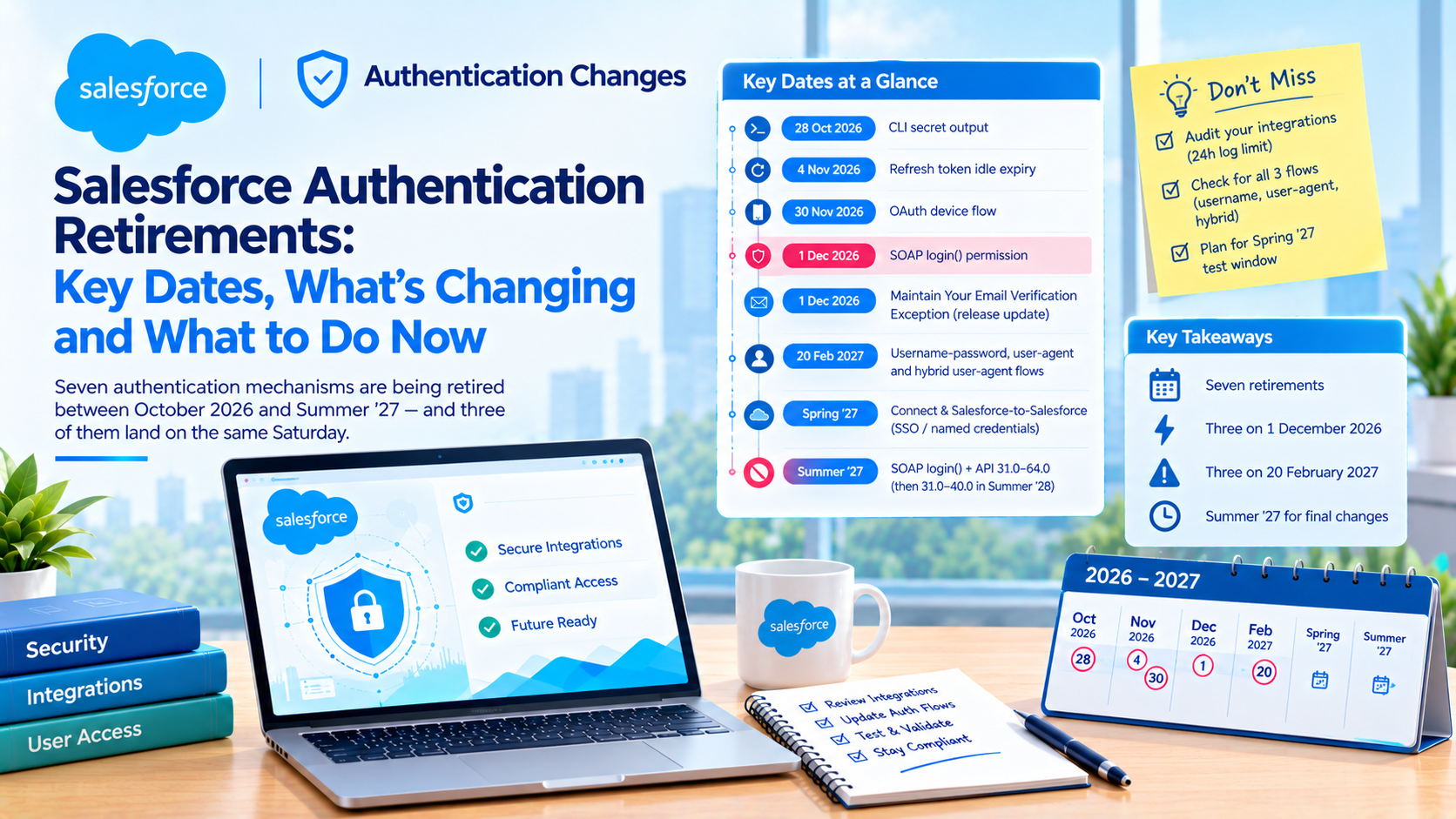
Salesforce retires seven authentication mechanisms between October 2026 and Summer '27, and three of them land on a single Saturday. The dates with a Salesforce primary source are 28 October 2026 (CLI secret output), 4 November 2026 (refresh token idle expiry), 30 November 2026 (OAuth device flow), 1 December 2026 (SOAP login() permission), 20 February 2027 (the username-password, user-agent and hybrid user-agent OAuth flows) and Summer '27 (SOAP login() retirement and the end of connected app support).
The first of those is sixteen days away as this is published. If you own server-to-server integrations, the audit starts now rather than in February, and the reason is not the deadlines. It is that the tool you would use to find the affected integrations keeps only 24 hours of data on a stock org.
Which Salesforce authentication changes have a date?
The best single source for this runway is not a Help article. It is Salesforce's own Winter '27 Release Architect Highlights, published 5 October 2026, which carries most of these dates in Salesforce's own words. The Developer's Guide to the Winter '27 Release carries the rest.
| Date | What changes | Evidence |
|---|---|---|
| 28 Oct 2026 | Salesforce CLI stops printing secrets. "The SF_TEMP_SHOW_SECRETS=true workaround that restores the old output goes away on October 28, 2026." | Salesforce primary, exact wording |
| 4 Nov 2026 | "Starting November 4, 2026, production refresh token idle time-to-live (TTL) expires after 30 days of inactivity" | Salesforce primary, exact wording |
| 30 Nov 2026 | "the OAuth 2.0 device flow is restricted beginning November 30, 2026" to local external client apps | Salesforce primary, exact wording |
| 1 Dec 2026 | "Beginning December 1, 2026, every user who authenticates with SOAP API login() needs the Use Any API Auth user permission." | Salesforce primary, exact wording |
| 1 Dec 2026 | "Maintain Your Email Verification Exception" release update enforced | Two independent specialist sources. Release update title confirmed, article itself not retrievable |
| 20 Feb 2027 | "the username-password, user-agent, and hybrid user-agent flows are retired on February 20, 2027." | Salesforce primary, exact wording |
| Spring '27 | Salesforce Connect cross-org adapter legacy authentication must move to named credentials. Salesforce-to-Salesforce retires completely. "Both changes take effect in Spring '27" | Salesforce primary, exact wording |
| Summer '27 | SOAP login() retires for API versions 31.0 through 64.0 | Salesforce primary, release name only, no calendar date |
| Summer '27 | API versions 31.0 through 40.0 become deprecated and unsupported. Calls begin failing Summer '28 | Salesforce primary, release names only |
| Summer '27 | "Support ends by Summer '27, so start migrating to external client apps soon" | Salesforce primary, exact wording |
Evidence standard: the column above states whether a date comes from Salesforce's own words or from secondary reporting. Nothing in this table is an estimate of ours.
Two things that circulate widely and should not be planned around. "1 June 2027" for the SOAP login() retirement and "1 June 2028" for the API 31.0 to 40.0 retirement are both single-sourced to third parties. Salesforce publishes release names only. And the "15 December 2026 standard-volume platform event retirement" is wrong. Salesforce's own allocations page states "Standard-volume custom platform events will be retired in Summer '27", and separately that "You can no longer define new standard-volume custom platform events", so the restriction on new definitions is already live and the retirement is later than the date in circulation.
Why 20 February 2027 is three retirements, not one
Nearly every round-up covers the username-password flow and stops. Salesforce's sentence covers three flows: "the username-password, user-agent, and hybrid user-agent flows are retired on February 20, 2027."
The user-agent flow is the implicit-grant browser flow. It is a different population of applications from the password-based server jobs everyone is writing about, and it tends to be embedded in older single-page applications and mobile clients that nobody has opened in three years. The hybrid user-agent flow is in the same family. If your inventory only looked for username-password usage, it missed two thirds of the change.
This date has already moved once. The release update was originally scheduled for Winter '27 and was postponed to 20 February 2027, which is worth knowing in both directions: it may move again, and the fact that it has already slipped is not a reason to assume it will.
Salesforce's own advice on the migration target deserves repeating, because it is the trap people fall into: "avoid migrating to another pattern that is already moving on a path toward restriction." Moving a username-password integration to the device flow in November 2026 would be exactly that mistake.
Why 20 February 2027 also breaks your test plan
Here is the part we have not seen written anywhere, and it is the reason to care about the date rather than just diary it.
Spring '27's production upgrade waves are, according to two independent trackers both citing Salesforce's Trust maintenance calendar, 16 January, 6 February and 20 February 2027, with sandbox preview opening around 9 January. We could not open the Trust calendar directly, so treat the wave dates as well corroborated rather than primary.
If those dates hold, the third Spring '27 production wave lands on the same Saturday the three OAuth flows are retired.
For an org on the third wave that produces two problems at once. You cannot test the retirement in a preview sandbox in isolation from the release, because the preview gives you both changes together. And on the day, a broken integration presents as a release regression rather than an authentication retirement, which sends the first hour of the incident down the wrong path.
The mitigation is cheap and specific: find your org's instance on Salesforce Trust and check which wave you are on. If you are on wave three, do the auth remediation before the Spring '27 preview opens on 9 January, so that when the preview sandbox arrives you are testing one change rather than two.
How to find the affected integrations in your own org
The discovery problem is harder than the remediation problem, and this is the sequence that works.
- Open Setup, then Connected Apps OAuth Usage. This lists every app any user in the org has ever authenticated against, with a User Count column that drills through to who uses it and when they last accessed it. It is the fastest inventory you can get and it takes two minutes. For external client apps the equivalent page is Setup, then External Client Apps OAuth Usage, which also lets you revoke a single token, all tokens for one user, or all access for an app.
- Query Login History for the last 90 days, grouped rather than filtered.
LoginHistorycarries anApiVersionfield, but several of the useful columns are reported to be groupable and not filterable, so the pattern that works isWHERE LoginTime = LAST_N_DAYS:90grouped byUserId,Application,ApiType,LoginTypeandStatus. Export it withsf data query --result-format csvand filter the CSV rather than the query. We could not verify the filterability restriction against Salesforce's object reference, so test it in your own org before building a process on it. It takes five minutes to confirm. - Filter for the specific flow. Username-password logins appear in Login History as login type "Remote Access 2.0" with subtype "OAuth Username-Password". That maps to
LoginTypeandLoginSubType. - Pull API Total Usage event log files. This is the free event log type that covers SOAP, REST and Bulk API requests. The fields that identify a caller are
CONNECTED_APP_ID,CLIENT_NAME,USER_IDandCLIENT_IP. - Cross-check the SOAP callers against the permission holders. Query
PermissionSetAssignmentfor holders ofPermissionsUseAnyApiAuthand compare that list against the users appearing as SOAP callers in step 2. Anyone calling SOAPlogin()without the permission breaks on 1 December 2026. - Search your codebase and scripts for hard-coded API versions. Salesforce's developer blog says it explicitly: search for hard-coded versions in the 31.0 to 40.0 range. Those stop receiving security and bug fixes in Summer '27 and begin failing in Summer '28.
- Check the CLI dependency before 28 October 2026. Any CI job that reads
accessTokenfromsf org display --jsongets[REDACTED]and then fails later with a 401, which is about the worst failure signature available because the error appears nowhere near its cause. The replacement issf org auth show-access-token.
Step 4 is the one with a clock on it, and the reason is in the next section.
Why the obvious audit tool cannot see your REST integrations
If you went looking for an audit tool, you would reach for ApiEvent, and on an org without Event Monitoring you would then buy Event Monitoring to get it. That would be the wrong purchase for this job.
From Salesforce's own ApiEvent reference, verified directly: it "Captures API requests through SOAP API and Bulk API for the Enterprise and Partner WSDLs", and "Tooling API calls and API calls originating from a Salesforce mobile app aren't captured."
REST is not in the captured list. An admin who buys Event Monitoring to inventory REST integrations ahead of these deadlines has bought a tool that structurally cannot see them. Accessing ApiEvent at all "requires either the Salesforce Shield or Salesforce Event Monitoring add-on subscription" plus the View Real-Time Event Monitoring Data user permission, so it is not a cheap mistake either.
The right tool is the API Total Usage event log file, which records SOAP, REST and Bulk API requests and is free on Enterprise and above. The catch is retention. On a stock org with no add-on you get seven free event types at daily frequency with one day of retention.
That is the whole argument for starting now. One day of retention means a quarterly integration, an annual data load, or a monthly finance job will not appear in any window you can query on a single pass. The audit has to be a scheduled export running from today until February, not a task somebody picks up in the new year. Set up the daily pull, write the files somewhere durable, and in four months you will have a real inventory. Start in February and all you will have is the previous day.
A related gap worth knowing: we found no Salesforce source stating a retention period for LoginHistory at all. Secondary sources say roughly six months. Either way, the consequence is the same for infrequent integrations.
What the Release Updates test run does, and what it does not do
The Release Updates page in Setup offers a test run for several of these retirements, and it does the opposite of what most people assume.
Salesforce's own guidance on API version retirement is explicit that the card "enables a test run that enforces retirement, which causes calls to fail. It doesn't report usage."
It is a simulation tool, not a discovery tool. Running it tells you whether something breaks. It does not tell you what would break, or who owns it, or when it last ran. Discovery and simulation are separate jobs with separate tools, and conflating them is how a sandbox test becomes a production incident.
While we are correcting assumptions: there is no "API Version Deprecation" assistant and no "Legacy API Versions" report. We looked specifically for both. Neither exists.
Which replacement flow to pick, and what each one requires
Three candidates, and the choice is less open than it looks.
| Flow | Right for | Documented prerequisites | The catch |
|---|---|---|---|
| Client credentials | Server-to-server integrations. Salesforce's own external client app guidance calls it "the standard for server-to-server integrations" | Enable OAuth Settings, then Enable Client Credentials Flow, acknowledge the risk warning. Scope "Manage user data via APIs (api)". Then set the Run As user under Manage, Edit Policies | The Run As user is configured after the app is created, not during. An app that looks complete can have no execution user |
| JWT bearer | Server-to-server where you want certificate-based assurance and no stored secret | "Select Use digital signatures", upload the certificate, set Permitted Users to "Admin approved users are pre-authorized", then explicitly assign profiles or permission sets | Pre-authorisation is two steps. Setting the policy without assigning profiles or permission sets authorises nobody, silently |
| Device flow | Input-constrained clients only, and after 30 November 2026 only on local external client apps | A local external client app, created and owned in your org rather than installed from a package | Not a server-to-server migration target. Packaged apps lose it with no setting to restore it |
Evidence standard: every prerequisite above is quoted or paraphrased from Salesforce's own documentation. The "catch" column is our observation from implementations, not Salesforce wording.
For the typical case, a nightly ERP sync running as an integration user, client credentials is the answer and JWT bearer is the answer if your security team will not accept a stored client secret. The trade-off between them is real and worth stating: client credentials is simpler to stand up and leaves a long-lived secret in your configuration management; JWT bearer removes the secret and adds certificate lifecycle management, which means an expiry date somebody has to own. We have seen more outages from expired certificates than from leaked client secrets, so if you pick JWT, the certificate expiry goes in the same calendar as these retirement dates.
Salesforce also publishes an integration-user standard, which is unusual and useful because it is vendor-documented rather than consultant opinion. From the external client apps governance guidance: a dedicated user one-to-one with the integration, the Salesforce Integration licence, a cloned API-only profile, no role unless record sharing requires one, permission sets for object and field access, scopes limited to the integration's responsibilities with the advice to "Avoid broad scopes like 'full'", Permitted Users set to admin-approved pre-authorisation, and IP restrictions enforced through the profile's login IP ranges.
That is Salesforce's recommendation, and our experience corroborates it rather than contradicting it. The single highest-value item on that list is one user per integration. Shared integration users are the reason nobody can answer "which system is making these calls" when the audit starts.
The change that produces no error until the next scheduled run
Of everything on this runway, the 4 November 2026 refresh token change is the one most likely to cause an outage nobody sees coming.
"Starting November 4, 2026, production refresh token idle time-to-live (TTL) expires after 30 days of inactivity." Salesforce's Help documentation describes the idle TTL as a sliding window: "each time the token is used within the 30 day-period, its idle TTL resets."
An integration that runs daily is unaffected. An integration that runs quarterly, or annually, or only when somebody triggers it, has a refresh token that goes stale between runs. It throws no error on 4 November. It throws an error the first time it runs after a 30-day gap, which could be weeks later, at which point nothing connects the failure to the change.
The Help page for the setting carries no enforcement date. The 4 November date comes from Salesforce's architect blog. So the gap between the two is itself worth noting: if you are planning around it, plan around the blog.
Go and find every integration with a cadence longer than monthly. For each one, either shorten the cadence to a heartbeat inside 30 days, or move it to client credentials or JWT bearer, which do not depend on a refresh token at all. That second option is the real answer, and it is also the answer to 20 February 2027, which is why doing this work once rather than twice is the sensible sequencing.
Where Salesforce's own documentation disagrees with itself
Three live contradictions, because a reader planning a remediation deserves to know where the ground is soft.
The instanced URL enforcement date. Salesforce's Enhanced Domains FAQ gives different timings in different sections of the same page. One section says enforcement happens "on a rolling basis in production orgs shortly after Winter '27 deployment". Another says it occurs "shortly after orgs get the Summer '26 release". Meanwhile the release note itself is quoted by specialist trackers as having been postponed to Spring '27, which would be its third postponement. We are not going to pick one. Fix the call sites regardless of the date, because the fix is the same under every version.
The SOAP login() two-year commitment. Salesforce's SOAP API end-of-life policy states that login() remains supported in API versions 62.0, 63.0 and 64.0 for at least two years after each version's release, while scheduling its retirement for Summer '27. API 64.0 shipped in Summer '25, so the two-year commitment runs past the retirement. Both statements are on Salesforce's own pages.
The release in which the Use Any API Auth restriction arrived. The login() call reference says the restriction became available "Starting with API version 62.0 (Summer '26)" while the same page's version list labels Summer '26 as API 67.0. The substance is not in doubt: the permission is required, it is "enforced by default in the newly created orgs", and a call without it "fails with an INSUFFICIENT_ACCESS error". The version labelling is.
None of these is a reason to delay. They are a reason to fix the underlying integration rather than scheduling work against a date that has already moved.
What actually breaks on 1 December 2026, and what does not
The SOAP login() change is narrower than most coverage suggests and worth stating precisely, because overstating it causes unnecessary work.
It is the login() operation that is affected, not SOAP API itself. SOAP API continues. The scope is API versions 31.0 through 64.0. Versions 65.0 and later never had the operation. It is already disabled by default in orgs created from Winter '26 onwards, and enabling it, per Salesforce's reference, "can't be undone in User Interface".
From 1 December 2026, every user authenticating via login() needs the Use Any API Auth user permission. Note that this is Use Any API Auth and not Use Any API Client, which is a different permission covering connected app self-authorisation. The API name you can query for is PermissionsUseAnyApiAuth, on both PermissionSet and Profile.
So the 1 December work is a permission assignment, and the Summer '27 work is a migration. Do the permission assignment now to stop the breakage, and schedule the migration separately, because doing them as one project is how the permission assignment slips past 1 December.
Frequently Asked Questions
When does Salesforce retire the OAuth username-password flow?
20 February 2027, according to Salesforce's own architect blog, and the same date retires the user-agent and hybrid user-agent flows. The retirement was originally scheduled for Winter '27 and was postponed, so it has already moved once. The date also coincides with the third Spring '27 production upgrade wave, which complicates testing for orgs on that wave.
Is SOAP API being retired?
No. The SOAP login() operation is being retired for API versions 31.0 through 64.0 in the Summer '27 release, and SOAP API itself continues. From 1 December 2026, users calling login() need the Use Any API Auth user permission or the call fails with an INSUFFICIENT_ACCESS error. Salesforce publishes a release name for the retirement, not a calendar date.
How do I find which integrations use a retiring authentication flow?
Start with Setup, then Connected Apps OAuth Usage, which lists every app any user has authenticated against. Then query Login History for the last 90 days grouped by user, application, API type and login type. Then pull API Total Usage event log files, which cover SOAP, REST and Bulk requests. On an org without Event Monitoring those log files retain only one day, so set the export up as a recurring job.
Can I use Event Monitoring to audit my REST integrations?
Not with ApiEvent. Salesforce's documentation states that ApiEvent captures requests through SOAP API and Bulk API for the Enterprise and Partner WSDLs, and excludes Tooling API and mobile app calls. REST is not covered. Use the API Total Usage event log file instead, which is free on Enterprise and above and does record REST.
What should replace the username-password flow?
Client credentials for most server-to-server integrations, or JWT bearer where a stored client secret is unacceptable. Both avoid the 4 November 2026 refresh token idle expiry as well. The device flow is not a replacement: it is restricted to local external client apps from 30 November 2026 and is intended for input-constrained clients.
Do connected apps still work, or do I have to move to external client apps?
Existing connected apps keep working, and creating new ones has been restricted since Spring '26 unless an admin re-enables it in Setup. Salesforce states that connected app "Support ends by Summer '27". No Salesforce page we could find describes external client apps as generally available, so treat the GA status as unstated rather than confirmed.
Where to start this week
The deadline that matters is not 20 February 2027. It is that the only free tool which sees your REST traffic keeps 24 hours of it, so an inventory built in February will miss every integration that runs less often than daily. That is the problem worth solving this week.
If you want help, we run this as a fixed-scope audit: a daily export of API Total Usage set up and running, a connected app and Login History inventory with an owner against each integration, and a remediation plan sequenced against the seven dates above rather than against all of them at once. Talk to us about an integration audit, or see what we do for Salesforce platform teams.
Have Questions or Need Assistance?
Our team of Salesforce experts is ready to help you implement the solutions discussed in this article.
Contact Us Today