Salesforce Shield Pricing: What 30% Actually Buys
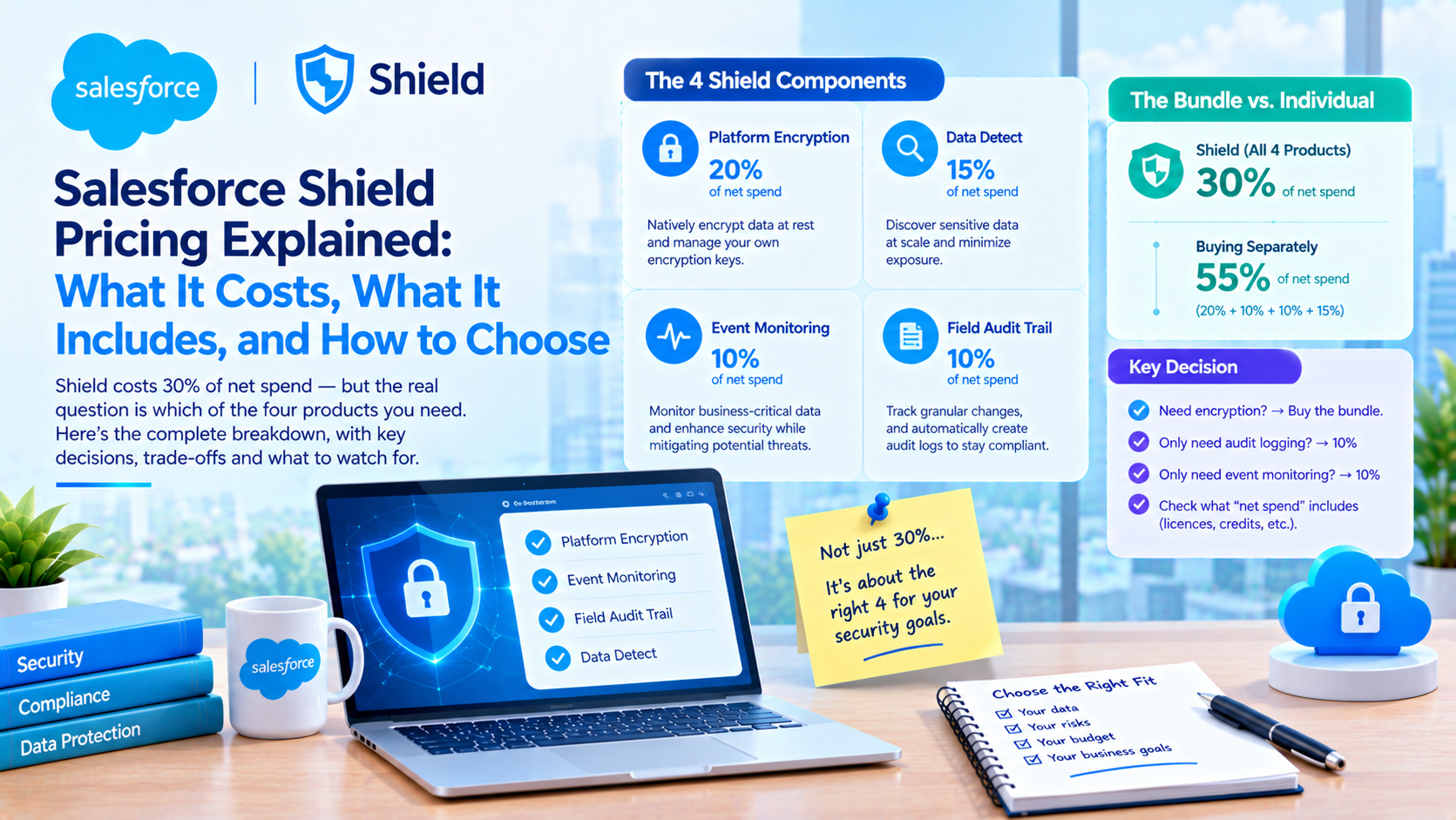
Salesforce Shield costs 30% of net spend and bundles four products: Shield Platform Encryption, Event Monitoring, Field Audit Trail and Data Detect. Those four also carry their own list prices of 20%, 10%, 10% and 15%, which means buying them separately costs 55% while the bundle costs 30%. So the question is not whether Shield is worth it. The question is which of the four you need, because one of them is two thirds of the bundle price on its own.
That component table sits on a public Salesforce page and almost nobody quotes it. Most Shield write-ups cite the 30% figure and stop there, which hides the decision that actually moves the number on a quote.
What does Salesforce Shield cost, and what counts as "net spend"?
Salesforce publishes Shield and its components as percentages of net spend rather than as per-user prices. These are published list prices, verified directly on 12 October 2026.
| SKU | Published price | What Salesforce says it does |
|---|---|---|
| Shield (bundle) | 30% of net spend | "Includes Event Monitoring, Field Audit Trail, Platform Encryption, and Data Detect in one suite" |
| Platform Encryption | 20% of net spend | "Natively encrypt data at rest and manage your own encryption keys" |
| Data Detect | 15% of net spend | "Discover sensitive data at scale and minimize exposure" |
| Event Monitoring | 10% of net spend | "Monitor business-critical data and enhance security while mitigating potential threats" |
| Field Audit Trail | 10% of net spend | "Track granular changes, and automatically create audit logs to stay compliant" |
Source: Salesforce Shield pricing, fetched 12 October 2026. Every figure above is Salesforce's published list price, not an estimate of ours.
The same four appear on the broader platform add-ons page, which carries the footnote "Total cost billed annually. All prices in USD." Both pages list these SKUs as available in Enterprise and Unlimited.
"Net spend" is never defined. The closest Salesforce gets is the FAQ line, "The contract price for our platform is calculated as a percentage of how much you spend" on other applicable Salesforce products, followed by a pointer to a sales representative to confirm which products count. On the same page, Premier Success is priced at "30% of net license fees", a different phrase on the same page, also undefined. The practical consequence is that two buyers can be quoted the same percentage against two different bases.
So get the base written down. In our experience the gap between "net spend" meaning licence subscription only and meaning licences plus consumption credits is large enough to change whether the business case passes. Ask for the calculation in the order form, with the included product list enumerated, before you negotiate the percentage.
One more thing worth knowing: the US and UK Shield pages disagree. The US page prices Data Detect at 15% of net spend. The UK page lists it as "Available with Shield bundle" with no percentage at all. Same product, same day, two Salesforce pages, two commercial answers. Treat the list price as a starting position rather than a fixed rate.
Which Shield component are you actually paying for?
The arithmetic is the most useful thing on the pricing page. Platform Encryption alone is 20% of net spend, which is two thirds of the full 30% bundle. Event Monitoring and Field Audit Trail are 10% each. Data Detect is 15%.
That produces three distinct buying positions:
- You need audit logging only. Field Audit Trail is 10%. You are paying a third of Shield's price for the one thing you asked for.
- You need forensic logging only. Event Monitoring is 10%. Same arithmetic.
- You need encryption plus anything else. Platform Encryption at 20% plus any single 10% component equals 30%, which is the bundle price. At that point the other two components are free, and there is no reason not to take the bundle.
The break point is encryption. If encryption is in scope, buy Shield and take the rest. If it is not, price the individual components and make Salesforce justify the gap.
This is where a lot of security programmes overspend. A requirement that reads "we need an audit trail of who changed what and who exported what" is a Field Audit Trail and Event Monitoring requirement, which lists at 20% combined, and the bundle at 30% is a 50% premium for an encryption capability nobody asked for. Clients consistently arrive at this conversation having been quoted the bundle and never having seen the component list.
What Shield Platform Encryption breaks, and the scheme choice nobody frames as a decision
Every blog post about Shield Platform Encryption limitations describes field-level encryption. Salesforce's own comparison page now has three columns: Classic Encryption, Field-Level Encryption and Database Encryption. The third one changes the answer.
Field-level encryption restricts your queries. From Salesforce's general considerations page, verified directly: "You can't include fields encrypted with the probabilistic encryption scheme in these SOQL and SOSL clauses and functions", and the list covers aggregate functions such as MAX(), MIN() and COUNT_DISTINCT(), the WHERE clause, the GROUP BY clause and the ORDER BY clause. Separately: "You can't sort records in list views by fields that contain encrypted data."
Deterministic encryption buys some of that back. Salesforce states that deterministic encryption "supports WHERE clauses in SOQL queries and is compatible with unique and external ID fields" and "also supports single-column indexes and single and double-column unique indexes". Note what the page does not claim. It says nothing about ORDER BY, LIKE or IN. So deterministic encryption restores exact-match filtering, and Salesforce does not claim it restores sorting. Any post telling you deterministic encryption fixes filtering and sorting is overclaiming against the documentation.
Database Encryption removes most of those restrictions and takes something else away. Salesforce's comparison table gives Database Encryption "All SOSL and SOQL queries" and "All custom fields", and the Shield Platform Encryption guide states that "Database Encryption provides full filtering, querying, searching, and sorting of the data that it encrypts."
The cost is permanence. From Trailhead, verified directly: "The decision to use Database Encryption is a permanent one. Once it's on, it's on permanently." And: "Database Encryption tenant secrets can't be exported, imported, or destroyed."
Here is the trade-off stated plainly, because Salesforce does not state it as one:
| Field-level encryption | Database Encryption | |
|---|---|---|
| SOQL WHERE, GROUP BY, ORDER BY, aggregates | Restricted under probabilistic; WHERE restored under deterministic | "All SOSL and SOQL queries" |
| Field coverage | "Limited", specific custom field types only | "All custom fields" plus metadata and Apex |
| Reversible | Yes | No. "Once it's on, it's on permanently" |
| Key destruction (crypto-shredding) | Yes, with the documented warnings | No. Secrets "can't be exported, imported, or destroyed" |
| Sandbox testing | Recommended by Salesforce | "Always test Database Encryption in your sandbox before enabling it in production" |
Evidence standard: every cell above is Salesforce's published wording, quoted from the pages linked in this section. None of it is our estimate.
Database Encryption is the easier option and Trailhead describes it as the quickest way to start. If your driver for encryption is a right-to-erasure obligation, or a contractual commitment that you can render data unrecoverable, the easier option is the wrong one, and it is a decision you cannot reverse. Choose the scheme before you choose the SKU.
Why Shield Platform Encryption does not hide data from your own users
This is the most common misunderstanding we meet in Shield conversations, and it costs real money.
Shield Platform Encryption encrypts data at rest. Since Spring '17 it "no longer masks encrypted data in the presentation layer", per Salesforce's own Classic versus Shield comparison. An authorised user with read access to a field sees the value in cleartext. Shield does not change who can see what.
Classic Encryption, which Salesforce's comparison table lists as "Included in base user license", does mask. It gives you a dedicated encrypted custom field type limited to 175 characters, mask types, and a "View Encrypted Data" permission that controls who sees the real value.
So if the requirement is "our offshore support team should not see full card numbers", a free Classic encrypted text field does that and a 20%-of-net-spend Platform Encryption purchase does not. If the requirement is "data at rest must be encrypted under keys we control, and we must be able to destroy those keys", Platform Encryption does that and Classic does not. These are different requirements and the procurement conversation usually conflates them.
Worth noting as a correction: the 175-character limit belongs to Classic Encryption, not to Shield. It appears in the Classic column of Salesforce's comparison table. There is no published 175-character cap on Shield-encrypted custom fields, and we could find no published cap on how many fields you can encrypt. The two real numeric constraints nearby are different things: an 80-field ceiling when deploying packages with Shield Platform Encryption enabled, and an 80 encrypted-field limit during org migrations.
The failure mode that degrades data quality quietly
From the same considerations page, verbatim and verified directly:
"Standard matching rules that include fields with Shield Platform Encryption don't detect duplicates."
"If you encrypt a field included in standard matching rules, deactivate the standard rule."
"When you rotate your keys, deactivate and then reactivate custom matching rules that reference encrypted fields."
Read the third one again. Key rotation is a routine security control. If your duplicate management references encrypted fields, rotating a key requires a manual deactivate and reactivate, and nothing tells you if you skip it. Duplicates stop being caught, nobody gets an error, and the data quality decline is attributed to user behaviour six months later. We have seen this exact sequence, and the fix is to put the matching-rule cycle into the key-rotation runbook rather than treating rotation as a security-team-only task.
One more, which belongs in any threat model: "If you encrypt fields with a key and then destroy the key, the corresponding search terms remain in the search index."
What Field Audit Trail actually retains, and why the "10 years" figure is wrong
Field Audit Trail is the component most often bought for a compliance requirement, and the figure in general circulation is wrong in both directions.
| Field History Tracking (included) | Field Audit Trail | |
|---|---|---|
| Retention | "18-24 months" | "Until deleted" |
| Fields tracked | "Up to 20 per object" | "Up to 200 per object" |
| Access | "UI and API" | "API only" |
Source: Salesforce's Field Audit Trail documentation, verified directly 12 October 2026. Published figures, not estimates.
Two corrections to the figures most commonly repeated. The per-object cap with Field Audit Trail is 200 fields, not 60. And retention is "Until deleted", not ten years.
The ten-year figure comes from the archiveRetentionYears setting, and the metadata documentation describes it as "The number of years until you manually delete data from the archive" and adds, "Use this field as a reminder for manually deleting data." The same page states: "By default, field history data isn't automatically deleted when Field Audit Trail is enabled." For contrast, archiveAfterMonths does have a published range, a minimum of 1 month and a maximum of 18.
So archiveRetentionYears does not delete anything. It is a note to yourself.
The gap between Field Audit Trail and a deletion obligation
This is the part to take to your data protection lead. From the same Salesforce page: when you delete a production record, "the delete cascades to the related history tracking records" but "Salesforce doesn't delete the history copied into the FieldHistoryArchive big object."
Privacy Center, which lists separately at 15% of net spend, runs right-to-be-forgotten policies that delete or mask records. Field Audit Trail keeps a copy of the field history that the production delete does not reach, and clearing it requires REST, SOAP or Tooling API calls you have to build and schedule yourself.
An org running both is paying 45% of net spend for one product that creates an erasure obligation and another that does not discharge it. Nobody is selling the job that joins them up. If you buy Field Audit Trail and you have erasure obligations, budget for the archive purge job in the same project, not in a later one.
Also note that Field Audit Trail cannot help with fields that were never trackable in the first place: formula, roll-up summary and auto-number fields, Created By and Last Modified By, long text fields and multiselect fields. If your audit requirement lands on a long text field, no Shield component solves it.
How long does Event Monitoring keep your logs? Salesforce gives two answers
The honest answer is that Salesforce's own sources disagree, and the gap is twelve-fold.
Salesforce's Event Log Files documentation states, for orgs with Shield or the Event Monitoring add-on: "Log files are retained, by default, for 1 year after their CreatedDate. Then, they are automatically deleted." It adds that customers "can adjust the data retention period and download up to one year of event log file data" via "the Event Monitoring Settings or using the EventSettings Metadata API type." Developer Edition and Trial orgs get one day.
Salesforce's Trailhead Event Monitoring module still shows historical storage as one day free and "Up to 30 days" licensed.
Both are Salesforce. Most third-party content repeats the 30-day figure. Before you write a retention commitment into a policy document, check EventSettings in your own org and screenshot it, because that is the only answer that is true for you.
The free tier is the part that decides whether you need the add-on at all. On Enterprise, Unlimited and Performance, Salesforce gives seven event types free (Login, Logout, Apex Unexpected Exception, CORS Violation, CSP Violation, Hostname Redirects and API Total Usage), at daily frequency, with one day of retention. The licensed tier gives 70 or more event types with hourly files.
Daily frequency and one-day retention means the free tier is close to unusable for incident response. By the time someone asks what happened yesterday, yesterday is gone. That is the real argument for Event Monitoring at 10%, and it is a better argument than the event-type count.
Real-Time Event Monitoring stores most of its events in big objects for up to six months, with two exceptions retained up to ten years: IdentityVerificationEvent and LoginEvent. Trailhead's "up to 10 years for certain events" line means those two objects, not a general capability. Salesforce also states that "Real-Time Event Monitoring big objects aren't bound by big object data storage limits", which is useful given Big Objects list at $1,000 per month per 50 million records.
Does Shield make you compliant with HIPAA, GDPR or PCI DSS?
Not on the evidence Salesforce publishes. Shield is not named as a requirement for any certification on Salesforce's compliance portal.
The HIPAA page directs customers who want to build compliant healthcare applications to contact their account representative about a Business Associate Addendum and points to the BAA Restrictions and HIPAA Covered Services document. Shield is not mentioned. The PCI DSS page indexes Attestations of Compliance and Responsibility Matrices by service, and Shield is not mentioned there either.
Stated carefully, because the distinction matters when a quote is riding on it: this is a documented absence on the pages we could read, not a proof that no requirement exists anywhere. The per-service Responsibility Matrix PDFs sit behind a document table we could not reach.
The practical framing is that Shield is bought to satisfy your own control framework, your auditor, or a commitment you made to a customer in a contract. It is not a prerequisite for any Salesforce certification, and anyone telling you Salesforce requires Shield for HIPAA should be asked for the page.
The nearest thing to a "you need Shield for this" statement we found is architectural rather than contractual, and it sits in the encryption guide: without Shield Platform Encryption enabled for change data capture and platform events, "events are stored in clear text in the event bus". If you are pushing regulated data through platform events, that is a real gap and it is worth a line in your design review.
How to size a Shield decision in the right order
This is the sequence we use with clients, and the ordering matters more than any individual step.
- Write the requirement as a control, not as a product. "Retain field-level change history on 40 fields of the Claim object for seven years, queryable on demand" is a requirement. "We need Shield" is a purchase.
- Check what the base platform already does. Field History Tracking covers 20 fields per object for 18 to 24 months. Setup Audit Trail covers configuration changes. The free event subset covers seven event types for one day. If the requirement fits inside those, stop.
- Map each surviving requirement to one component. Audit history to Field Audit Trail. Access and export forensics to Event Monitoring. Encryption at rest with customer-managed keys to Platform Encryption. Sensitive-data discovery to Data Detect.
- Run the bundle arithmetic. Add the component percentages. If the total is 30% or more, take the bundle. If it is 20% or less, price the components.
- Choose the encryption scheme before you sign. Field-level or Database Encryption, and confirm whether you need crypto-shredding, because Database Encryption is permanent and removes it.
- Get the definition of net spend in writing, with the included product list enumerated.
- Budget the operational work, not just the licence. The key-rotation and matching-rule cycle, the
FieldHistoryArchivepurge job, and theEventSettingsretention configuration are all build work that no SKU includes. - Test in a sandbox first. Salesforce recommends it for Platform Encryption generally and states it as an instruction for Database Encryption.
Step 7 is the one that gets missed. The licence is a line on a contract. The encryption field selection, the archive purge, the retention settings and the runbook changes are a project, and in our experience that project is where the schedule slips rather than the enablement.
What Shield does not fix
Honest limitations, each one something we have watched surprise a client:
- It does not hide data from authorised internal users. Platform Encryption stopped masking in the presentation layer in Spring '17.
- It does not give you reports on archived field history. Field Audit Trail access is "API only", and the documented retrieval path is a Bulk API query job against
FieldHistoryArchive. - It does not delete archived history when you delete the record. You build that.
- It does not make encrypted fields behave like normal fields. Probabilistic encryption removes WHERE, GROUP BY, ORDER BY and aggregates. Deterministic restores exact-match filtering and Salesforce does not claim it restores sorting.
- It does not cover every field type. Only specific custom field types can be encrypted, and once encrypted "you can't change the field type".
- It does not keep working silently through a key rotation. Custom matching rules need manual deactivation and reactivation.
- Salesforce cannot recover a destroyed key. "Salesforce can't help you with deleted, destroyed, or misplaced tenant secrets and keys", and destruction is reversible only if you exported the key material first.
Frequently Asked Questions
How much does Salesforce Shield cost?
Shield lists at 30% of net spend, per Salesforce's published pricing page. There is no per-user list price. The individual components are also priced separately: Platform Encryption 20%, Data Detect 15%, Event Monitoring 10% and Field Audit Trail 10%. "Net spend" is not defined on the pricing page, so the base for the percentage is something to settle in the order form.
Is Event Monitoring included in Shield or sold separately?
Both. Event Monitoring is one of Shield's four components and is also sold on its own at 10% of net spend. If audit and access logging is your only requirement, the standalone SKU is a third of the bundle price. Real-Time Event Monitoring is described on one Salesforce page as "available with add-on" even in the Shield column, so confirm its inclusion at quote stage.
Does Shield Platform Encryption break reports and SOQL?
Partly. Fields encrypted with the probabilistic scheme cannot appear in SOQL or SOSL WHERE, GROUP BY or ORDER BY clauses, or in aggregate functions, and list views cannot be sorted by encrypted fields. Deterministic encryption restores WHERE clause support and index compatibility. Database Encryption, the newer scheme, supports all SOQL and SOSL queries but is permanent once enabled.
Do I need Shield to be HIPAA or GDPR compliant?
Salesforce does not name Shield as a requirement for HIPAA, GDPR or PCI DSS on its compliance portal. HIPAA work on Salesforce centres on a Business Associate Addendum arranged through your account representative. Shield is bought to satisfy your own control framework or a contractual commitment, so ask any adviser who claims otherwise for the specific Salesforce page.
How long does Field Audit Trail keep field history?
Until you delete it. Salesforce's documentation gives Field Audit Trail retention as "Until deleted" and states that field history data "isn't automatically deleted when Field Audit Trail is enabled". The archiveRetentionYears setting is documented as "a reminder for manually deleting data", so it does not purge anything. Deletion requires REST, SOAP or Tooling API calls you build yourself.
What is the cheapest way to meet an audit logging requirement?
Check the included features first. Field History Tracking covers 20 fields per object for 18 to 24 months, and Setup Audit Trail covers configuration changes. If you need more than 20 fields, longer retention, or data access and export logging, the paid components start at 10% of net spend each. The free event log subset retains only one day, which rules it out for investigations.
Getting the scope right before the quote
The expensive version of a Shield purchase is the one where a compliance requirement arrives as a product name, the bundle gets quoted against an undefined base, and the encryption scheme is chosen after the contract is signed. The scheme choice in particular is the one that cannot be undone.
If you are being quoted Shield and you are not certain which of the four components your requirement actually needs, we will map the requirement to the components, run the bundle arithmetic against your own net spend, and tell you where the base platform already covers you. That conversation usually takes an hour and occasionally ends with us telling you not to buy it. Get in touch or read more about how we work with Salesforce platform teams.
Have Questions or Need Assistance?
Our team of Salesforce experts is ready to help you implement the solutions discussed in this article.
Contact Us Today