What AIforce Means for Your Salesforce UI Investment
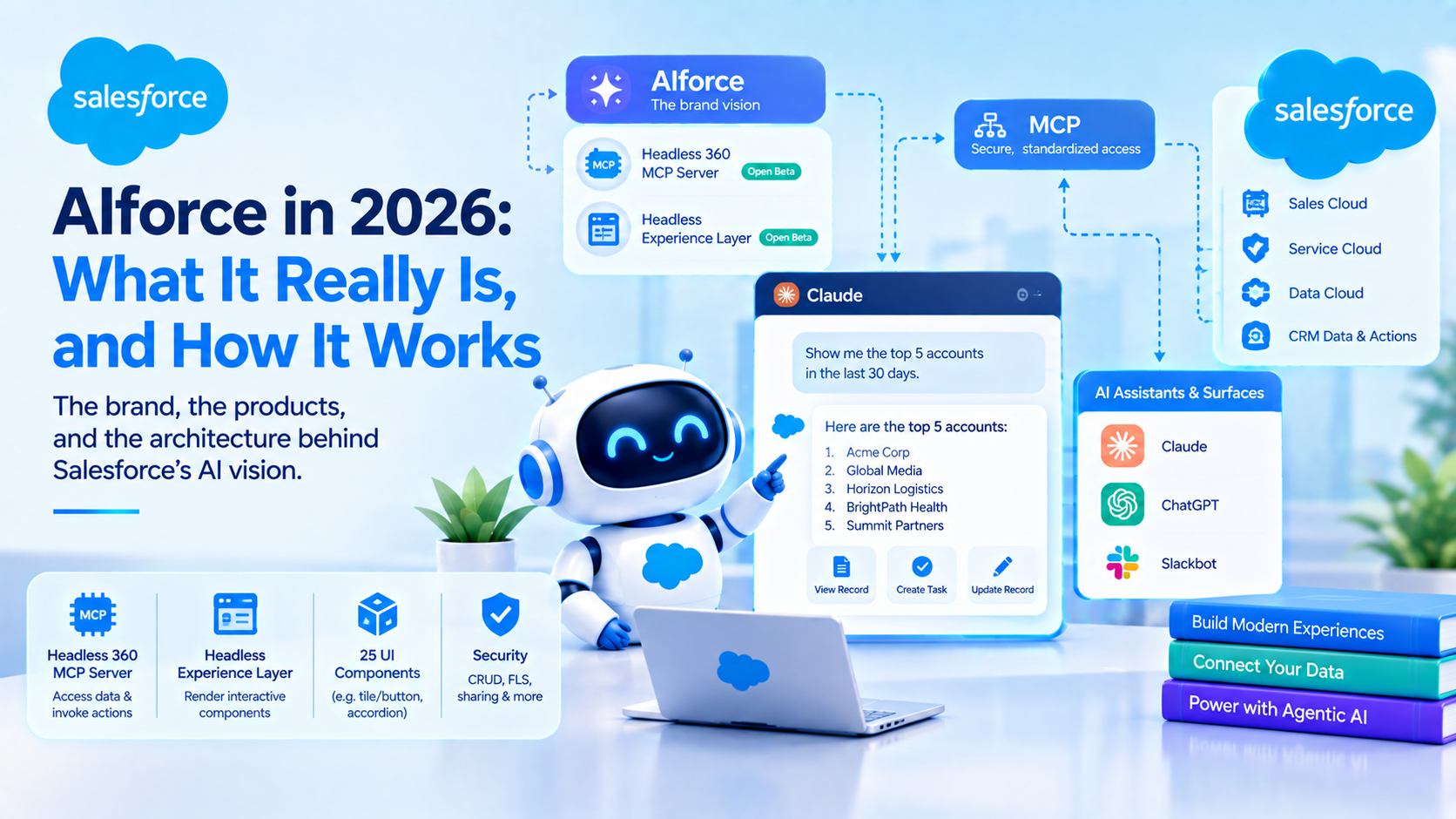
AIforce is Salesforce's brand for reaching CRM from outside the Salesforce interface. Underneath the brand sit two documented open-beta products: the Headless 360 MCP Server, which lets any MCP-aware client read data and invoke actions, and the Headless Experience Layer, which renders interactive components on surfaces such as Claude, ChatGPT and Slackbot. Salesforce has announced no deprecation of Lightning, Lightning Web Components or Experience Cloud.
The keynote framing was considerably more dramatic than that. Parker Harris asked why you should ever log into Salesforce again, and answered "maybe you never will". Marc Benioff described a metadata-driven platform where the UI "is the only thing that needs to be built if users want to access it in a personalized way".
Those are positioning statements. This post is about what is documented, because that is what you can plan against.
AIforce is a brand. These are the two products underneath it
No developer documentation, API or metadata type is named AIforce. We looked. The name exists in the newsroom and the keynote, and nowhere in the technical documentation.
What exists underneath it, and what you should actually be reading:
| Marketing name | The documented product | Status, in Salesforce's words | First shipped |
|---|---|---|---|
| AIforce | No technical documentation under this name | Announced only, no availability statement | Brand, 15 Sep 2026 |
| Headless Toolkit | Headless 360 MCP Server | Open beta available now | Beta, July 2026 |
| Personalised or agentic UI | Headless Experience Layer | Open beta available now | Beta |
| Claudeforce | An MCP connection over Headless 360 | Beta, approval gated | Announced 26 Aug 2026 |
Both architecturally load-bearing pieces shipped in beta before the keynote. That is the single most useful thing to know: the technology is not new, the brand is. The documentation is findable, and it is findable under names no keynote coverage uses.
One contradiction to carry with you. Salesforce's own Headless 360 announcement page lists the Headless Experience Layer as "Open beta available now", while Salesforce Ben's developer roundup reports it as GA. Prefer Salesforce's page, and confirm before you plan a delivery date around it.
How an external surface actually reaches your CRM
The mechanism is published, and it is MCP.
The Headless 360 MCP Server documentation describes a server that "brings the full breadth of Salesforce to any MCP-aware agent through a single connection". Rather than exposing thousands of individual tools, it exposes exactly four, backed by a semantic index of operations:
- Discover searches a vector index of available Salesforce operations and returns ranked results, with a configurable limit of 1 to 50 and a default of 10.
- Describe returns the technical contract for an operation: APIs, parameters, dependencies and ordered execution steps.
- Dispatch invokes operations over HTTP using GET, POST, PUT, DELETE or PATCH.
- Dispatch Read Only is GET only and, per Salesforce, "never modifies data or configuration".
The production endpoint is https://api.salesforce.com/platform/mcp/v1/platform/headless-360, with a separate sandbox and scratch org endpoint. Prerequisites are API version 67.0 or later, an External Client App configured with the mcp_api scope, and an MCP client using OAuth. You activate it in Setup under Hosted MCP Servers.
So an external surface reaches CRM as an OAuth-authenticated MCP client calling a Salesforce-hosted remote MCP server, which brokers to the underlying REST APIs. It is not Lightning Out, it is not a UI runtime, and it is not screen scraping. If you have built API integrations before, this is a shape you already understand.
The second half is rendering. The Headless Experience Layer is described by Salesforce as "the control plane for how AI shows up across your business", which "separates what an agent should do from how that experience is delivered". Its beta reference documents 25 components identified by structured names such as tile/accordion and tile/button, covering layout (Column, Row, Container), content (Text, Image, Markdown) and interaction (Button, Link, Accordion).
Note what that is: a new, deliberately constrained component vocabulary. It is not Lightning Web Components. The documentation lists four supported channels in beta, being Agentforce, ChatGPT, Claude and Slackbot, while the marketing page claims a wider set including Lightning, mobile and Teams. Plan against the four.
What enforces field-level security when the request comes from Claude?
This is the question every architect asks first, and unusually, it has a clear published answer.
From the Headless 360 MCP documentation: "Object permissions (CRUD), field-level security (FLS), sharing rules, profile permissions, and permission sets all apply." And more usefully for a stakeholder conversation: "If you can't perform an action in Salesforce, your agent can't perform it through the MCP server."
Three further documented controls matter:
- Every transaction executes as the authenticated user. Not as an integration user, not as a service principal.
- Audit trails attribute all actions to the originating user.
- Access is scoped through the External Client App and its
mcp_apiscope.
Because the path runs through the standard APIs, validation rules and Apex triggers fire as they normally would. Your business logic does not get bypassed by the request arriving from Claude rather than from a browser.
Now the qualifications, because the reassuring version is not the whole picture.
Tool-level restrictions are guidance, not platform enforcement. Salesforce recommends configuring restrictions in the MCP client and advises admins to "require your approval before it runs a tool that changes org configuration or alters or deletes data". That is a recommendation implemented on the client side. The platform does not enforce it. If your client is misconfigured, the guard is not there.
Masking is still disabled for agents. Salesforce states it directly: "Pattern-based and field-based data masking for large language models (LLMs) is disabled for agents." Nothing announced at Dreamforce changes this, and the documentation confirms masking stays off even when the model runs inside Salesforce's own trust boundary. The permission stack controls what the agent can reach. It does nothing about what the model sees once it has reached it.
That is the real exposure, and it is worth being precise about it rather than reaching for vaguer worries. The permission model is not the weak point. The absence of masking on the agentic path is.
One thing we deliberately will not assert. There is a widely repeated claim that field-level security violations in Agentforce return null silently rather than erroring. We could not find that behaviour documented or denied in current Salesforce documentation. It is a community-reported pattern. If it happens in your org it is worth capturing as evidence, but we are not going to attribute it to Salesforce documentation that does not say it.
What happens to the Lightning Web Components you already paid for?
This is the question with real money attached, and the published answer is better than the keynote implies.
Existing LWC investment is explicitly reusable on agent surfaces, through Custom Lightning Types. The mechanism, per Salesforce's Lightning Types documentation, works like this:
- An Agentforce action returns structured output.
- A Custom Lightning Type is associated with that action at configuration time.
- The type's renderer, which is an LWC component referenced with the
cnamespace prefix, maps the structured output to a display. - Agentforce renders it in the conversation.
Salesforce's Trailhead puts it plainly: "The action continues to return the same structured output. The CLT, renderer, and HXL widget determine how Agentforce presents that output." Documented renderer channels include lightningDesktopGenAi for Employee agents and enhancedWebChat for Service agents.
So there are two parallel rendering routes, and which one you need depends entirely on where the experience surfaces:
| Custom Lightning Type renderer | HXL component | |
|---|---|---|
| Built with | Existing LWC | New HXL component vocabulary, 25 components in beta |
| Works on | Salesforce-hosted agent surfaces | External surfaces: Claude, ChatGPT, Slackbot, plus Agentforce |
| Reuses existing work | Yes | No |
| Documented status | Available | Open beta |
The reason for the split is not arbitrary. An LWC cannot execute inside Claude. That is why a separate component vocabulary exists at all, and it is why "write once, deploy everywhere" needs reading carefully: you write the HXL component once and deploy it to the surfaces HXL supports, not to everything you already built.
We could not verify whether HXL components can wrap or embed existing LWCs for external surfaces. Nothing published addresses it, and it is the most commercially significant open question in this area.
Business logic is unaffected either way. Apex, Flow and validation rules sit behind the API and do not care which surface called them.
What Salesforce has and has not said about Lightning, Flow and Experience Cloud
Salesforce has made no statement at all about deprecating Lightning pages, page layouts, Lightning Web Components, screen flows or Experience Cloud. No sunset date, no deprecation notice, no migration guidance. We looked across the keynote coverage, the newsroom and the documentation. Say this to anyone in your business who has been told the UI is going away.
What Salesforce did say is reassuring in a narrower way. The AIforce announcement states: "No new permissions model, no migration, no custom integration work. Admins connect once and teams get access on day one." That is a claim about the cost of adopting AIforce, not a claim about the fate of what you already have.
On automation specifically, Salesforce's current architectural guidance actively defends the traditional approach. Its decision guide on agentic versus traditional automation says: "Use Traditional Automation with Flows and Apex for rule-based deterministic work, where the outcome can be entirely scoped and defined by a set of rules." It notes that "synchronous record-triggered flows execute within the platform transaction and complete in milliseconds", and recommends Flow with invocable Apex and prompt templates for low-density deterministic processes that need AI.
That guide does not address screen flows, LWC, Lightning pages or Experience Cloud at all. They are out of its scope, which is itself informative: Salesforce is not currently publishing guidance that moves them anywhere.
Where Flow still wins, and where the agentic path is genuinely better
The trade-off worth naming, because most coverage of AIforce skips it entirely.
Flow and Apex win on determinism, latency and auditability. A record-triggered flow completes inside the platform transaction in milliseconds, produces the same result every time, and leaves an audit trail a compliance team can read. An agentic path is non-deterministic by construction, and Salesforce's own documentation confirms that identical inputs can produce inconsistent outputs. For anything where the outcome can be fully specified by rules, the agent is the worse engineering choice and the more expensive one.
The agentic path wins where the work cannot be fully specified in advance, and where the user is already somewhere else. Pipeline review across an account, drafting an outreach sequence, summarising what changed on a deal since last week: these have no deterministic definition, and the value comes partly from the user never leaving the tool they are already in.
The alternative we have recommended against, more than once, is rebuilding an existing screen flow as an agent because the agentic version demonstrates better. It loses on three counts: it costs credits per action where the flow cost nothing, it introduces run-to-run variance into a process that previously had none, and it makes a previously auditable step harder to explain. We have yet to see that trade come out in the agent's favour for a deterministic process, and Salesforce's own decision guide agrees.
The limits and gaps to plan around
These are published and enforced. They are not guidance.
- Discover returns between 1 and 50 results, defaulting to 10.
- API version 67.0 or later is required for the Headless 360 MCP Server.
- Agentforce Coworker does not index files over 75 MB.
- Agentforce Coworker is English only during beta, with multilingual promised at GA, and is not available in GovCloud.
- Agentforce Coworker binds to exactly one dedicated Data Space in multi-space orgs.
- Koa, at GA, is US regions only. If your data residency is in the UK or the EU, it is not a 2026 line item.
And the gaps, which matter as much:
- No published rate limits, quotas or concurrency caps for the Headless 360 MCP Server.
- No pricing for HXL, and no statement on whether it consumes credits.
- No GA target for either open-beta product.
- Agentforce Coworker's status is contradicted across two Salesforce pages in the same week. The AIforce page says it is "instantly available to Salesforce customers". The agent portfolio page lists "Agentforce Coworker with AI Skills" as pilot now with GA in October '26. Salesforce Help carried it as Beta in August.
How to evaluate AIforce without committing to it
- Stand up the Headless 360 MCP Server in a sandbox. You need API v67.0 or later and an External Client App with the
mcp_apiscope. This is a half-day task, not a project. - Start with Dispatch Read Only. It is GET only and cannot modify data or configuration, which makes it the right shape for a first evaluation.
- Test the permission boundary deliberately. Connect as a restricted user and confirm that field-level security and sharing behave as the documentation says. Record what you find, because the silent-null question is not settled publicly and your evidence is worth more than a blog's.
- Inventory where your UI investment actually sits. Separate LWCs that could become Custom Lightning Type renderers from Lightning pages and Experience Cloud sites, which have no published external-surface path.
- Try the HXL Playground before writing components. Salesforce publishes one at headlessexperiencelayer.com, and 25 components is a small enough vocabulary to assess in an afternoon.
- Do not plan a delivery date yet. Both products are open beta with no GA target, and one of them has two different statuses published by two different Salesforce sources.
At Aptivus Solutions we run this as a sandbox evaluation rather than a strategy workshop, because the useful question is not whether the UI is dead. It is whether the MCP path returns what your users need, under the permissions they already have.
Frequently Asked Questions
What is AIforce?
AIforce is a Salesforce brand announced at Dreamforce '26, described as "a live interface layer that brings the full power of Salesforce to wherever people and agents work". No technical documentation exists under that name. Underneath it are two documented open-beta products, the Headless 360 MCP Server and the Headless Experience Layer, both of which shipped before the keynote.
Is Salesforce getting rid of the Lightning UI?
No deprecation of Lightning pages, Lightning Web Components, screen flows or Experience Cloud has been announced. Salesforce has published no sunset date, deprecation notice or migration guidance for any of them. The keynote framing about never logging in again is positioning rather than a roadmap statement, and Salesforce's own architecture guidance still recommends Flow and Apex for deterministic work.
Can my existing Lightning Web Components be reused by agents?
Yes, on Salesforce-hosted agent surfaces. A Custom Lightning Type associates an LWC renderer with an Agentforce action, so the action returns the same structured output and the renderer controls presentation. External surfaces such as Claude and ChatGPT cannot execute an LWC, which is why the Headless Experience Layer defines its own component vocabulary of 25 components.
How is security enforced when an agent reaches Salesforce from outside?
Salesforce documents that object permissions, field-level security, sharing rules, profile permissions and permission sets all apply, and that every transaction executes as the authenticated user with audit attribution. Its own summary is that if you cannot perform an action in Salesforce, your agent cannot perform it through the MCP server either. Validation rules and Apex triggers fire normally.
Does the Headless 360 MCP Server cost anything?
No pricing, rate limit or quota has been published for the Headless 360 MCP Server. It is in open beta and subject to Salesforce's Beta Services Terms. Actions invoked through Agentforce consume Flex Credits at published rates, but Salesforce has not stated whether MCP dispatch itself is metered separately, so treat the running cost as unquantified.
What is the difference between AIforce and Agentforce?
Agentforce is the agent platform: agents, topics, actions and the reasoning engine, running inside Salesforce. AIforce is the interface layer that lets external surfaces reach Salesforce data and actions and render results outside the Salesforce UI. AIforce does not replace Agentforce or consolidate licensing, it adds a layer, and both are licensed separately.
The evaluation worth running this quarter
The specific problem AIforce creates is that the brand moves faster than the documentation, so the planning conversation happens against a keynote rather than against an API contract. The API contract exists, it is called the Headless 360 MCP Server, and it answers the permission question clearly while leaving pricing, rate limits and GA timing open.
Stand it up in a sandbox with Dispatch Read Only and find out what it returns for your data model. If you would like a second pair of hands on that evaluation, or on the LWC inventory that decides how much of your existing front end survives, get in touch.
Have Questions or Need Assistance?
Our team of Salesforce experts is ready to help you implement the solutions discussed in this article.
Contact Us Today