Which Salesforce Limits You Can Raise, and Which You Cannot
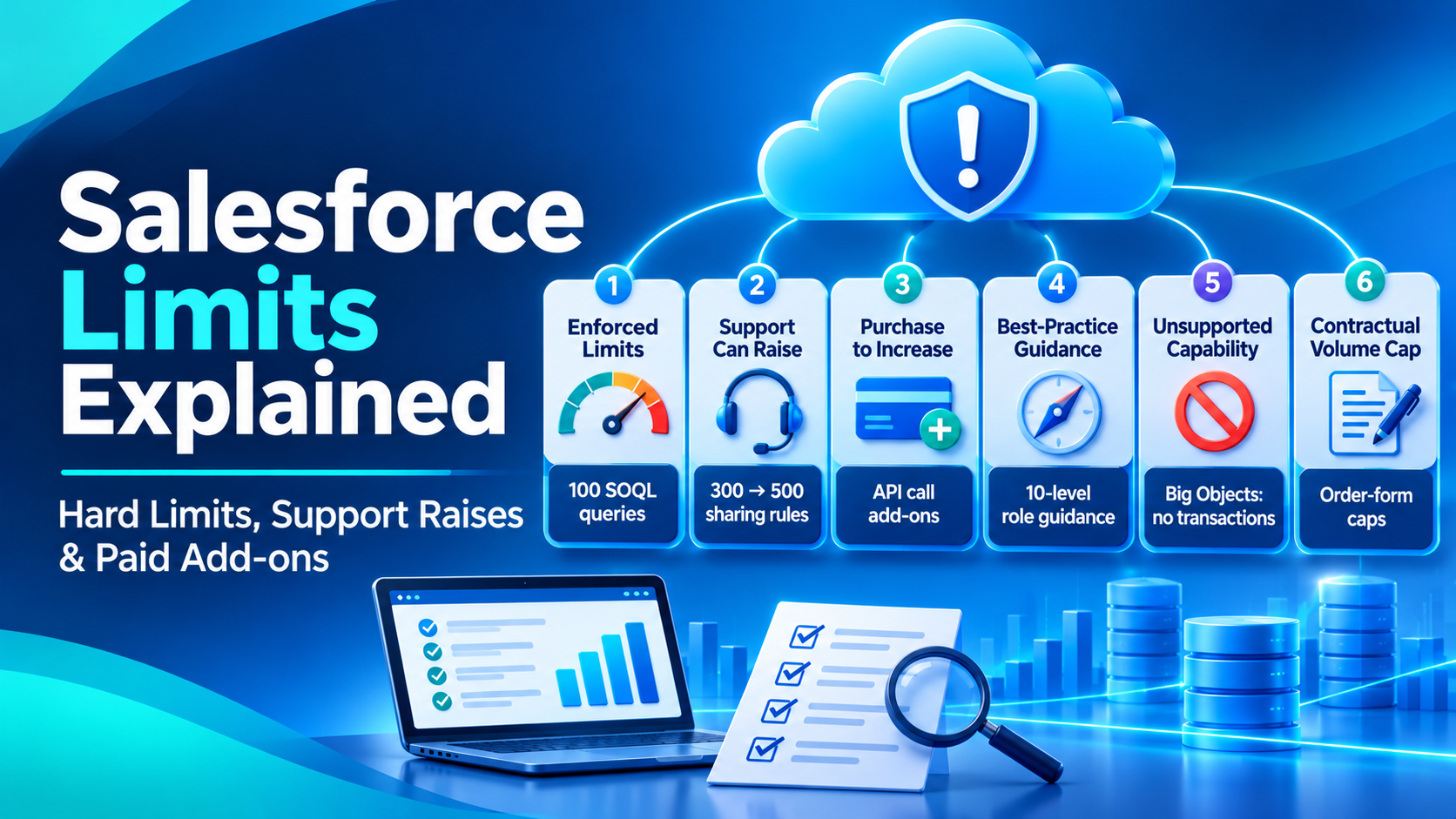
Salesforce limits are not one kind of thing. They fall into five categories with five different remedies: limits the platform enforces and nobody can raise, limits Salesforce Support will raise on request, limits you raise with a purchase order, numbers that read like limits and enforce nothing at all, and behaviour documented as unsupported. A sixth exists outside the platform entirely, in your contract. Working out which category a number belongs to is the first thing an architect should do, and the documentation often makes it difficult on purpose.
The cost of getting it wrong runs both ways. Treat an enforced limit as advice and you ship a design that fails at scale. Treat a best-practice number as a hard ceiling and you redesign around a constraint that does not exist. We have seen both in the same project.
Why "is it a hard limit?" is the wrong first question
Because "hard limit" means at least three different things in Salesforce's own documentation, and the page that tells you which one applies is sometimes below the table rather than above it.
Here is the classification we use on every architecture review.
| Category | What it means | Remedy | Example |
|---|---|---|---|
| 1. Enforced, not adjustable | The platform throws and you cannot catch it | Redesign | 100 SOQL queries per synchronous transaction |
| 2. Enforced, Support raises it | A real ceiling with a documented request route | Support case | 300 sharing rules per object, raised to 500 |
| 3. Enforced, money raises it | The limit has a purchasable term in it | Purchase order | API calls per 24 hours |
| 4. Not enforced at all | An instruction or a recommendation | Judgement | Role hierarchy depth of 10 |
| 5. Documented as unsupported | The capability does not exist | Change approach | Transactions on big objects |
| 6. Contractual volume cap | A quantity in your order form | Order form | Industry cloud order volumes |
Categories 1, 2 and 3 are all hard limits in the sense that the platform stops you. They are completely different problems to have. Categories 4 and 5 are not limits at all, and conflating them with the first three is the most common error we see in architecture documents written by people who are otherwise very good at their jobs.
Category 1: the limits nobody raises
Apex governor limits are the cleanest example. Salesforce's Execution Governors and Limits page opens with "Because Apex runs in a multitenant environment, the Apex runtime engine strictly enforces limits" and goes on to say "If some Apex code exceeds a limit, the associated governor issues a runtime exception that can't be handled."
Current values, verified directly on 23 November 2026.
| Limit | Synchronous | Asynchronous |
|---|---|---|
| Total number of SOQL queries issued | 100 | 200 |
| Total number of records retrieved by SOQL queries | 50,000 | 50,000 |
| Total number of DML statements issued | 150 | 150 |
| Total number of records processed by DML statements | 10,000 | 10,000 |
| Total heap size | 10 MB | 25 MB |
| Maximum CPU time on the Salesforce servers | 10,000 ms | 60,000 ms |
| Total number of callouts in a transaction | 100 | 100 |
| Maximum cumulative callout timeout | 120 seconds | 120 seconds |
| Maximum Apex jobs added with System.enqueueJob | 50 | 1 |
Two notes on that table, because both have caught people out recently.
The heap figures are 10 MB and 25 MB. For years the published values were 6 MB and 12 MB, and a great deal of community material still says so. Salesforce corrected the page. If your coding standard quotes 6 MB, it is now wrong in the safe direction, which is the better kind of wrong, but it will make you refactor code that did not need it.
The CPU time figures are the ones we see breached most often in practice, and the asynchronous allowance of 60,000 ms is six times the synchronous one. That ratio, not the absolute number, is usually the design lever.
Here is the precision that matters, and it is a point of intellectual honesty rather than pedantry. That page never says these limits cannot be raised. It says the exception cannot be handled, which is a different claim. The reason we classify them as category 1 is the absence of any documented raise route anywhere, combined with "strictly enforces". If someone asks you to produce the Salesforce sentence saying governor limits are unchangeable, you will not find one.
And three rows further down the same page sits a limit that is category 2. Under Size-Specific Apex Limits, "Maximum amount of code used by all Apex code in an org" is 6 MB, with the footnote "The default 6 MB limit can be increased by opening a support case for your org." One page, two categories, no visual distinction between them. That is the whole problem in a single document.
Category 2: the limits Salesforce Support will raise
These exist in greater number than most architects expect, and Salesforce documents them in help articles that follow a predictable title pattern. The ones we have verified directly:
| Limit | Default | Maximum via Support | Source |
|---|---|---|---|
| All sharing rules per object | 300 | 500 | Help article 000384485 |
| Criteria-based sharing rules per object | 50 | 200 | Same article |
| Roles, orgs created before Spring '21 | 500 | 10,000 | Help article 000385813 |
| Roles, orgs created Spring '21 or later | 5,000 | 10,000 | Same article |
| Controlling picklist values | 300 | 500 | Help article 000387742 |
| Custom indexes per object | 25 | Not stated | Help article 000386304 |
| Total Apex code in an org | 6 MB | Not stated | Apex governor limits page |
| File shares per file | 2,000 | 2,000 | Help article 000381543 |
The sharing rules article is unusually explicit about the route: "Only Salesforce Support can increase Sharing Rules limits beyond the default." There is no setting, no add-on and no workaround. You raise a case.
Two rows in that table deserve a second look.
The roles row is three numbers, not two, and the article does carry all three. The default is 500 for existing orgs, 5,000 for orgs created in Spring '21 or later, and 10,000 as the ceiling Support will go to. We have seen a design document quote 500 as the hard figure for an org created in 2024, which was off by a factor of ten. Check your org's creation date before you quote either default.
The file shares row is the odd one. The article gives a default of 2,000 and states that 2,000 is the documented maximum, with requests above it handled individually and approval not guaranteed. That is a category of its own: a Support route that exists and may well be declined. We treat any design resting on an ungranted raise as an open risk rather than a decision, and we say so in writing, because the alternative is discovering it after go-live.
One boundary case worth knowing, because it looks like category 2 and is not. Fields tracked in field history default to 20 per object. Raising it to 60 is not a Support case, it is a purchase: you buy Field Audit Trail or the additional field history product, and the request goes through your account executive. The article says so. We flag this one because "ask Support" is the wrong first move and wastes a week.
Category 3: the limits a purchase order raises
The platform add-ons page is the single most useful page in Salesforce's commercial documentation for an architect, because it tells you which constraints have a price.
| Add-on | Published price |
|---|---|
| Additional API Calls | $25/month for 10,000 daily calls |
| Platform Events | $500/month for 100,000 daily events |
| Big Objects | $1,000/month for 50 million records |
| Change Data Capture | $5,000 org/month |
| Salesforce Connect | $4,000 connection/month |
| Additional Custom Objects | $75/user/month |
| Web Services API | $25/user/month |
| Salesforce Data Pipelines | $9,000/org/month for 100M rows and 30 hours processing |
| Apex Debugger | $1,500 org/month |
| Scratch Org | $25 org/month |
All prices as published on 23 November 2026, billed annually in USD per the page's own footnote. These are list prices, not quotes, and nothing stops your account executive discounting them.
The API limit is the clearest illustration of the category, because the limit formula literally contains a purchased term. Salesforce's API request limits page gives it as 100,000 plus the number of licences multiplied by calls per licence type, plus purchased API Call Add-Ons. It then tells you the remedy in one sentence: "If you need more API requests in your org, use Your Account App to buy additional user licenses or extra API calls." You do not redesign your integration. You buy the headroom, or you buy licences you were going to buy anyway.
Now the confirmed absence, which is the most useful thing in this section. There is no line item on that page for additional data storage or additional file storage. We checked the whole page directly. The only storage-adjacent entries are Big Objects, which Salesforce describes as "Hyperscale big data storage" and which is a different storage class, and Platform Expansion for Experience Cloud, priced "Request a Quote".
So what do you buy when you run out of data storage? Salesforce's storage allocations page routes you to a human, and the help article on calculating storage allocation tells you to contact your account executive. Data storage is the one major Salesforce constraint with no published price attached to relief. That makes it a seventh shape if you want to be strict about it: raisable, but only by negotiation, at a number nobody outside the deal gets to see. It is also, in our experience, the single most expensive surprise in a large Salesforce estate, because the discovery usually happens at the point where the org is already full.
Category 4: numbers that look like limits and enforce nothing
This is where most architecture documents go wrong, and the fix is simple: read the preface before you copy the number.
The role hierarchy depth of 10. Salesforce's platform sharing architecture guide says "As a best practice, keep the role hierarchy to no more than 10 levels of branches in the hierarchy." Nothing enforces it. A twelve-level hierarchy will save. Worth knowing: the Salesforce Help page on role guidelines gives no number at all, saying only to minimise the number of levels, so cite the architect guide if you need the figure.
Agentforce actions and subagents. The Agentforce considerations page reads "For best performance, we recommend assigning no more than 10 actions to a subagent, and 10 subagents to an agent." That is a performance recommendation. The enforced number nearby is 100 agents, and the same page notes that Einstein bots count toward it, which catches orgs that forgot they had any. Note also that the page does not say "per org", so do not add a word the source does not have.
The Bulk API 100 MB figure. This one is a third thing again, and it is the most interesting case in Salesforce's documentation. The Bulk API limits page says "A request can provide CSV data that does not in total exceed 150 MB of base64 encoded content", then "When job data is uploaded, it is converted to base64", then "This conversion can increase the data size by approximately 50%", then "To account for the base64 conversion increase, upload data that does not exceed 100 MB."
There is no hedge on that last sentence. No "we recommend". It is an imperative instruction, and it is neither enforced nor advisory: it is computed. 100 MB is simply what 150 MB of base64 works back to. Calling it a guideline invites an engineer to try 130 MB and hit a hard failure at the real ceiling. Calling it a hard limit is also wrong, because the enforcement lives at 150 MB. The honest description is that it is arithmetic.
Our rule: when you find a number in Salesforce documentation, read the sentence that introduces it. "We recommend" is category 4 advice you may decline with reasons. "Do not exceed" with no hedge is an instruction derived from something else, and you should go and find the something else. A bare number under a column headed and defined as enforced is category 1.
Category 5: documented as unsupported
Neither raisable nor advisory. The capability is absent, and the only remedy is a different design.
Big objects do not support transactions. The big object considerations page states "Big objects don't support transactions" and adds "If attempting to read or write to a big object using a trigger, process, or flow on a sObject, use asynchronous Apex."
Big objects do not support encryption. Same page: "Big objects don't support encryption", with Shield Platform Encryption named as not otherwise supported for custom big objects.
Field Audit Trail archived data stays unencrypted. The Field Audit Trail documentation notes that previously archived data remains unencrypted, and that history already archived in the FieldHistoryArchive big object "remains stored without encryption". It also confirms that deleting a production record does not remove its archived copy.
Archived records in Salesforce Archive are read only. "Archived records are read only and can't be edited or included in standard Salesforce reports." You unarchive before you can report.
Async SOQL is retired. Salesforce retired it with the Summer '23 release and the guidance is to "use the Bulk API or batch Apex to query or report on custom Big Objects". Community material recommending Async SOQL for big object queries is now several years out of date.
Note the contrast in that list, because it is a genuine trap. Field Audit Trail's archive stays unencrypted. Salesforce Archive's data is encrypted and read only. Two archival products, opposite postures, both documented. An architect who assumes "archive" implies one behaviour will be wrong roughly half the time.
Category 6: the limit that lives in your contract
Some Salesforce constraints are not technical at all. Industry cloud order forms carry volume caps such as a stated number of orders per year, and the remedy when you exceed one is neither a redesign nor a Support case.
Salesforce's Master Subscription Agreement section 3.2, which we read directly on salesforce.com in November 2026 at the version marked last updated 16 October 2023, sets out the sequence. If a customer exceeds a contractual usage limit, Salesforce "may work with Customer to seek to reduce Customer's usage". Then, "Customer will execute an Order Form for additional quantities" of the applicable services "promptly upon SFDC's request, and/or pay any invoice for excess usage".
Read the force of those two clauses. The remediation step is permissive and sits with Salesforce. The true-up is mandatory and sits with the customer. There is no suspension remedy and no stated excess-usage rate. This is why we never describe exceeding a contractual volume cap as a commercial conversation. It is an obligation to sign on request, at a price not fixed in advance.
Where the documentation itself will mislead you
Four live examples, all verified on 23 November 2026, all worth knowing before you cite a Salesforce limits page in a design.
A page that disclaims its own numbers. The Communications, Media and Energy application constraints page is widely cited as the Industries CPQ limits. In its introduction, above the tables, it says "The limits outlined in this topic are not hard limits." The surrounding text explains that Salesforce load-tests Industries CPQ with larger bundles, and that product model, rules, promotions and system load may prevent reaching the published numbers at all. They are a modelling reference, not a ceiling and not a guarantee. Any document presenting those figures as hard limits is misreading the page.
A key that sits below its table. The commerce product data limits page has the cleanest soft and hard distinction in Salesforce's documentation: "The * denotes a soft limit that can be increased by contacting Salesforce customer support" and "Limits without the * are hard limits and can't be changed." Both sentences sit after the table. A reader who scrolls to the number they need and stops will never see the key. And the five asterisked rows are the smallest numbers on the page, including Category Depth of 5 and Attributes per Set of 5, so the limits most likely to bite are exactly the ones that can be lifted.
A page where the distinction is set up and never used. The Agentforce Coworker limits page prefaces its table, above it, with "Hard limits are enforced by the platform and can't be adjusted." That is exactly the sentence an architect wants. It then marks every one of the fourteen rows as hard and never defines a soft limit. Worth noting one of those rows gives total file volume per SharePoint site as "10-15 GB", which is a 50% uncertainty band inside a column headed "Hard Limit?".
A page that gives three figures for one limit. The roles article gives 500, 5,000 and 10,000, each correct in its own circumstance. Quoting one without the circumstance is how design documents end up wrong.
How to classify a Salesforce limit in under a minute
- Find the primary. Prefer
developer.salesforce.com, thenhelp.salesforce.comarticles, thenarchitect.salesforce.com. Do not take a number from Trailhead, which in our experience is the least reliable Salesforce surface for any figure, and do not take one from a partner blog, including this one, without checking it. - Read the preface and the footnotes, not just the cell. The sentence introducing the table decides the category. Check below the table too, because at least one major limits page keeps its key there.
- Search the page for a raise route. "Support case", "contact Salesforce customer support", "contact your account executive" and "purchased add-ons" each put the number in a different category.
- Check the hedge. "We recommend" is category 4. An unhedged "do not exceed" is an instruction, and you should find the enforced number it was derived from before you design to it.
- Check whether the number is in your order form. If a quantity appears in the contract, it is category 6 and the remedy is commercial regardless of what the platform does.
- Write the category next to the number in your design document, rather than the number on its own. "100 SOQL queries, enforced, no raise route" and "300 sharing rules, Support raises to 500" are different instructions to whoever implements this after you.
The trade-off we usually recommend, and the one we usually decline
When a client hits a category 2 limit, the two options are to raise a case or to redesign. We default to redesigning, and we are explicit with clients that this is not the cheaper option in the short run.
The case for raising the limit is strong on its face: 300 sharing rules to 500 is a ticket and a wait, against potentially weeks of remodelling. We have raised plenty of them and will again.
The case against, and the reason it usually loses: a raised limit is a one-time purchase of headroom in a system that is still generating rules at the same rate. An org that needed 300 sharing rules lifted to 500 is typically an org creating ten rules a quarter, and 500 is the documented ceiling. You arrive at the same conversation eighteen months later with no further relief available and a more complicated org. Where the underlying cause is a modelling decision, such as sharing rules standing in for a missing object or a role hierarchy that does not match the business, raising the limit buys time at the cost of making the eventual fix larger.
Where we do recommend the raise without hesitation: when the growth is genuinely bounded, when the limit was hit by a one-off migration rather than ongoing operations, or when the redesign would change a data model that other integrations depend on. The question is not "can this be raised" but "will we be back here".
Frequently Asked Questions
Can Salesforce governor limits be increased?
No published route exists to raise per-transaction Apex governor limits such as 100 SOQL queries, 150 DML statements or 10,000 ms of CPU time. Salesforce says the runtime engine strictly enforces them and that the resulting exception cannot be handled. Note the page never states they are unchangeable; the classification rests on the absence of any raise route. The remedy is a redesign, usually moving work asynchronous where the allowances are larger.
Which Salesforce limits can Support increase?
Confirmed by Salesforce help articles: sharing rules per object from 300 to 500, criteria-based sharing rules from 50 to 200, roles up to 10,000, controlling picklist values from 300 to 500, and total Apex code in an org above 6 MB. The sharing rules article states that only Salesforce Support can raise those limits beyond the default, so there is no setting or workaround.
How much does it cost to increase the Salesforce API limit?
Additional API Calls are published at $25 per month for 10,000 daily calls, billed annually. The API allocation formula itself includes purchased add-ons as a term, so buying headroom is the documented remedy rather than a workaround. Salesforce's own guidance is to use Your Account App to buy either extra API calls or additional user licences, since each licence type also contributes calls.
Can you buy more Salesforce data storage?
Salesforce publishes no price for additional data or file storage for core CRM. We checked the platform add-ons page directly and no such line item exists. Both the storage allocations page and the storage calculation article route you to your account executive instead. Big Objects, at $1,000 per month for 50 million records, is a different storage class and not a substitute for CRM data storage.
Is the 10-level Salesforce role hierarchy a hard limit?
No. Salesforce's platform sharing architecture guide phrases it as "As a best practice, keep the role hierarchy to no more than 10 levels of branches in the hierarchy." Nothing enforces it and a deeper hierarchy will save successfully. Deep hierarchies do carry a real performance cost in sharing recalculation, so treat the figure as a design target rather than either a ceiling or a number to ignore.
What happens if we exceed a contractual volume cap in our Salesforce order form?
Section 3.2 of the Master Subscription Agreement states that Salesforce may work with the customer to reduce usage, and that the customer will execute an order form for additional quantities promptly upon Salesforce's request, or pay an invoice for excess usage. The remediation step is permissive and Salesforce's; the true-up is mandatory and yours. No excess-usage rate is stated in the agreement.
What to do with the limits already in your design document
The specific problem this post describes is a design document that quotes numbers without their category, so the next engineer cannot tell which ones are negotiable. If you have one of those, the fix is a single pass: for every limit you cite, add the category and the raise route or the absence of one. It takes an afternoon and it is the cheapest architecture work available, because it tells you in advance which constraints you will be living with and which ones are a phone call. If you would rather have someone else do that pass and argue with you about the conclusions, that is the kind of review we run, and you can send us the document.
Have Questions or Need Assistance?
Our team of Salesforce experts is ready to help you implement the solutions discussed in this article.
Contact Us Today